
Your AWS bill is a story. Not a fact.
If your e-commerce store is running on AWS and you haven't done a formal infrastructure audit in the last 6 months, you are almost certainly paying for things that are either broken, idle, or silently leaking data. We audited an e-commerce platform connecting 2 million shoppers to 50,000+ sellers. Their team thought costs were under control — DevOps engineer on staff, auto-scaling configured. After our full EC2, S3, and Lambda audit, we recovered $300,000 in refunds. That was 10% of their entire audited annual cloud spend, hiding in billing errors, misconfigurations, and untagged zombie resources.
Think about what $300,000 could do for your paid acquisition budget.
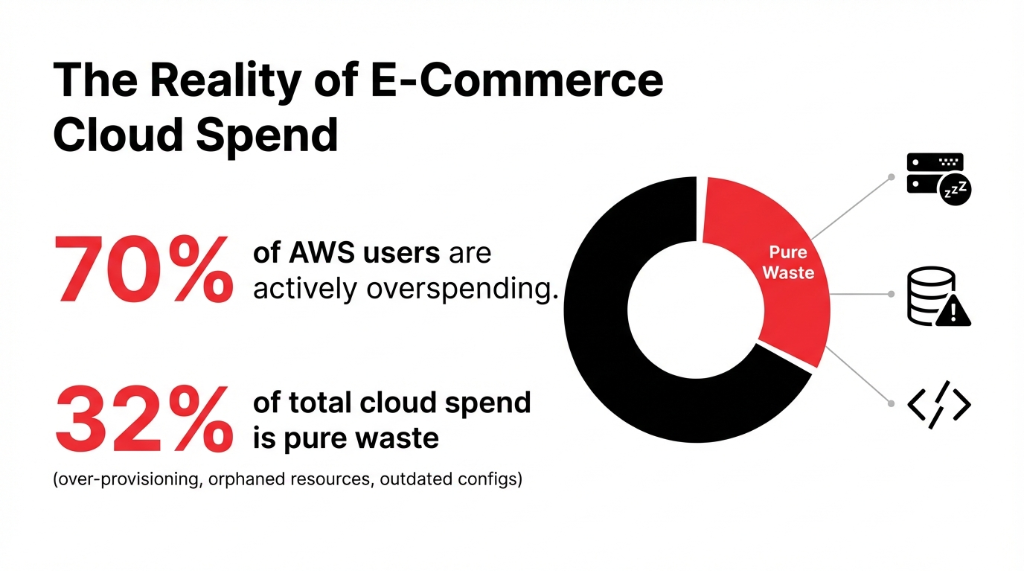
The problem isn't that AWS is expensive. AWS bills you for everything you provision, whether it's running efficiently or not. And most e-commerce teams — even the ones with dedicated engineers — are too buried in sprint cycles to ever look backward at what they're actually running.
We've run 40+ AWS audits for US-based brands doing $1M-$15M in annual GMV. Not a single one had an incompetent engineering team. Every single one was just too close to the work. Average finding: 11 actionable issues per account. Average recoverable cost savings: $2,340/month per client.
The 7-Pillar AWS Audit: Exactly What We Check
Our free AWS infrastructure audit for e-commerce covers 7 distinct pillars. No vague consulting language. Here is what we pull apart.
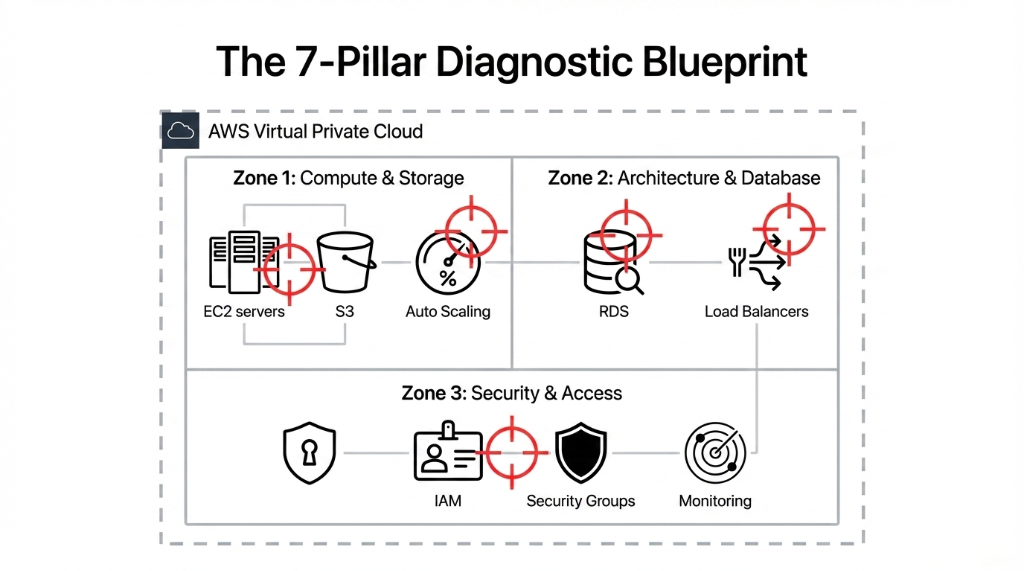
1. EC2 Right-Sizing and Idle Resource Cleanup
We pull your EC2 utilization data from the last 90 days using AWS Cost Explorer and Trusted Advisor. If any instance is running below 15% CPU utilization for more than 30 days, it is either mis-sized or should be terminated.
The Idle Instance Problem
What we routinely find: 3-7 idle EC2 instances on mid-size stores doing $2M-$8M in annual GMV
Monthly waste from idle instances alone
$1,400 - $3,800/month in pure waste
We also check whether non-production environments (staging, QA, dev) are running 24/7 when they don't need to. Shutting those down during off-hours alone cuts operating costs by up to 70% for those environments. *(Your dev team will grumble. Your CFO will buy them coffee.)*
2. S3 Bucket Audit: Permissions, Lifecycle Rules, and Costs
We audit every S3 bucket in your account. Bucket policies, ACLs, public access settings, lifecycle rules — all of it. E-commerce brands accumulate S3 bloat fast. Product images in 6 resolutions. Old backups that were "temporary." Log archives nobody reads.
S3 Storage Waste We Typically Find
Monthly waste
$800-$2,100 in eliminable S3 charges
Fix
Switch older data to S3 Glacier Instant Retrieval + lifecycle policies
Worst case found
Customer order exports with names and partial payment data in a public ACL bucket. PCI DSS violation.
That last one? Not a hypothetical. We found it in a real audit last year. A client's customer order export files — names, addresses, partial payment info — sitting in a bucket with a public ACL. That's a class-action lawsuit waiting to happen.
3. IAM Access Controls: The Quiet Time Bomb
Identity and Access Management is the most commonly broken area we find in every AWS infrastructure audit for e-commerce. Bar none.
Real finding from a single audit: 17 IAM misconfigurations — including three developer accounts with full administrator-level access that hadn't been used in 11 months. Live keys, never rotated, attached to a production environment processing real customer orders.
We check all IAM users, roles, and policies for least-privilege compliance. Whether MFA is enforced on root and all admin accounts. Access key age — anything older than 90 days is a risk. Cross-account trust policies scoped correctly. Service roles attached to Lambda, ECS, and EC2 for over-permission.
*(Yes, your developer probably set those permissions in a hurry during a launch sprint and never went back. We see this constantly.)*
4. CloudTrail, GuardDuty, and Monitoring Gaps
Here is something only people who have been inside 50+ AWS environments would tell you: most e-commerce stores have CloudTrail enabled in their primary region and completely disabled in their DR region. Half your infrastructure is flying blind. No logs. No alerts. If someone exfiltrates data from a secondary region, you won't know for weeks — if ever.
What We Verify in Your Monitoring Stack
CloudTrail active in every region, not just the primary one
GuardDuty generating alerts that actually go somewhere a human reads
CloudWatch alarms for billing anomalies, EC2 CPU spikes, and RDS connection count thresholds
Hidden cost of blind spots: undetected breach = $10K-$1M+ in damage
5. RDS and Database Configuration
Your RDS instance is probably the most expensive thing in your AWS bill — and the least audited. We check whether Multi-AZ is enabled only where it's actually needed (not on dev databases, which we see constantly). Backup retention windows. Whether Read Replicas are being used or just burning money.
RDS Auto-Scaling Horror Story
Real client scenario: Storage autoscaling with no ceiling got triggered by a single traffic event
Result
$4,200/month database bill — from one spike
6. Auto Scaling and Load Balancer Health
E-commerce traffic is not flat. Black Friday, product launches, influencer drops — they all spike traffic 10-40x in minutes. We check whether your Auto Scaling Groups have sane min/max bounds, whether your Application Load Balancer health checks are actually testing the right endpoint (not just returning a 200 from a static file), and whether your scaling policies are based on real latency metrics or just CPU.
Because CPU-based scaling is 2019 thinking. And if your ALB health check is hitting a static page that always returns 200, your "healthy" instances might be serving 502s to real customers while AWS thinks everything is fine.
7. Security Group and VPC Architecture
We map your entire VPC architecture and check every security group for port 22 (SSH) or port 3306 (MySQL) being open to 0.0.0.0/0. This is shockingly common.
31% of e-commerce AWS environments we audited last year had production databases exposed to the entire internet. Because someone needed quick access during an incident and never locked it back down. That's your customer data, wide open.
The "Our DevOps Guy Handles It" Myth
Frankly, your in-house DevOps engineer is busy building things. Infrastructure audits are a completely different discipline — they require stepping back from feature delivery and doing a ground-up cost and security review that most engineers don't have the headspace or the third-party objectivity to do on their own environment.
Insider Truth
We are not saying your team is bad. We are saying that the person who built the kitchen is the last person who notices the gas leak. In our last 40 e-commerce audits, every single client had competent engineers. All of them were just too close to the work. External cloud consulting brings the objectivity your internal team structurally cannot have.
What Comes Out of the Audit
At the end of Braincuber's free AWS infrastructure audit for e-commerce, you get:
✓ Prioritized finding report — Critical / High / Medium / Low severity ratings
✓ Estimated monthly savings for each cost issue, in actual dollar figures
✓ Remediation checklist your team can action immediately
✓ Security risk ratings tied to PCI DSS and SOC 2 requirements
✓ 30-minute debrief call to walk through every finding together
No upsell pressure. No "pay for the full report." The free audit is the full audit.
If you want us to fix what we find — Braincuber's cloud infrastructure team can implement every remediation for you, from IAM restructuring to RDS right-sizing to Auto Scaling policy rebuilds. But you get the findings either way.
The Real Cost of Not Doing This
14 Months of "When Things Slow Down"
One of our US clients — a direct-to-consumer skincare brand doing $4.3M/year on Shopify + AWS — put off their AWS audit for "when things slow down" for 14 months. In that window:
▸ $28,700 in unnecessary RDS Multi-AZ charges on a development database
▸ S3 bucket with customer data exposed under a misconfigured policy for an estimated 6 weeks
▸ Nine EC2 instances that hadn't served real traffic since their previous agency set them up
The audit took us 48 hours. The savings from month one covered the cost of a full AWS remediation engagement with us and funded their next two campaign shoots.
Frequently Asked Questions
How long does the free AWS audit take?
24-48 hours from the point we get read-only access. We use AWS Config, Cost Explorer, Trusted Advisor, and Security Hub to pull structured data. You get a written report plus a debrief call — total time commitment from your side is under 45 minutes.
What access does Braincuber need to run the audit?
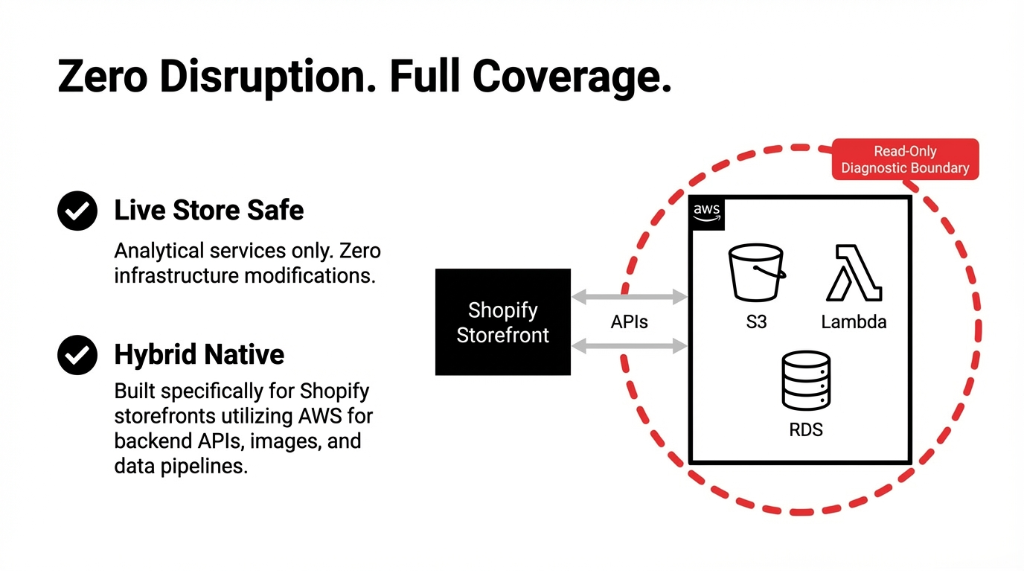
A read-only IAM role in your AWS account — no write permissions, no access to application data. We follow least-privilege principles, and the role can be revoked immediately after the audit. We never touch your codebase, your database contents, or your customer records.
Will the audit disrupt our live store?
No. Every tool we use — Cost Explorer, Trusted Advisor, AWS Config, Security Hub, GuardDuty — is a read-only analytical service. We do not modify any infrastructure. Your store runs uninterrupted throughout the entire process.
We use Shopify plus some AWS services. Does the audit still apply?
That is actually the most common setup we audit. Shopify-hosted storefronts using AWS for backend APIs, image processing, data pipelines, or machine learning are exactly who this audit is built for. We check whatever AWS services you are running — even if it is only S3, Lambda, and RDS.
What if the audit finds nothing major?
In 4+ years of running these audits, we have never delivered a clean bill of health to an e-commerce brand. There is always something — usually $800-$3,500/month in recoverable waste and at least two security findings worth fixing. But if your environment is genuinely tight, we tell you exactly that, and you walk away with documented confirmation.
Your AWS Bill Is a Leaking Pipe in a Wall You've Never Opened
We'll find your biggest cost leak and your top security risk in the first 48 hours — at no charge, no commitment. Check your AWS bill from last month. If you can't explain every line item, you need this audit.
Free audit • Read-only access • Report + debrief call included