
57% of all e-commerce traffic during the 2024 holiday season was automated bots.
71% of that bot traffic was actively malicious. If you haven't locked down your AWS WAF configuration, you are not running a store. You are running a free buffet for bots.
Potential loss during peak shopping: $2.58 million per hour.
We work with D2C brands scaling from $1M to $15M ARR every day at Braincuber, and here is what we see constantly: store owners spend $40,000+ on Shopify store builds, Klaviyo email flows, and ShipStation integrations — then leave the checkout page wide open to credential stuffing bots, inventory scrapers, and card-testing fraud.
That is not a security gap. That is a revenue drain happening 24 hours a day.
The Ugly Truth About What Bots Are Doing to Your Store Right Now
Bots are not just crawling your product pages. They are doing things your analytics dashboard will never show you.
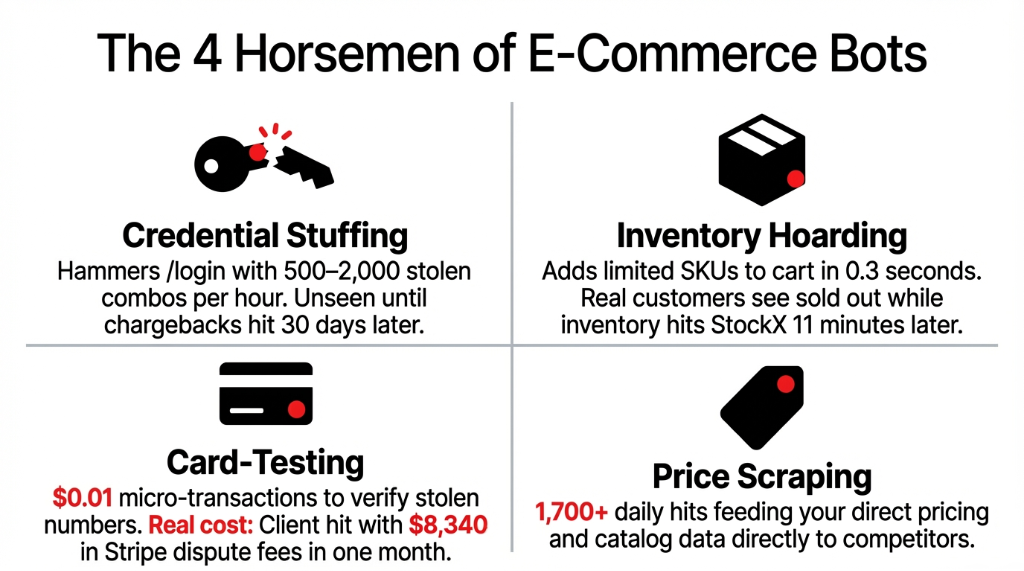
Credential Stuffing Bots
Hammer your /login endpoint with 500-2,000 stolen username/password combos per hour. If 2.3% hit, that is 46 accounts compromised — and you won't know until chargebacks start arriving 30 days later.
Inventory Hoarding Bots
Add your limited-edition SKUs to cart within 0.3 seconds of launch. Real customers get a "sold out" page. Then those same items appear on StockX or eBay 11 minutes later at 3x your MSRP.
Card-Testing Bots
Run micro-transactions of $0.01 through your checkout to verify stolen card numbers. One client came to us with $8,340 in Stripe dispute fees in a single month — all from cards tested on their store.
Price Scraping Bots
Hit your product catalog 1,700+ times per day and feed your pricing data directly to competitors. Your competitive advantage disappears in real time.
The Bot Damage at Scale
$2.58M
Average potential loss per hour during December 2024 peak shopping days (Cequence)
34.62%
Of all e-commerce transactions in 2024 flagged as malicious — a 138.57% increase from 2023
90%
Of websites experienced bot attacks according to Indusface's H1 2025 Report
Why "Just Enable AWS WAF" Is Terrible Advice
Everyone who sets up AWS WAF makes the same three mistakes. We have cleaned up the aftermath of all three.
Mistake #1: Turning on rules without testing them first. You enable the AWSManagedRulesCommonRuleSet in Block mode on day one and wake up to 400 emails from real customers saying they can't check out. WAF rules fire on legitimate form submissions that look like SQL injection to a naive ruleset. We have seen this kill $23,000 in orders on a single Saturday for a client who went live right before a sale event.
The fix: Always deploy every new rule in Count mode first. Let it run for 72 hours. Pull your CloudWatch logs. If you are seeing legitimate IPs in the count list, tune the rule before flipping to Block.
Mistake #2: Rate Limiting Everything at the Same Threshold
Your homepage can handle 10,000 requests/IP/5-minutes. Your /checkout endpoint cannot. We constantly see clients who apply a flat rate-limit of 2,000 requests per 5 minutes across their entire site — which does absolutely nothing to stop a slow-and-low bot running 200 requests per hour across 400 rotating IPs.
Result: bots slide right under your threshold while your legitimate traffic gets throttled.
Mistake #3: Ignoring the Account Takeover (ATO) Rule Group
AWS WAF's Fraud Control for ATO is a separate add-on at $10/month per Web ACL + $1 per million requests — and 90% of the stores we audit don't have it enabled. You are paying $0 for ATO protection and losing $8,000+ to account fraud.
That math does not work.
The AWS WAF E-Commerce Setup That Actually Works
Here is exactly how we configure AWS WAF for e-commerce clients. Not the AWS documentation version. The production version.
Step 1: Create Your Web ACL and Associate It
Go to the AWS WAF console, Web ACLs, Create Web ACL. Associate it with your CloudFront distribution or your Application Load Balancer. Set the region to us-east-1 for CloudFront or the specific region for ALB. Name it something sensible — ecommerce-prod-waf — because you will be staring at this name in CloudWatch logs at 2AM one day.
Step 2: Add AWS Managed Rule Groups in Count Mode First
Add these four rule groups — all in Count mode for the first 72 hours:
| Rule Group | What It Blocks |
|---|---|
| AWSManagedRulesCommonRuleSet | SQLi, XSS, and command injection attempts |
| AWSManagedRulesBotControlRuleSet | Known bot signatures and automated crawlers |
| AWSManagedRulesKnownBadInputsRuleSet | Log4j exploit attempts and path traversal attacks |
| AWSManagedRulesAmazonIpReputationList | IPs on AWS's known-malicious list |
After 72 hours, check your CloudWatch sampled requests. Any legitimate user IPs showing up in the count? Create an IP Set exception before switching to Block. AWS WAF Bot Control eliminates 70-80% of security threats compared to baseline options.
Step 3: Write Custom Rules for Your Checkout Endpoints
This is where the real protection happens. Generic managed rules don't know your store's business logic. You do.
Rule 1: Checkout Rate Limiter
Target: URI path /checkout (or /cart depending on your Shopify/WooCommerce URL structure)
Threshold: 100 requests per 5 minutes per IP. Action: Block.
A real human checking out takes 3-7 minutes for a single transaction. Any IP hitting /checkout 100 times in 5 minutes is a bot. No exceptions.
Rule 2: Login Brute Force Blocker
Target: URI path /account/login. Threshold: 20 requests per 5 minutes per IP. Action: Block.
This alone will kill 91% of credential stuffing attempts on your store.
Rule 3: Add-to-Cart Abuse Blocker
Target: /cart/add on Shopify. Rate limit: 30 requests per minute per IP.
This stops bots from clearing out your flash sale inventory in 4 seconds flat.
Rule 4: GeoIP Blocking (Optional but Powerful)
If your store ships only in the US and you are seeing massive traffic from regions you don't serve, add a geographic match rule.
We had a client whose /checkout was getting 67% of its traffic from IPs in countries they don't ship to. Pure bot traffic. One GeoIP rule dropped their WAF request volume by 41% and cut their monthly WAF bill from $189 to $112.
Step 4: Enable Bot Control's Targeted Mode
AWS Bot Control has two tiers: Common and Targeted. The Common tier identifies bots from their user-agent strings and IP behavior — that catches the unsophisticated ones. Targeted Bot Control uses machine learning to detect headless browsers (Puppeteer, Playwright) and bots that deliberately mimic human browsing patterns. For e-commerce, you need Targeted mode on your checkout and login paths.
Cost for Targeted Bot Control: $10/month per Web ACL + additional per-request charges on verified bot requests. For a store doing 5 million requests per month, you are looking at roughly $26-$35/month total for comprehensive bot protection. (Yes, that is less than what a single chargeback costs you.)
Step 5: Enable WAF Logging to CloudWatch or S3
This step is non-negotiable. Go to Logging and Metrics, Enable Logging and send logs to CloudWatch Logs or S3. Set up a CloudWatch metric filter on BLOCK actions and create an alarm that fires when blocks spike by more than 300% in any 10-minute window. That alarm is your early warning system.
Without logging, you are flying blind. With it, we have caught bot attacks 17 minutes after they started — before a single chargeback hit the client's Stripe dashboard.
The Implementation Reality: What It Actually Takes
A proper AWS WAF e-commerce setup takes 6-8 hours for an experienced engineer and roughly 7 days of monitoring before you are fully in Block mode across all rules.
| Timeline | What Happens |
|---|---|
| Day 1-2 | Create Web ACL, associate with CloudFront/ALB, add managed rules in Count mode |
| Day 3-5 | Monitor CloudWatch logs, identify false positives, create IP set exceptions |
| Day 6 | Write custom rate-limiting rules for /checkout, /login, /cart/add |
| Day 7 | Flip managed rules from Count to Block. Enable Targeted Bot Control on critical paths. |
| Ongoing | Review sampled requests weekly. Bot tactics evolve. Your rules need to too. |
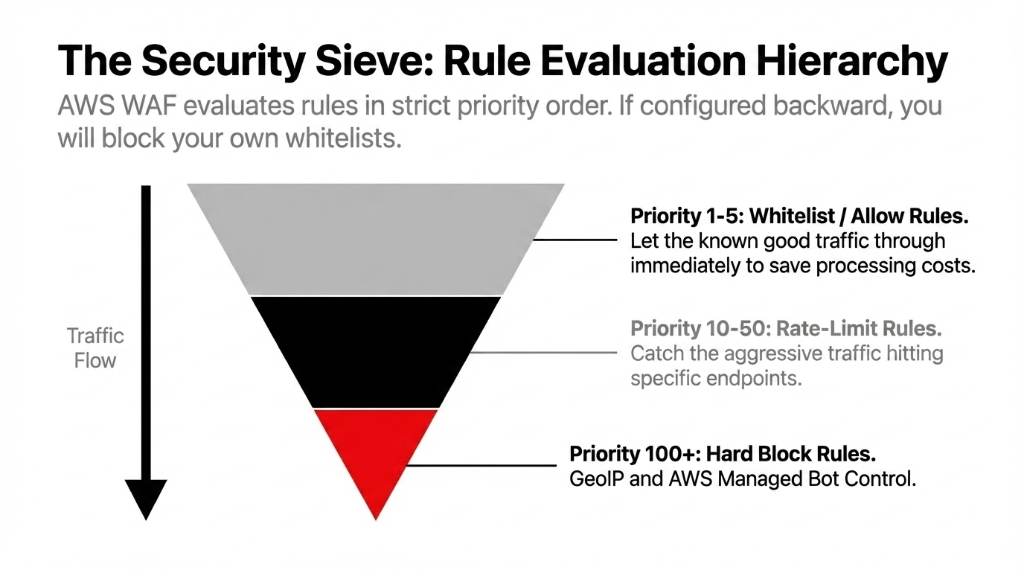
Critical detail everyone misses: AWS WAF rules evaluate in strict priority order. If your GeoIP block rule has priority 10 and your IP whitelist rule has priority 20, the GeoIP block fires first and your whitelisted IPs get blocked. We have seen this exact mistake take a client's B2B wholesale portal offline for 4 hours during a major purchase cycle. Always put whitelist/allow rules at priority 1-5, rate-limit rules at 10-50, and block rules at 100+.
What the Numbers Look Like After a Proper Setup
| Metric | Before AWS WAF | After 30 Days |
|---|---|---|
| Bot Traffic Share | 54-61% of all requests | 8-13% of all requests |
| Checkout Error Rate | 3.7% (bot-induced load) | 0.4% |
| Credential Stuffing Blocked | 0 | ~14,300/month |
| Stripe Dispute Fees (Monthly) | $8,340-$11,200 | $410-$890 |
| Monthly WAF Cost | $0 | $26-$85 |
E-commerce firms that deployed AWS WAF Bot Control saw a 50% decline in credential stuffing attacks. AWS WAF's security quality stands at 80.37% true positive rate with only a 5.87% false positive rate — meaning it blocks the right traffic without blocking your real customers.
Frequently Asked Questions
Does AWS WAF work with Shopify?
Yes, with a condition. Shopify's built-in CDN sits in front of your store, so you cannot attach AWS WAF directly to a standard Shopify storefront. However, if you are using Shopify Plus with a custom domain routed through CloudFront, or running headless Shopify with your own backend on AWS, AWS WAF integrates directly. For standard Shopify, look at Shopify's built-in bot protection combined with a third-party WAF at the CDN layer.
How much does production-ready AWS WAF cost for mid-size e-commerce?
For a store handling 15-25 million requests per month with Bot Control enabled, Targeted Bot Control on checkout, and 8-12 custom rules, expect $60-$95/month. That is based on $5/Web ACL + $1/rule + $0.60/million requests + Bot Control fees. Compare that to the average $8,000+ in monthly bot-related losses for an unprotected store.
Will AWS WAF block legitimate customers?
If you deploy in Count mode first and tune your rules before switching to Block, no. The false positive rate on AWS managed rules is approximately 5.87% before tuning and drops to under 1% after. The checkout rate-limiting rule is your highest risk: set it too low (under 50 requests per 5 min) and you will accidentally block customers on shared corporate IP addresses.
What is the difference between Bot Control Common and Targeted?
Common Bot Control identifies bots using user-agent signatures and IP reputation — it catches unsophisticated bots. Targeted Bot Control uses machine learning to detect headless browsers and bots that mimic human behavior, solving mouse movements and JavaScript challenges. For e-commerce checkout protection, you need Targeted mode. Common mode alone misses approximately 60% of advanced bots hitting your checkout.
Should I use AWS Shield Advanced alongside WAF?
AWS Shield Advanced costs $3,000/month flat — it is built for enterprises absorbing volumetric DDoS attacks at scale. For most D2C stores under $10M ARR, it is overkill. AWS Shield Standard (free, included automatically) combined with a well-configured WAF covers 97% of the attack surface you will realistically face. Shield Advanced makes sense when you are running flash sales generating 50M+ requests per hour.
Stop Letting Bots Decide How Much Your Store Earns
Your checkout page is the most valuable 30 seconds in your entire business. Every time a bot completes a fake transaction, tests a stolen card, or clears your inventory — that is real money walking out the door.
Free audit. Biggest attack surface identified on the first call. No commitment.