
The Real Cost of Not Having AWS SSO
Here is the ugly truth that most AWS consultants will not tell you upfront: unmanaged identity access is the #1 cause of cloud cost overruns for e-commerce teams, not compute waste or over-provisioned RDS instances.
$6.7M/Year D2C Apparel Brand: The Identity Mess We Found
14 AWS accounts. 11 engineers. 31 IAM users across accounts. 17 of those users had AdministratorAccess. Three ex-employees still had active credentials. One had last logged in 43 days before we found it. The average cost of a cloud credential compromise: $4.45 million. (No, that is not a typo. Yes, your CFO should read this section.)
The reason this happens is not laziness. It is architecture drift. The team sets up one AWS account, creates IAM users manually, and then the company grows. They add accounts for compliance (PCI DSS for payments, SOC 2 for enterprise buyers), spin up separate environments for Elasticsearch and Kafka — and suddenly, nobody has a single pane of glass for who can do what, where.
This is the identity chaos we untangle first during our AWS consulting services engagements — because the $4,300 cloud bill spike is the symptom, not the disease.
Why Everyone's Advice About IAM Is Wrong for E-Commerce Teams
Most AWS documentation and YouTube tutorials treat IAM as a single-account problem. You get a lesson about creating groups, attaching policies, and you call it done.
That is architecturally wrong for any e-commerce engineering team with more than 2 AWS accounts.
E-commerce backends are inherently multi-account. You have your payment processing environment (Stripe or Razorpay integrations), your order management microservices (API Gateway and Lambda), your analytics stack (Redshift or Athena pulling from S3), your CDN layer (CloudFront + S3 origin), and your CI/CD pipeline account (CodePipeline or GitHub Actions on EC2). That is 5 to 7 accounts at a minimum for any serious D2C platform.
The Multi-Account Reality
Managing access across 5-7 accounts with individual IAM users means your engineers are logging in and out 7 times a day using 7 different passwords — or, worse, they have all agreed to share one set of "team credentials" in a Slack DM. (We have seen this. It ends badly.) AWS IAM Identity Center was built exactly for this scenario. And 73% of the e-commerce teams we onboard have never used it properly.
How AWS SSO Actually Works (The Architecture, Not the Marketing Slide)
Before we walk through the setup, you need to understand the three-layer model:
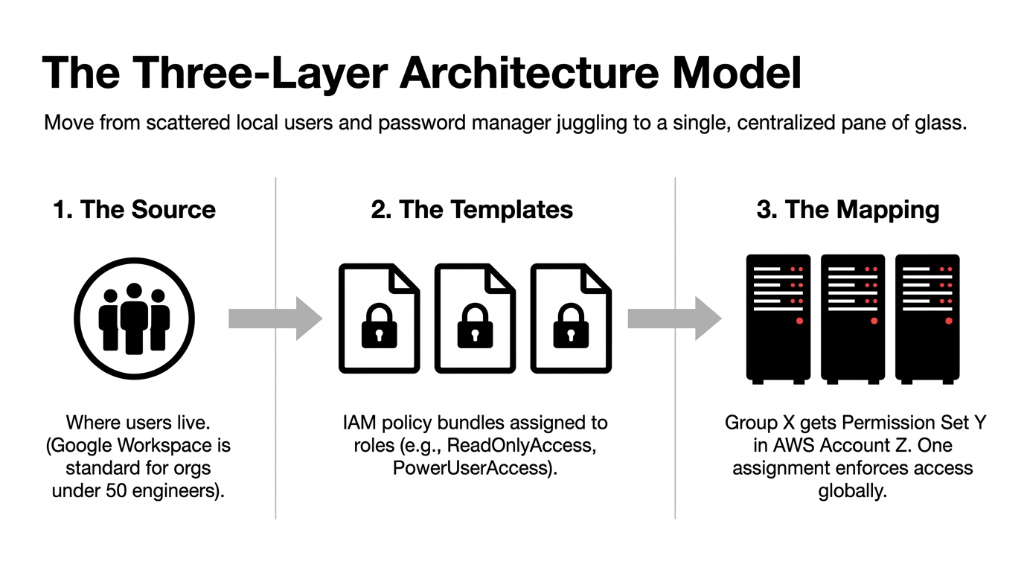
The Three-Layer Architecture
1. The Identity Source
Where your users live. Options: AWS built-in directory, Microsoft AD, or external IdP like Okta, Google Workspace, Azure AD. For most e-commerce teams under 50 engineers, Google Workspace is already in place. Use that.
2. The Permission Sets
IAM policy bundles assigned to users or groups for specific accounts. Job-role templates: ReadOnlyAccess for QA, PowerUserAccess for backend engineers, BillingViewAccess for FinOps.
3. The Account Assignments
Maps "Group X gets Permission Set Y in AWS Account Z." One assignment enforced across every login. No password manager juggling.
The entire experience for your engineer becomes: open the AWS SSO portal URL, click their account, click their role, land directly in the AWS Console or get a short-lived CLI credential — automatically.
The Step-by-Step AWS SSO Setup for E-Commerce Engineering Teams
We use this exact sequence for every e-commerce cloud engagement at Braincuber Technologies:
Step 1: Enable IAM Identity Center in Your Management Account
Log in to the root management account (the account that owns your AWS Organization). Navigate to IAM Identity Center in the console. Enable it. Pick your region — us-east-1 is the default and works for most teams unless you have data residency requirements. (EU brands, note this.)
One-Time Decision: Region Lock
Your IAM Identity Center lives in one region permanently. You cannot migrate it later without re-creating everything. Pick carefully.
Step 2: Connect Your Identity Source
If your team uses Google Workspace, go to Settings → Identity Source → External Identity Provider and download the IAM Identity Center SAML metadata. Upload it into Google Admin's SAML app configuration. Set up SCIM provisioning so that when you deactivate a Google account (offboarding an engineer), their AWS access is automatically revoked within 40 seconds — not 40 days.
80% of Teams Skip This Step
The SCIM provisioning step is where 80% of teams skip and then wonder why offboarded engineers still have access 3 months later. For Okta users, the same SCIM-based auto-provisioning applies — Okta's AWS SSO integration is pre-built in their app catalog.
Step 3: Create Your Permission Set Library
Build permission sets that match your e-commerce team structure. Here is the exact set we configure for a 12-20 person e-commerce engineering org:
| Permission Set | Policy Base | Target Group | Usage |
|---|---|---|---|
| EcomPlatformEngineer | PowerUserAccess | Backend engineers | Lambda, RDS, ElastiCache, API Gateway |
| EcomDataEngineer | Custom: S3+Glue+Athena | Data team | Analytics pipelines, Redshift |
| EcomReadOnly | ReadOnlyAccess | QA, Product Managers | Review logs, check resources |
| EcomSecurityAudit | SecurityAudit (managed) | Security lead | CloudTrail, Config, GuardDuty |
| EcomBillingView | Billing+CostExplorer | FinOps/CFO | Cost dashboards, usage reports |
| EcomDevOps | Custom: EC2+ECS+ECR+CodePipeline | DevOps team | CI/CD, container deployments |
Zero Exceptions Rule
Do not use AdministratorAccess as a permission set for anyone below your Staff Engineer level. We enforce this across every client. Zero exceptions. The $4,300 bill spike from the opening of this post? That was an intern with AdministratorAccess spinning up GPU instances "to test something."
Step 4: Create Your Group Structure
Mirror your Google Workspace or Okta groups: aws-backend-engineers, aws-data-engineers, aws-devops, aws-readonly. When a new hire joins, your engineering manager adds them to the right Google group — and they get AWS access automatically within minutes via SCIM sync.
This replaces the "create IAM user, generate access keys, DM them on Slack" workflow that takes 37 minutes per new hire and creates ungoverned credentials from day one.
Step 5: Assign Groups to Accounts
Go to AWS Accounts in IAM Identity Center, select your Production account, click Assign Users or Groups. Pick aws-backend-engineers, assign EcomPlatformEngineer. Pick aws-data-engineers, assign EcomDataEngineer. Repeat for every account-group combination. One assignment screen. Propagated within 3-5 minutes across all accounts in your Organization.
Step 6: Configure CLI Access
This is the part most guides skip, and it is where engineers push back on SSO because "it breaks the CLI." Run aws configure sso on each engineer's machine. Set the SSO start URL, region, and default output. Every CLI command triggers a browser-based login that issues a credential valid for 1-8 hours (you control this via permission set session duration).
For Terraform and CI/CD pipelines (GitHub Actions, Jenkins), use IAM Roles for service accounts instead of IAM users with long-lived access keys. This is non-negotiable for any PCI DSS or SOC 2 environment — and it is standard practice in every cloud consulting services engagement we run.
MFA, Session Duration, and the Settings Nobody Talks About
The Three Settings That Matter
Session Duration: Set to 4 hours for production accounts, 8 hours for non-production. This limits the blast radius if a session token is stolen.
MFA Enforcement: Under Settings → Authentication, set MFA to "Required for all users." Every login requires TOTP (Google Authenticator, Authy) or a hardware key (YubiKey for Staff and Principal engineers). Do not set it per-user — set it at the IAM Identity Center level.
CloudTrail Centralization: Turn on CloudTrail in every account with a centralized S3 bucket in your logging account. Every SSO login, every role assumption, every API call is logged. When something goes wrong at 2 AM on Black Friday, you have a 90-day forensics trail that tells you exactly who did what and when.
What Gets Easier Immediately After You Do This
Within 48 Hours of a Proper AWS SSO Rollout
▸ Engineer onboarding drops from 37 minutes of manual IAM setup to under 4 minutes (Google group assignment + automatic SCIM sync)
▸ Offboarding drops from "we think we got all the accounts" to guaranteed 40-second revocation across all 7-14 accounts
▸ Your next SOC 2 Type II audit has a clear, exportable user-access review instead of 14 separate screenshots from 14 consoles
▸ No more shared IAM credentials in .env files committed to GitHub (yes, we have found this)
The Implementation Reality
Implementation Timeline
1.5-3 Days
Full AWS SSO setup for a 10-20 person team running 6-10 AWS accounts, assuming your identity source (Google/Okta) is already in place
+4-6 Hours
Additional time if you need to clean up legacy IAM users: deactivating old keys, migrating service accounts to IAM roles
+0.5 Days
If your accounts are still standalone (not linked in an Organization) — this step is worth doing regardless of SSO
Do not let anyone tell you this is a weekend side project. Do it right the first time: group structure, SCIM provisioning, MFA enforcement, session duration policy, and CloudTrail centralization — all in one pass.
For brands running AI-powered recommendation engines and dynamic pricing alongside their storefront, proper identity governance is non-negotiable — our AI e-commerce solutions always deploy with SSO-enforced access because an ungoverned ML pipeline account with AdministratorAccess is a data breach waiting to happen.
Frequently Asked Questions
Does AWS SSO work if our team is spread across India, the UAE, and the US?
Yes. IAM Identity Center is a global AWS service with no regional user restrictions. Your engineer in Bengaluru and your DevOps lead in Dubai both access the same portal URL with the same login experience. Latency to the SSO portal is under 200ms in most regions and credentials are scoped to the AWS region where your resources live.
Can we use AWS SSO with an existing Okta or Google Workspace setup?
Absolutely. Connect your existing IdP as the external identity source via SAML 2.0 and SCIM. This means you manage all user lifecycle (onboarding, offboarding, role changes) in Okta or Google Admin, and AWS reflects those changes automatically. You do not need to maintain a second directory inside AWS.
What happens to existing IAM users when we enable IAM Identity Center?
They continue to work. IAM Identity Center does not delete or disable existing IAM users. You migrate teams progressively — start with DevOps, then backend engineers, then everyone else — while legacy IAM users are deprecated account by account. Aim to eliminate all human IAM users within 30-60 days of SSO go-live.
Is AWS SSO free to use?
IAM Identity Center itself has no additional AWS charge. You pay for the underlying AWS resources accessed through it. If you connect an external IdP like Okta or Azure AD, those licensing costs apply on your IdP vendor side. For teams already paying for Google Workspace Business or Okta, there is zero incremental AWS cost.
Does AWS SSO support CLI and Terraform workflows?
Yes, fully. The aws configure sso command sets up short-lived credential profiles for CLI use. For Terraform and CI/CD pipelines, use IAM Roles with OIDC trust policies. GitHub Actions, GitLab CI, and Bitbucket Pipelines all support this. This eliminates long-lived access keys from your pipelines entirely — which is what every PCI DSS and SOC 2 auditor will ask you about.
The Insider Takeaway
Stop running your $5M+ e-commerce platform on an identity model designed for a 3-person startup. 73% of the e-commerce teams we onboard have never set up AWS SSO properly. They have 31 IAM users across 14 accounts, 17 with AdministratorAccess, and ex-employees with active credentials from 43 days ago. SCIM provisioning revokes access in 40 seconds. The full setup takes 1.5-3 days. It is free. And the alternative — a $4.45M average credential compromise — is not a number your CFO wants to learn about from a breach notification letter.
How Many of Your 31 IAM Users Still Need Access?
Check your IAM console right now. Count the users with AdministratorAccess. Count the ones who last logged in over 30 days ago. If either number is above zero, your identity architecture is a liability your security team does not know about yet.
Book our free 15-Minute AWS Security Audit. We will pull your IAM user inventory, identify orphaned credentials, and give you a migration priority list on the first call. No prep required. No sales deck.
Book Your Free AWS Identity Audit