
The Multi-Account Problem Nobody Talks About Honestly
Most e-commerce companies growing past $2M ARR end up with AWS account sprawl faster than they expect. Production, staging, data warehouse, payment processor integrations — that is a minimum of four accounts. And here is the structural problem with four accounts:
Each account has its own IAM configurations. Your root user in the staging account probably has no MFA enabled. Your data warehouse account almost certainly allows developers to provision RDS instances in ap-southeast-1 when your compliance requires everything in us-east-1. And your payment integration account? Someone has s3:PutBucketPolicy wide open, which means any IAM user can make that bucket public in 30 seconds.
AWS IAM Alone Cannot Solve This
You can write perfect IAM policies in one account and a developer in another account can undo everything with three API calls. This is the structural gap that SCPs are built to close. IAM governs what individual identities can do. SCPs govern what the entire account can ever allow — full stop.
This is the gap we diagnose in the first 2 hours of every AWS consulting services engagement. And it is almost always there, regardless of how mature the team thinks their security posture is.
SCPs Define the Ceiling, Never the Floor
SCPs do not grant permissions. Full stop. This is the most common misunderstanding we encounter when onboarding new clients. A VP of Engineering will say: "We attached the FullAWSAccess SCP — we should be fine." They are not fine.
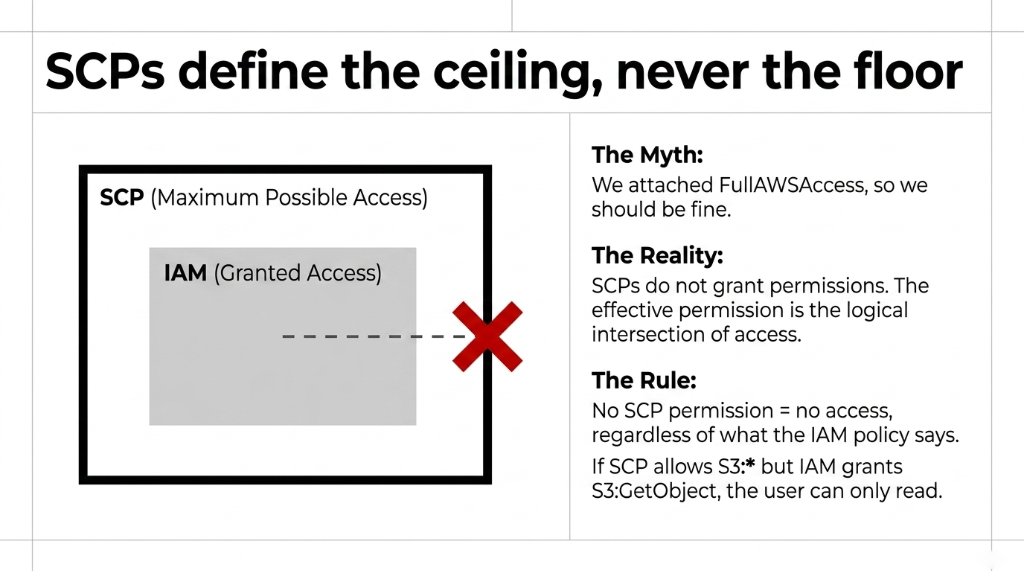
SCPs define the ceiling of what an account can do — never the floor. If your SCP allows S3:* but the IAM policy on that developer role only grants S3:GetObject, the user can only read S3 objects. The SCP never overrides an IAM restriction; it only caps the maximum possible access.
The Building Analogy That Makes This Click
Think of an SCP as the building's fire exit lock. It does not decide who gets a keycard (that is IAM), but it absolutely stops everyone from opening the emergency exit during business hours — even the CEO. The effective permission for any principal in AWS is the logical intersection between the SCP and the identity-based policy. No SCP permission means no access, regardless of what IAM says.
The Battle-Tested E-Commerce SCP Architecture
We have built SCP frameworks across 40+ cloud engagements for e-commerce brands on AWS. The structure that works consistently — deployed and refined across real Black Friday traffic, PCI audits, and SOC 2 assessments — looks like this:
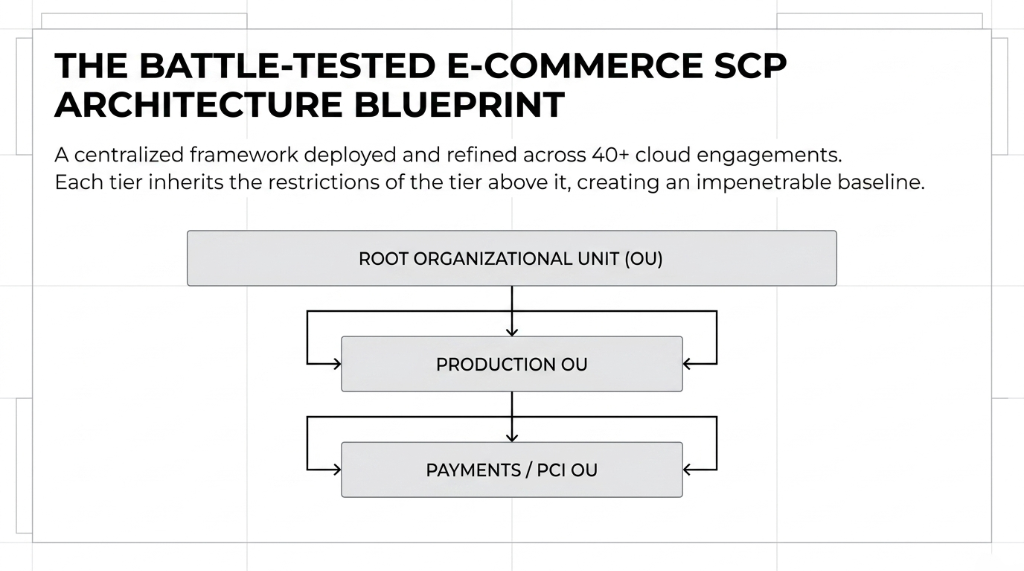
Root OU Level: Non-Negotiable Guardrails
4 SCPs That Go on Every Root OU, No Exceptions
Deny leaving the Organization: Prevents any member account from detaching from AWS Organizations — a move attackers use to escape centralized governance after compromising an account.
Deny root user activity: Root credentials in member accounts should never be used operationally. Non-optional in any PCI-DSS or SOC 2 environment.
Region lockdown: For a US-based DTC brand, there is zero legitimate reason for EC2 instances in ap-east-1. We typically allow us-east-1, us-west-2, and one EU region for GDPR-compliant brands.
Deny disabling CloudTrail: An SCP blocking cloudtrail:StopLogging and cloudtrail:DeleteTrail means your forensic audit trail is permanently protected — even if an attacker compromises a developer account.
Production OU Level: Where Most Teams Are Dangerously Under-Protected
Deny unencrypted S3 uploads: An SCP that denies s3:PutObject where s3:x-amz-server-side-encryption is absent applies across every bucket in that account — even ones created at 2 AM by a panicking developer before a product launch. A bucket policy does not cover new buckets. This SCP does.
Deny public S3 bucket ACLs: An SCP blocking s3:PutBucketAcl with a condition denying public-read or public-read-write would have prevented the $177,000 incident from the top of this post. This is 8 lines of JSON. Eight lines.
Restrict IAM permission escalation: No developer in production should be able to call iam:CreateUser, iam:AttachUserPolicy, or iam:PutUserPolicy without going through your Change Management pipeline. An SCP here means no rogue admin account creation, even if an attacker compromises developer console credentials.
Payments/PCI OU Level: The Cardholder Data Environment
Even Stripe and Braintree Users Are In Scope
If you use Stripe or Braintree and think you are "not in scope" for PCI DSS, you are likely wrong. Any system touching cardholder data — even a webhook processor that reads a charge ID — creates PCI scope. These SCPs isolate and protect that scope structurally.
Deny non-HTTPS API Gateway configurations — enforce that no endpoint is created without HTTPS-only access. Lock KMS key deletion — block kms:ScheduleKeyDeletion and kms:DisableKey so no one destroys your encryption keys, accidentally or intentionally. Deny unapproved VPC peering — your payments environment should not be peerable with your developer sandbox, enforced at the policy layer, not just the network ACL layer.
Why "We Have GuardDuty" Is Not a Security Strategy
GuardDuty is a genuinely good threat detection tool. But detection is reactive. An SCP is preventive. GuardDuty will tell you — usually within 15 minutes — that someone just disabled CloudTrail in your production account. An SCP means that action was denied before it happened.
The difference between those two timelines is the difference between a security incident and a security audit finding. We see this gap constantly. A brand spending $1,400/month on GuardDuty, Security Hub, and Inspector across their accounts. Zero SCPs deployed. They are paying for a smoke alarm when what they need is a sprinkler system.
Prevention vs. Detection: The Real Cost Gap
SCP Prevention
Action denied before it executes. Zero forensic investigation. Zero breach notification cost. Zero regulatory fine exposure. 11.3 hours to implement baseline framework.
GuardDuty Detection
Alert arrives 15 minutes after the action completes. Damage already done. Investigation required. Customer notification required. Regulatory disclosure timeline starts.
No Controls
$183,000 average breach cost for mid-market e-commerce brands. Includes regulatory fines, remediation, customer notification, and LTV reputational impact. Per incident.
The SCP Rollout Mistake That Locks Every Account Out of Production
Here is the insider detail no vendor will put in their sales deck: if you attach an SCP to your root OU without the FullAWSAccess managed policy also attached, you will lock every single account in your organization out of every AWS service. Simultaneously. Including production.
$14,200 Lost on a Single Friday Evening
A $4.1M ARR apparel brand running Shopify on AWS misread the AWS docs on a Friday afternoon. By 6:47 PM, their entire checkout flow was down. No Lambda invocations. No DynamoDB reads. No CloudFront serving assets. The SCP had denied everything at root with no allow policy in place. 73 minutes to resolve. $14,200 in lost GMV at their $195/minute checkout revenue rate. Never deploy a new root-level deny SCP on a Friday.
The correct rollout sequence: (1) attach FullAWSAccess at root OU first, (2) create deny SCPs and test in a sandbox OU that mirrors production, (3) deploy to development accounts, (4) promote to staging after 48 hours of clean operation, (5) deploy to production OUs only after two clean cycles in staging.
Stop Clicking in the Console: SCPs Must Be Infrastructure as Code
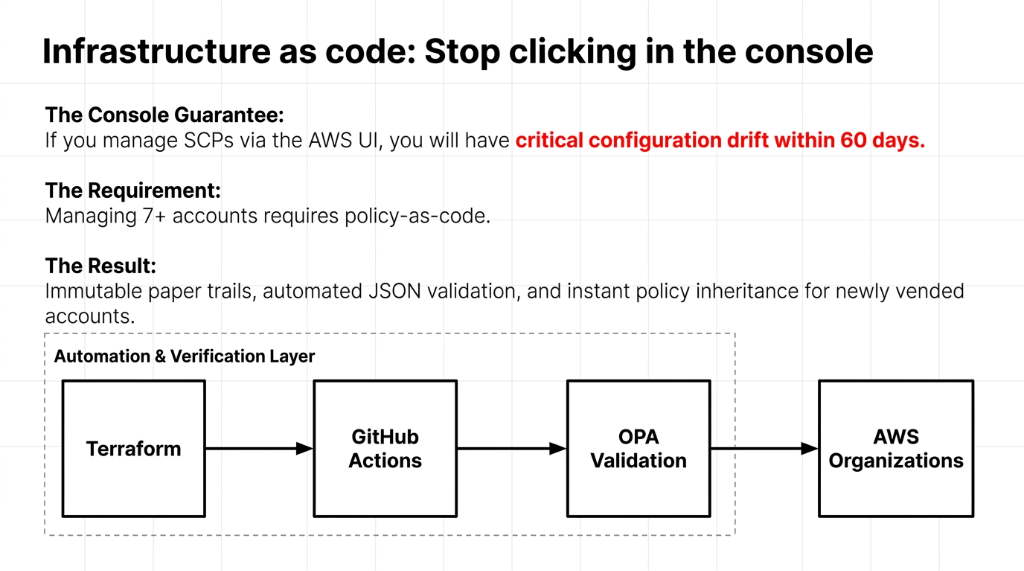
If your SCP management workflow involves logging into the AWS Organizations console and clicking "Create Policy," you will have critical configuration drift within 60 days. Guaranteed. Every SCP we deploy is version-controlled in Terraform, reviewed via pull request, and deployed through a CI/CD pipeline with automated JSON validation.
This gives you: policy changes with a full Git blame paper trail, Terraform plan flagging accidental SCP deletions before they reach production, and new accounts automatically inheriting correct SCPs the moment they are provisioned — zero manual steps.
The toolchain that works: Terraform + AWS Organizations + GitHub Actions + OPA (Open Policy Agent) for policy-as-code validation. If you are managing more than 7 AWS accounts without this stack, you are managing cloud security through hope. See how this integrates with our full cloud consulting services delivery model.
The Hard Numbers From 23 Real Deployments
SCP ROI Across Braincuber's E-Commerce Client Base
11.3 Hours
Average time to deploy a baseline SCP framework across a 6-account AWS Organization. Includes sandbox testing, staging validation, and production rollout.
$183,000
Average annual cost of a data breach for a mid-market e-commerce brand under $50M revenue. Includes regulatory fines, remediation, customer notification, and LTV reputational impact.
0 vs. 7
Security incidents in accounts with properly enforced SCPs vs. without, in our client base over 24 months. Zero incidents with SCPs. Seven without.
The ROI math is not complicated. 11.3 hours of implementation work has prevented, at minimum, one incident that would have cost $183,000. That is an ROI that would embarrass most marketing spend. Pair this with our AI e-commerce solutions and you have a complete, governed, automated cloud architecture.
Frequently Asked Questions
Quick SCP Rules Every E-Commerce Team Should Know
▸ SCPs cap maximum permissions — they never grant access. IAM is still required.
▸ Always attach FullAWSAccess at root OU before adding any deny SCPs.
▸ Test every new SCP in a sandbox OU for 48 hours before promoting to production.
▸ Never deploy a new root-level deny SCP on a Friday. This rule has saved three of our clients from self-inflicted outages.
Do SCPs replace IAM policies in AWS?
No. SCPs cap the maximum permissions available — they never grant access themselves. You still need IAM policies attached to users, roles, or resources. SCPs are the outer fence; IAM is the lock on the door. Both are required for a complete access control model.
Will attaching an SCP break my existing AWS accounts?
It can, if done wrong. Always ensure the FullAWSAccess managed SCP is attached at the root OU before adding deny policies. Test every new SCP in a sandbox OU that mirrors production before promoting it. Never deploy a new root-level deny SCP on a Friday — this is not a joke, it is a war story.
Can SCPs protect against insider threats in e-commerce?
Yes — specifically against privilege escalation. An SCP can block any IAM user or role from creating new admin users, attaching new policies, or modifying security service configurations, even if they already have broad IAM permissions. This is the most underutilized SCP use case in retail cloud environments.
How many SCPs should an e-commerce AWS Organization have?
A well-architected e-commerce org with 6-12 accounts typically operates with 9-14 active SCPs — 4-5 at root level, 3-4 at the production OU level, and 2-3 in the payments/PCI OU. More than 20 SCPs without a management tool usually indicates policy sprawl that is itself a governance risk.
Do SCPs work with AWS Control Tower?
Yes — AWS Control Tower uses SCPs it calls Guardrails. Your custom SCPs must not conflict with Control Tower's mandatory guardrails, or provisioning new accounts will fail silently. Always review the Control Tower guardrail list before deploying custom deny policies at the OU level.
The Insider Takeaway
You are spending $1,400/month on GuardDuty alerts that fire 15 minutes after the damage is done. A baseline SCP framework takes 11.3 hours to deploy. It prevents the $183,000 breach, not just notifies you of it. In 24 months across our client base: zero security incidents in accounts with properly enforced SCPs. Seven incidents in accounts without them. The JSON is not the hard part. The discipline to deploy it before something breaks is.
Your Next $180,000 Mistake Is Already in Progress
Check your AWS Organizations console right now. Count the accounts with no SCPs attached. Count the production accounts where s3:PutBucketAcl is unrestricted. If either number is above zero, you are one developer mistake away from a breach notification letter.
Book our free 15-Minute AWS Security Audit. We will identify your single most dangerous SCP gap in the first call — and hand you the JSON to fix it before you hang up. No prep required.
Book Your Free AWS Security Audit