
The Single-Account Trap That Is Killing Your Security Posture
Most e-commerce teams build their AWS environment the way a startup builds their first app — fast, messy, and with "we'll clean it up later" energy. Then the company grows. And the cleanup never comes.
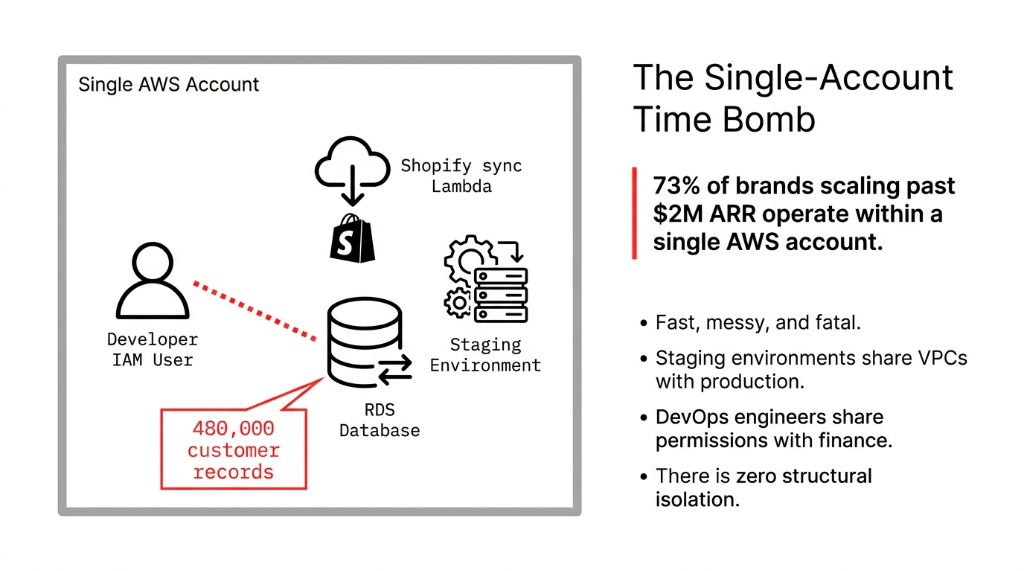
The result: your Shopify sync Lambda, your production RDS database, your staging checkout environment, and your FinOps dashboards all live in the same account. Same blast radius. Zero structural isolation.
The Only True Perimeter
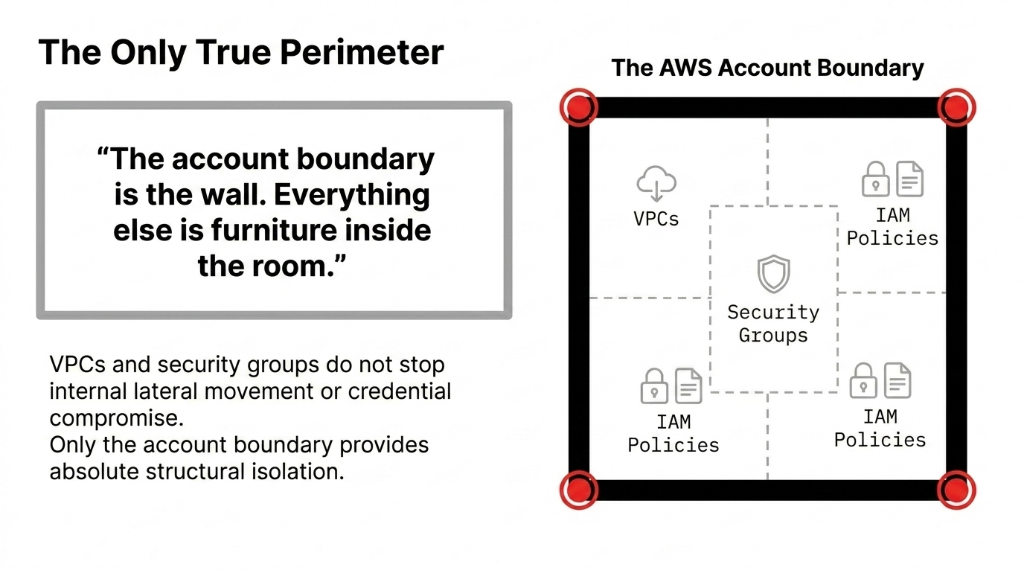
AWS accounts are the only true security isolation boundary in AWS. Not VPCs. Not security groups. Not IAM policies alone. VPCs and security groups do not stop internal lateral movement or credential compromise. Only the account boundary provides absolute structural isolation.
"The account boundary is the wall. Everything else is furniture inside the room."
This is not a compliance checkbox. This is the structural reality of AWS. And it is why our first action on every AWS consulting services engagement is to count how many accounts the client is running.
The E-Commerce Multi-Account Blueprint
AWS Organizations is a free service that lets you centrally manage and govern multiple AWS accounts from a single management account. Think of it as your org chart for cloud infrastructure — with hard enforcement capabilities no CISO can veto.
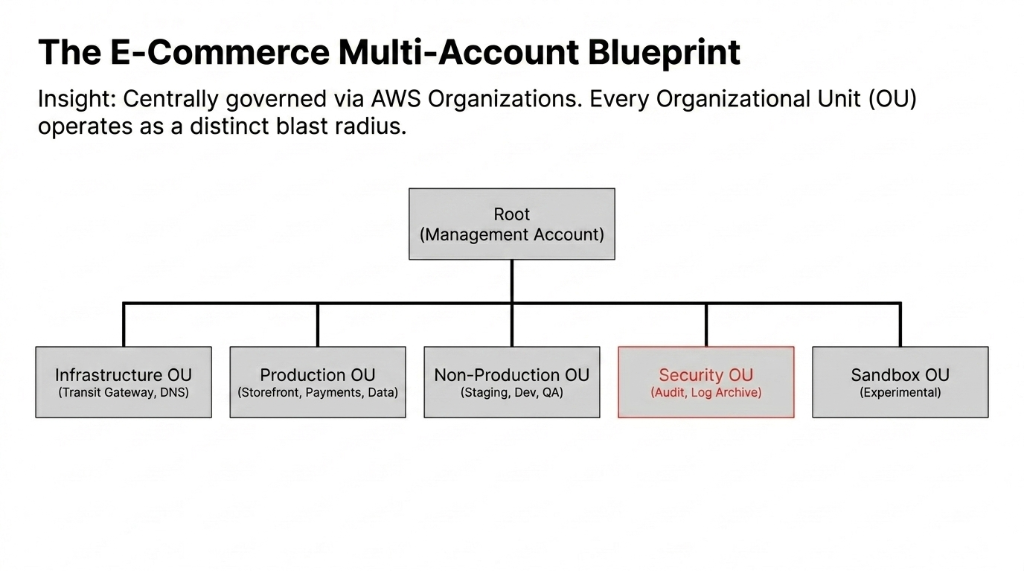
The 5-OU Architecture We Deploy for Every E-Commerce Client
Infrastructure OU
Shared networking, Transit Gateway, DNS, logging. The backbone that connects accounts without opening them to each other.
Production OU
Storefront account, Payments account, Data account. Three separate blast radii. A bug in checkout cannot touch your Redshift cluster.
Non-Production OU
Staging, Dev, QA accounts. Engineers can break things freely here. Production never sees the fallout.
Security OU
Audit account, Log Archive account. Nobody deletes logs here. SCPs make it structurally impossible — even for admins.
Sandbox OU
Experimental workloads, isolated from everything. Your engineers can test AWS Bedrock, Lambda runtimes, or new architectures without risk.
The Account-by-Account Reality Nobody Documents Honestly
Here is what actually lives in each account for an e-commerce brand doing $1M–$10M ARR:
Payments Account: The PCI Win Nobody Talks About
Isolating your Stripe webhook processors, AWS Payment Cryptography, and card-handling Lambda into a dedicated Payments account shrinks your PCI DSS audit surface from 11 control domains covering your entire AWS environment to 2-3 domains covering just this account. A UAE client reduced their annual PCI audit cost from $68,000 to $19,500 by doing this single isolation. That is $48,500/year recovered from a 1-week architecture change.
Storefront Account handles CloudFront distributions, ALBs, and ECS containers running your Next.js storefront. It talks to the API layer via cross-account IAM roles. No direct database access. Ever.
Data Account holds your Redshift cluster, S3 data lake, Glue jobs, and SageMaker pipelines. The only way in is cross-account sts:AssumeRole with strictly scoped permissions. No developer touches this account directly.
Log Archive Account is the one account nobody can delete logs from — enforced by SCPs that deny CloudTrail:DeleteTrail, S3:DeleteBucket, and Config:DeleteConfigurationRecorder at the OU level. Your non-negotiable forensics record.
SCPs: The Guardrails Your IAM Policies Cannot Provide
Service Control Policies are JSON-based guardrails that define the maximum permissions any IAM user or role inside an account can ever have — regardless of what their IAM policy says. If your SCP says Deny ec2:TerminateInstances in the Payments account, no one can do it. Not an admin. Not the root user. Not even with AdministratorAccess attached.
The 3 SCP Categories We Deploy on Every New Account
Preventive SCPs: Hard denies. Deny s3:DeleteBucket on buckets tagged environment:production. Deny rds:DeleteDBInstance across Production OU. Deny iam:CreateUser everywhere except the Identity account.
Detective SCPs: Mandatory tagging enforcement. Every resource must carry CostCenter, Environment, and Owner tags. No tags, no resource creation. We have seen brands waste $14,200/month in orphaned EC2 instances because nobody could trace who spun them up. SCPs kill this in 48 hours.
Compliance SCPs: For GDPR-heavy EU storefronts, SCPs deny s3:PutObject to any bucket not in eu-west-1 or eu-central-1. Customer data physically stays in Europe. Your GDPR conversation with legal goes from a 3-month project to one paragraph.
AWS Control Tower: 47 Minutes vs. 4 Weeks
Controversial opinion: do not set up AWS Organizations manually if you are starting fresh. Use AWS Control Tower.
Control Tower auto-configures your landing zone, provisions 21 mandatory guardrails you cannot disable, integrates CloudTrail across all accounts by default, and spins up your Log Archive and Audit accounts automatically. The manual route takes 3-4 weeks of engineering time. Control Tower takes 47 minutes.
When Control Tower Is NOT the Answer
If you are migrating an existing messy single-account setup, or if your org has highly custom governance requirements, build the Organizations structure manually with Terraform and apply SCPs via AWS CDK pipelines. We have seen companies spend $22,000 in consulting fees trying to force-fit existing workloads into a Control Tower landing zone. Know the difference before you start.
Consolidated Billing: $64,800/Year Recovered in 2 Hours
All accounts in your org roll up to a single bill. But here is the finance team's favorite part: Reserved Instance and Savings Plans sharing.
When you buy a 1-year Compute Savings Plan in your management account, that discount automatically applies to matching compute usage across all accounts in the org. A US-based fashion e-commerce brand was running 38 EC2 instances across storefront and data accounts, paying on-demand pricing in each account separately. After Organizations and a single Savings Plans purchase at org level, their monthly EC2 bill dropped from $12,700 to $7,300. That is $64,800/year recovered from a 2-hour architecture change.
Cross-Account Access: How Your Developers Actually Work
The question we get at every implementation: "If everything is in separate accounts, how do my developers work?"
The answer is IAM Identity Center tied to your management account. A developer gets read-only access to Production accounts, read-write access to Dev accounts, and zero access to the Security OU — all from a single login portal. No 47 individual IAM users across 8 accounts. No access keys in .env files on laptops.
Cross-account resource access — like your storefront Lambda in Account A reading from S3 in Account B — works via sts:AssumeRole. Account A's Lambda execution role assumes a specific role in Account B that only has s3:GetObject on one specific bucket. Least privilege, enforced structurally. See how this integrates with our cloud consulting services for the full cross-account pattern.
The 4-Week Migration Timeline (And Where 83% of the Pain Lives)
Migration Timeline for Mid-Size E-Commerce Brand
Week 1
Management account setup, OU structure, Control Tower or manual deployment. Mandatory SCPs applied. This part is clean.
Week 2
Account provisioning, VPC peering or Transit Gateway, IAM Identity Center. Your developers will hate SSO for 3 days. Then never go back.
Week 3
Workload migration. 83% of the pain. Hardcoded account IDs, hardcoded ARNs, Lambda functions assuming FullAWSAccess. Expect 11-14 days of hunting and patching.
Week 4
Monitoring, alerting, SCP testing. Enable GuardDuty at org level. AWS Security Hub aggregated view in Audit account. AWS Config Rules across all accounts.
Total engineering cost: 3-4 weeks of a senior cloud engineer. Typical ongoing cost reduction from better governance and Savings Plans sharing: $4,000–$18,000/month depending on current AWS spend.
What We Would Lock In on Day One
Braincuber's Day-One Checklist
▸ Never put workloads in the management account. It is for billing and governance only. Any compute, storage, or database in the root account is a security anti-pattern.
▸ Tag everything at creation time. Retroactive tagging costs 3x more in engineering hours than enforcing it via SCPs from day one.
▸ Enable all features from the start — not consolidated billing-only mode. Switching later requires re-inviting member accounts: 4 hours of headache per account.
▸ Create a Break Glass account with hardware MFA. One account, one IAM user, one YubiKey in a physical safe. For true emergencies only.
Every single client we have done this for — in the US, UK, UAE, and Singapore — says the same thing after: "I wish we had done this 18 months ago." See how multi-account governance integrates with our broader AI e-commerce solutions for complete infrastructure control.
Frequently Asked Questions
Does AWS Organizations cost anything to use?
AWS Organizations itself is free — no charges for creating or managing accounts within an organization. You pay only for the individual AWS services used in each account. AWS Control Tower may incur charges for services it auto-provisions, like AWS Config and CloudTrail across all accounts.
Can I add my existing AWS accounts to an Organization?
Yes. You invite existing accounts via the AWS console or API. The account owner receives an invitation email, accepts it, and after joining you can apply SCPs immediately. Existing IAM policies within the account remain unchanged — SCPs layer on top as the maximum permission boundary.
How many accounts should an e-commerce brand have?
A mid-size e-commerce operation typically needs 6-9 accounts: Management, Storefront, Payments, Data, Staging, Dev, Log Archive, Audit, and optionally Sandbox. More accounts mean tighter blast radius containment but also more cross-account networking complexity. Start with 6 and expand as your team grows past 15 engineers.
Do SCPs override IAM AdministratorAccess policies?
Yes. SCPs define the maximum permissions available in an account. Even if an IAM user has AdministratorAccess, an SCP Deny on their account makes that permission void. The effective permission is always the intersection of the SCP and the IAM policy — whichever is more restrictive wins. This is the core power of AWS Organizations.
What happens to AWS service limits across multiple accounts?
AWS service quotas are enforced per account, not per organization. This is a benefit: a traffic spike in your Storefront account consuming all Lambda concurrency will not starve your Payments account. Each account has its own independent quota pool. You can request quota increases per account as needed.
The Insider Takeaway
73% of e-commerce brands scaling past $2M ARR are on a single-account time bomb. The multi-account structure — 5 OUs, targeted SCPs, Savings Plans sharing at org level — is not an enterprise luxury. It is the baseline for any brand that takes security, compliance, and cost governance seriously. One UAE client recovered $48,500/year in PCI audit costs. A US fashion brand recovered $64,800/year in compute savings. Neither required more than 4 weeks of engineering time. Check your AWS account count right now. If it is 1, you are already behind.
How Many AWS Accounts Are You Running Right Now?
If the answer is one, you have no blast radius containment, no PCI scope isolation, no structural security boundary between your checkout pipeline and your customer database.
Book a free 15-Minute Cloud Architecture Audit. We will review your current AWS setup, tell you exactly which accounts you need, which SCPs to apply first, and how much you are leaking in unoptimized compute. No prep required.
Book Your Free AWS Architecture Audit