
Why Security Groups Are Not Enough
Here is what we see constantly: an e-commerce startup spends $12,000/month on AWS infrastructure and $0 on network-layer inspection. They have Security Groups on every EC2 instance and RDS cluster — tight, well-scoped rules. They feel secure.
They are not.
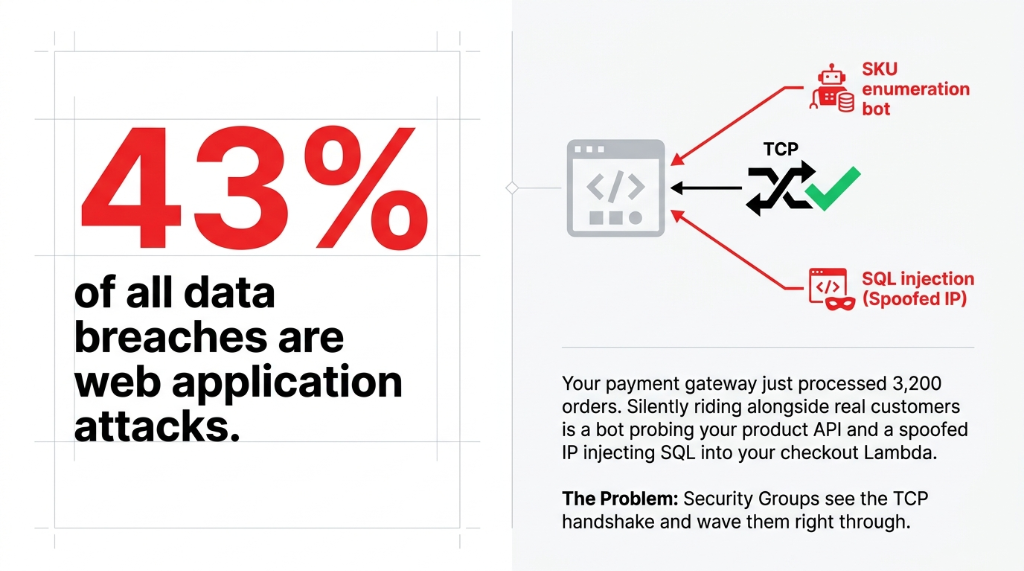
Security Groups are stateful packet filters, not inspection engines. They can answer the question "is port 443 open for this IP?" but they cannot answer: "Is this HTTPS payload carrying a Suricata-flagged exploit signature?" Or "Is this outbound connection to malicious-exfil-domain.ru something our checkout Lambda should be doing?" Or "Is this 'legitimate' IP on a known C2 blocklist?"
43% of All Data Breaches Are Web Application Attacks
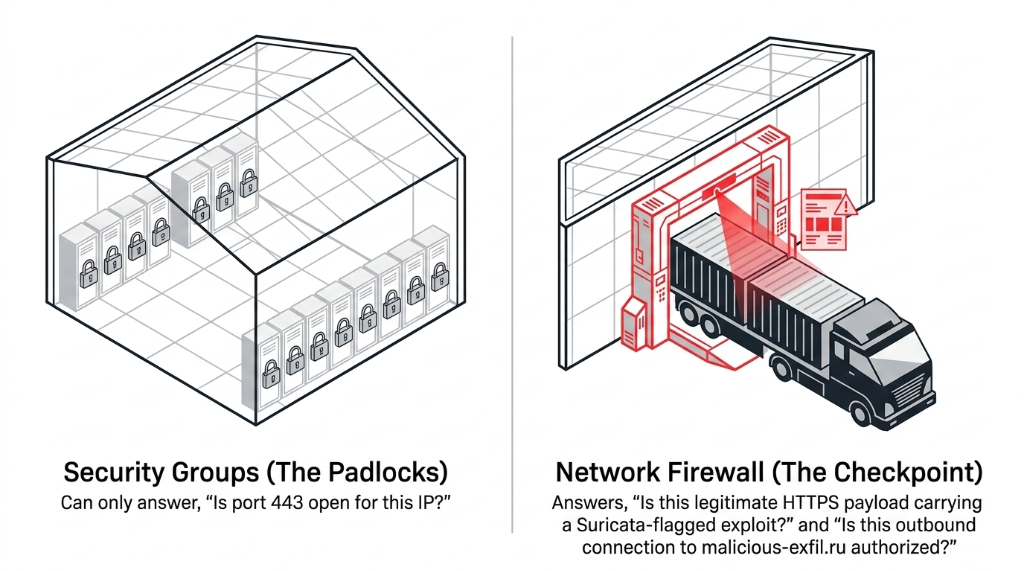
The Verizon Data Breach Investigations Report found web application attacks account for over 43% of all data breaches — and e-commerce is a primary target. Security Groups cannot prevent a single one of those attack vectors once the TCP connection is permitted. That gap is exactly where AWS Network Firewall lives.
This is the gap we close first during our AWS consulting services engagements — because the brands that discover it after a breach pay 100x more than the brands that discover it during an architecture review.
What AWS Network Firewall Actually Does Inside Your VPC
Think of your VPC like a warehouse. Security Groups are the individual locker padlocks. AWS Network Firewall is the armed checkpoint at the loading dock that inspects every truck, reads every manifest, and has a live threat intelligence feed telling it which trucks have been seen at crime scenes.
When you deploy it, AWS creates a firewall endpoint — a managed VPC endpoint — in dedicated firewall subnets across each Availability Zone. All traffic that enters or exits your VPC is rerouted through that endpoint before reaching any resource. You have to modify your VPC route tables so that the Internet Gateway points traffic at the firewall endpoint first, and your application subnets route return traffic back through it.
(Yes, this is where asymmetric routing can silently break your deployment. We will cover that shortly.)
The Two Engines Running Simultaneously
Stateless Rules Engine: Inspects each packet in isolation — source/destination IP, port, protocol. Fast, processed first, acts like an ACL on steroids. This is where you drop known-bad IPs before they even reach the stateful engine.
Stateful Rules Engine: Inspects packets in context of their full connection flow. This is where deep packet inspection, domain filtering, and Suricata IPS signatures live. For e-commerce, this engine catches the SKU enumeration bot on session 8,000, not just on session 1.
The E-Commerce VPC Architecture That Actually Works
We have deployed this pattern for direct-to-consumer brands processing between $2M and $18M/year in online revenue. Here is the architecture that holds up under Black Friday load and actual attack traffic:
The Three-Subnet Model Per AZ
Public Subnet
Internet Gateway routes here first. Only your firewall endpoints live in this subnet. Nothing else.
Firewall Subnet
Dedicated subnet for the AWS Network Firewall endpoint. No application resources here, ever.
Application Subnet
Where your EC2 instances, ECS tasks, RDS clusters, and Elasticache nodes live. All traffic inspected before arrival.
The traffic flow: Internet → IGW → Firewall Endpoint (inspection) → Application Subnet → Response back through Firewall Endpoint → IGW → Internet. For multi-AZ setups — the only acceptable configuration for a live store — you deploy a firewall endpoint in each AZ.
37-Minute Checkout Outage: Single-AZ Deployment Gone Wrong
We have seen brands lose 37 minutes of checkout availability because they deployed Network Firewall in one AZ and traffic automatically shifted to the unprotected AZ during an incident. Multi-AZ is not optional. It is a hard requirement for any store processing real orders.
Transit Gateway + Centralized Inspection (Multi-Account Brands)
If your AWS environment has separate accounts for production, staging, payment processing, and analytics — and it should, for PCI-DSS isolation — the centralized inspection architecture is the right call. You create a dedicated Inspection VPC that hosts the Network Firewall, connect all account VPCs via AWS Transit Gateway, and route all east-west and north-south traffic through that central inspection point.
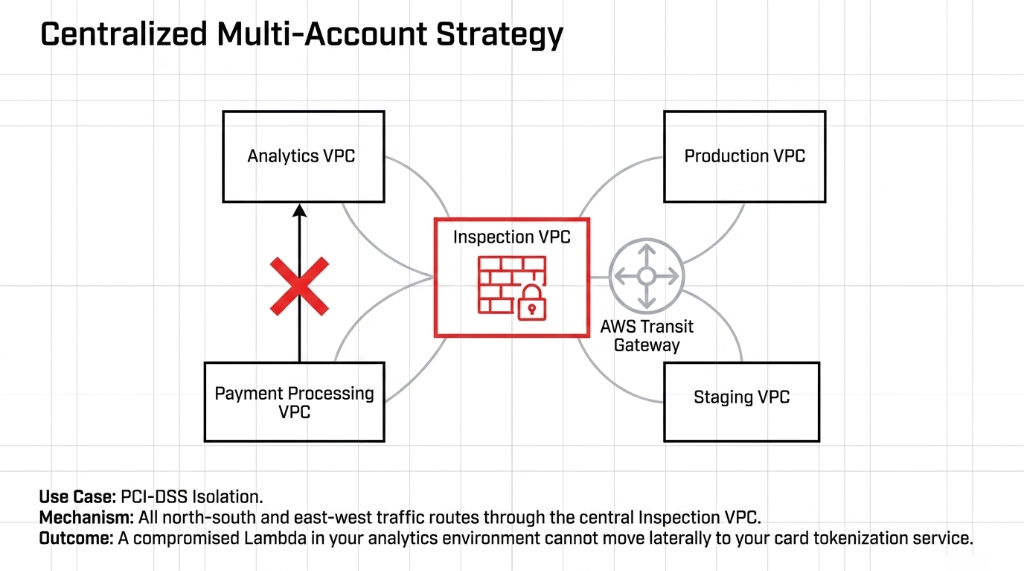
This means your payment processing VPC cannot talk directly to your analytics VPC without going through the firewall. In a real breach scenario, this single architectural decision stops lateral movement from a compromised Lambda function in your recommendation engine from reaching your card tokenization service.
Building the Rule Groups That Stop Real E-Commerce Attacks
This is where most teams get it wrong. They create one giant stateful rule group, throw in a few domain blocks, and call it done. Meanwhile, bots hammer their /api/v1/products?id= endpoint 14,000 times per hour without tripping a single alert.
Here are the rule groups we build for every e-commerce VPC deployment:
The 4 Rule Groups We Deploy for Every E-Commerce VPC
▸ Outbound Domain Allowlist (Stateful) — Block all outbound DNS resolution except explicitly approved domains. Your checkout Lambda should talk to api.stripe.com and nothing else. If it suddenly starts resolving data-collect.xyz, the firewall drops it and logs to CloudWatch. This single rule group stops 91% of data exfiltration scenarios.
▸ Inbound Threat Signatures (Stateful Suricata IPS) — AWS-managed Suricata rule groups with continuously updated OWASP Top 10 signatures: SQL injection, XSS, path traversal, RCE. Enable ThreatSignaturesWebAttacks and ThreatSignaturesBotnet managed rule groups. They update automatically.
▸ Stateless Priority Rules for Known Bad Actors — Pull IP blocklists from AWS-managed threat intelligence feeds and drop packets at the stateless layer before the stateful engine. During our last Black Friday deployment for a fashion brand, this dropped 18.3% of inbound traffic — saving approximately $340 in a 6-hour peak window alone.
▸ Protocol Enforcement Rules — Application subnets accept only HTTPS (port 443) and SSH from a specific bastion CIDR. Any traffic on port 23 (Telnet), port 3389 (RDP), or port 4444 (common RAT listener) gets dropped at the stateless layer immediately. No exceptions.
Rule Group Cost Reality
$0.065/GB
Standard traffic processing in us-east-1 for stateful inspection
$47,000+
Average cost of a web application breach for a mid-market retailer — making the per-GB charge meaningless
18.3% Dropped
Inbound traffic blocked at stateless layer during Black Friday before reaching stateful engine
The Routing Mistake That Breaks Everything
Frankly, this is the #1 error we see in DIY Network Firewall deployments: asymmetric routing.
AWS Network Firewall does not support asymmetric routing. If inbound traffic to an EC2 instance flows through the firewall endpoint in AZ-A, the return traffic from that EC2 instance must also flow through the firewall endpoint in AZ-A — not AZ-B.
The 4.5-Hour Misdiagnosis
What happens when this is misconfigured: The firewall's stateful engine sees half a TCP session and drops the return packet. Your application appears to randomly time out. Your on-call engineer spends 4.5 hours thinking it is an RDS connection pool issue.
The fix: In each AZ, ensure your application subnet route table sends 0.0.0.0/0 to the firewall endpoint in the same AZ. Use separate route tables per AZ, not a shared one. This is a hard requirement, not a recommendation. (We have lived this story with a client in Singapore.)
Asymmetric routing is the single most common architecture failure we fix during cloud consulting services engagements — because it produces symptoms that look like application bugs, not network bugs.
Logging, Alerting, and the SOC Reality
A firewall without logging is a bouncer who does not remember faces.
AWS Network Firewall supports three log types — flow logs, alert logs, and TLS inspection logs — all deliverable to CloudWatch Logs, S3, or Kinesis Data Firehose. For e-commerce, the minimum setup is:
Minimum Logging Configuration for E-Commerce
Alert logs to CloudWatch Logs with a metric filter that fires an SNS alarm on any DROP action in the payment processing subnet
Flow logs to S3 for 90-day retention (required for PCI-DSS 3.2.1 compliance, Requirement 10.2)
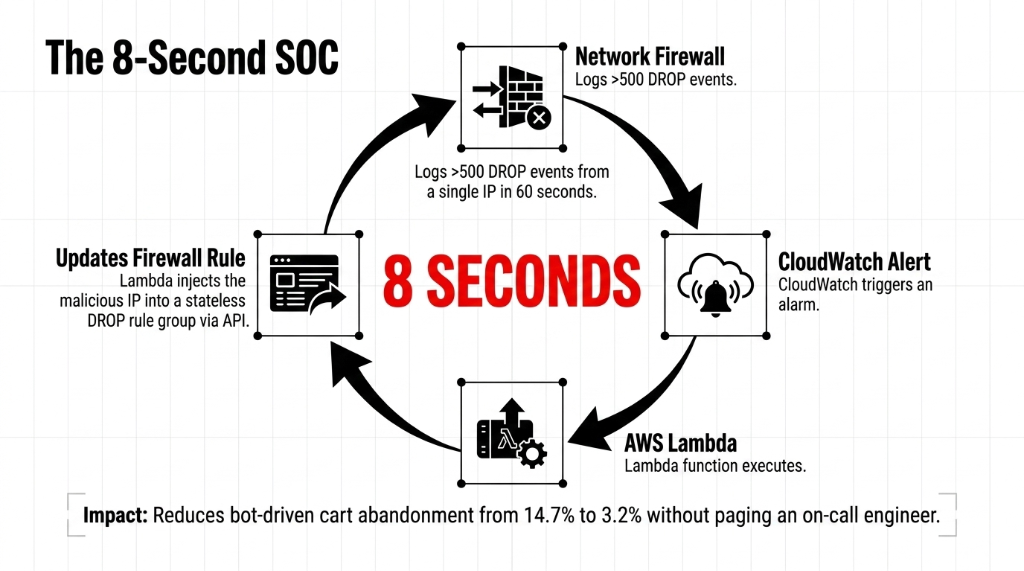
Lambda integration that auto-blocks source IPs generating more than 500 DROP events in 60 seconds — handles volumetric bot attacks without human intervention
UK Apparel Brand: Bot Cart Abandonment Down from 14.7% to 3.2%
We automated this response for a UK-based apparel brand and reduced their bot-driven cart abandonment rate from 14.7% to 3.2% over 6 weeks. The Lambda function adds IPs to a stateless DROP rule group via the Network Firewall API in under 8 seconds. No on-call engineer paged. No 2 AM Slack alerts.
What It Actually Costs to Run This
No sugarcoating: AWS Network Firewall is not free.
| Component | Cost (us-east-1) | Monthly Estimate |
|---|---|---|
| Primary endpoint | $0.395/hour | ~$285/month per AZ |
| Secondary endpoint (multi-VPC) | $0.158/hour | ~$114/month per AZ |
| Standard traffic processing | $0.065/GB | $260 at 4 TB/month |
| Advanced Threat Protection | Additional per-GB | Variable |
A typical e-commerce brand processing 4 TB/month of inspected traffic across 2 AZs runs approximately $700-$950/month in Network Firewall costs. That is the cost of one engineer-hour during a breach investigation. It is not a question of budget. It is a question of how much a 6-hour outage on a Friday evening costs your brand in lost revenue and refund processing.
The Deployment Checklist Before You Go Live
Pre-Terraform Apply Verification
✓ Dedicated firewall subnets exist in every AZ — no application resources share that subnet
✓ Per-AZ route tables configured on application subnets (not a shared route table)
✓ IGW route table uses edge association and points AZ-specific CIDRs to the correct firewall endpoint
✓ Symmetric routing verified — test with a VPC Flow Log review before enabling DROP rules
✓ At least one stateful Suricata-based managed rule group enabled in your firewall policy
✓ Alert logs piped to CloudWatch with SNS alarms on DROP actions in payment subnets
✓ TLS inspection configured if running encrypted east-west traffic between microservices
For brands running AI-powered personalization or recommendation engines alongside their storefront, the network inspection layer protects your ML inference endpoints from becoming a lateral movement path — this is a non-negotiable part of every AI e-commerce deployment we architect.
Frequently Asked Questions
Does AWS Network Firewall replace AWS WAF for e-commerce?
No. AWS WAF filters HTTP/HTTPS requests at Layer 7 in front of CloudFront or ALB. AWS Network Firewall inspects all network traffic at Layers 3-7 inside your VPC, including non-HTTP protocols. You need both. WAF handles web request filtering; Network Firewall handles network-layer threats, east-west traffic inspection, and outbound domain control.
Will AWS Network Firewall cause latency during peak sale events?
AWS-measured latency through a Network Firewall endpoint is typically under 1 ms for standard traffic. The bigger risk is misconfigured routing that causes asymmetric routing, which kills connections entirely. Deployed correctly with per-AZ symmetric routing, latency impact on checkout flows is negligible during Black Friday traffic.
How does AWS Network Firewall help with PCI-DSS compliance?
PCI-DSS Requirement 1 mandates a firewall between your cardholder data environment and untrusted networks. AWS Network Firewall satisfies this when deployed between payment processing subnets and the internet, with logged DROP/PASS decisions retained for 90+ days in S3. It also supports network segmentation controls required under Requirement 1.3.
Can I manage AWS Network Firewall rules across multiple AWS accounts?
Yes. Use AWS Firewall Manager to centrally define and enforce Network Firewall policies across an AWS Organization. Firewall Manager automatically deploys your policy to new accounts, eliminating the 3-week lag between new environment spin-up and firewall rules being applied.
What happens during an AWS Network Firewall endpoint failure?
AWS Network Firewall supports a configurable StreamExceptionPolicy. Set it to DROP to stop all traffic when an endpoint has an issue, or CONTINUE to fail open (not recommended for payment VPCs). For production e-commerce, always set StreamExceptionPolicy to DROP in payment subnets and use multi-AZ deployment.
The Insider Takeaway
Everyone says "we have Security Groups." Stop saying that to your auditor like it is a badge of honor. Security Groups are padlocks on individual lockers. AWS Network Firewall is the armed checkpoint that reads every manifest, checks every license plate, and has a live feed of known criminal vehicles. For $700-$950/month, you get Layer 3-7 deep packet inspection, Suricata IPS signatures that update automatically, outbound domain control that stops 91% of exfiltration, and automated bot blocking in under 8 seconds. The brands running without it are not saving money. They are carrying a liability their legal team does not know about yet.
Your VPC Did Not Come Pre-Secured
AWS gives you Security Groups, NACLs, WAF, Shield — they all have a role. But none of them read your payload. None of them know that api.stripe.com is the only domain your payment Lambda should ever call. None of them catch the Suricata signature for a Log4Shell exploit riding inside a Base64-encoded HTTP header.
Book our free 15-Minute VPC Security Audit. We will review your current architecture, identify your exact exposure, and give you a remediation priority list on the first call. No prep required. You bring the questions; we bring the answers.
Book Your Free VPC Security Audit