
The Dirty Reality of E-Commerce Data Sprawl
Here is the ugly truth that nobody in your AWS account review meeting wants to say out loud.
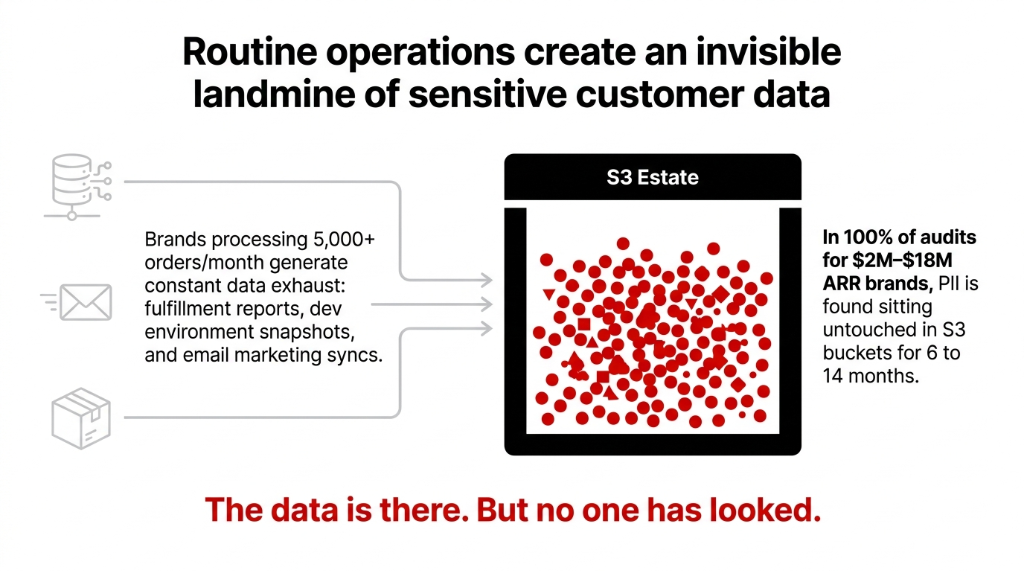
Every time your warehouse team exports a fulfillment report to S3, every time your dev runs a DynamoDB snapshot to test a new feature, every time Klaviyo pushes an email engagement CSV — you are creating a new PII landmine.
The Breach Cost Math Is Brutal
$200,000 GDPR Ceiling
4% of annual global turnover for a $5M revenue brand. And that is before you calculate customer trust damage, legal fees, and the 23.7% average customer churn rate that follows a confirmed e-commerce data breach.
100% Hit Rate
In every single e-commerce AWS audit we have conducted for $2M-$18M ARR brands, we found PII sitting in S3 buckets untouched for 6 to 14 months. Not most. Not usually. Every time.
Nobody Has Mapped It
The mistake most brands make: they assume their DevOps team "handles security." What that actually means is nobody has mapped where the PII lives. The buckets are there. The data is there. But no one has looked.
This invisible data sprawl is what we map during our AWS consulting services engagements — because you cannot protect data you do not know exists.
Why Turning on S3 Bucket Policies Is Not Enough
Everyone's first instinct is to lock down bucket policies and call it compliance. Wrong.
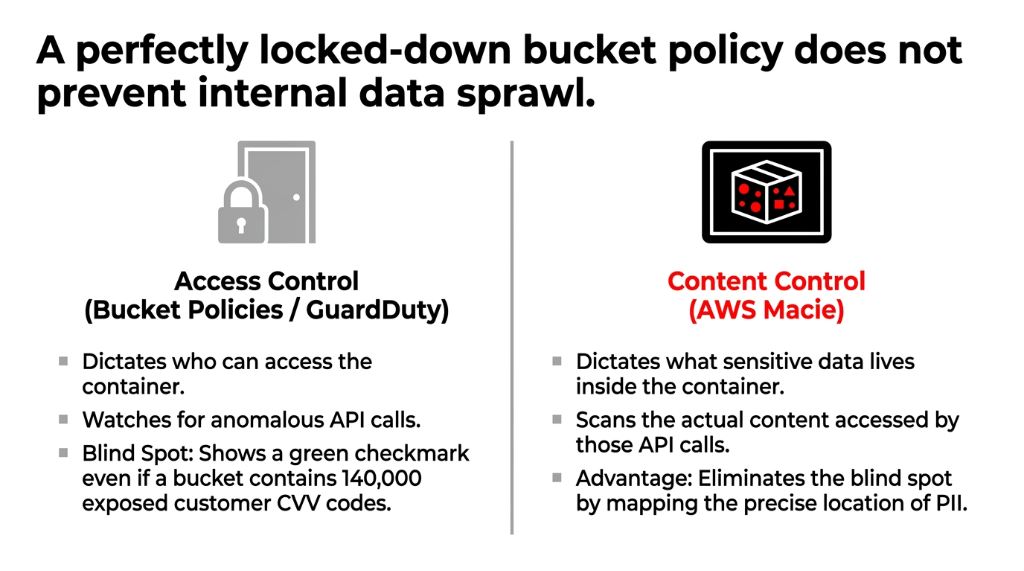
A bucket policy tells you who can access data. It does not tell you what sensitive data is inside. You could have a perfectly locked-down S3 bucket containing 140,000 rows of customer full names, home addresses, and partial CVV codes, and your bucket policy would show a clean green checkmark.
That is the gap AWS Macie fills — and it is a gap that standard AWS Config rules and GuardDuty cannot close on their own. GuardDuty watches for anomalous API calls. Macie watches what those API calls are accessing. These are not redundant — they are two entirely different threat surfaces.
How AWS Macie Actually Works (No Magic)
Macie runs two modes, and knowing when to use each one saves you real money.
Mode 1: Automated Sensitive Data Discovery
This is Macie's always-on surveillance mode. It evaluates your entire S3 bucket inventory every single day, uses statistical sampling to pull representative objects, and scans them for PII. Cost: $0.01 per 100,000 objects per month plus tiered data inspection fees starting at $1.00 per GB for the first 50 TB. For most mid-market e-commerce brands with under 10 TB of S3 data, the monthly bill lands between $47 and $110.
Mode 2: Targeted Sensitive Data Discovery Jobs
You point Macie at specific buckets — say, your shopify-order-exports-prod bucket — and it does a full, deep scan. This is what you run after a major product launch, a new third-party integration, or any data migration. You can run it once (on-demand) or on a recurring schedule. (Yes, you can schedule this to auto-run every Sunday night and wake up to a clean findings report on Monday morning.)
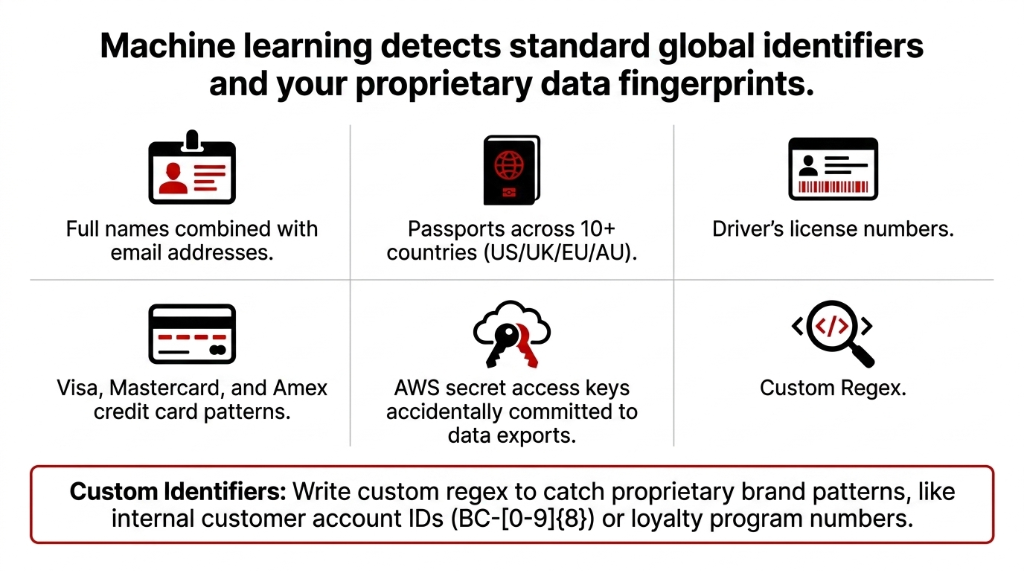
Custom Data Identifiers: Your Brand's Data Fingerprints
This is where Macie gets serious for e-commerce. Write your own regex to catch things like your internal customer account IDs (BC-[0-9]{8}), loyalty program numbers, or any proprietary data pattern your brand uses. Macie is not just looking for generic PII — it is looking for your data fingerprints.
The Allow List Feature That Nobody Uses (And Should)
Here is an insider detail that most AWS documentation glosses over.
Macie's Allow Lists let you tell the scanner to ignore specific patterns. If your support team's public phone number appears in 12,000 order confirmation objects, Macie will fire 12,000 findings for that number without an allow list. That is 12,000 false positives flooding your Security Hub dashboard and your on-call engineer's Slack at 2 AM.
The Fix: Create Allow Lists Immediately
Add your company's public contact numbers, test data email addresses (@example.com), and any PII that is intentionally public. This drops false-positive noise by roughly 60 to 80% in a typical e-commerce environment, based on what we have seen across implementations. This makes your security team's job tractable instead of impossible.
Connecting Macie to Your Security Ecosystem
Macie does not live in a silo — and it should not. Here is the correct architecture for an e-commerce brand running on AWS:
The Integration Pipeline
▸ Macie to EventBridge: When Macie fires a high-severity finding (500+ credit card numbers in a public bucket), EventBridge triggers a Lambda function that immediately blocks public access. Zero human response time.
▸ Macie to Security Hub: Aggregate all findings alongside GuardDuty alerts and Inspector vulnerability reports in a single dashboard across multi-account AWS Organizations.
▸ Macie to SNS to PagerDuty/Slack: Your security engineer gets a Slack ping with the exact S3 object path, the PII type, and finding severity within 3 minutes of detection.
▸ Macie to S3 Findings Export: Every analysis result gets logged in JSON format — your compliance audit trail. When a GDPR DSAR lands, you pull this log and know where that customer's data lives across your entire S3 estate in minutes, not days.
The EventBridge auto-remediation pipeline is part of the broader security architecture we build during our cloud consulting services engagements — because a Macie finding nobody acts on is just expensive logging.
What an E-Commerce Macie Setup Actually Costs
Stop guessing. Here are real numbers.
| S3 Scale | Bucket Monitoring | Data Inspection (Est.) | Monthly Total |
|---|---|---|---|
| 50 buckets, 500 GB | $5.00 | $27-$35 | ~$32-$40 |
| 200 buckets, 2 TB | $20.00 | $80-$110 | ~$100-$130 |
| 500 buckets, 8 TB | $50.00 | $310-$390 | ~$360-$440 |
Bucket monitoring runs at $0.10 per bucket per month. Data inspection is tiered: $1.00/GB for the first 50 TB, dropping to $0.50/GB for the next 450 TB. New accounts get a 30-day free trial covering up to 10,000 buckets and 150 GB of automated inspection — enough to run a full baseline audit before committing a single dollar.
(Note: These costs do not include the S3 GET and LIST request charges that Macie generates when pulling objects for inspection. On a typical 2 TB estate, this adds roughly $4-$8/month at standard S3 request rates.)
The Compliance Framework Map: Where Macie Checks Which Box
Macie Touches Multiple Frameworks Simultaneously
GDPR (EU/UK)
Article 32 requires "appropriate technical measures" to secure personal data. A documented Macie scanning schedule with retained findings exports satisfies auditors asking for evidence of continuous PII monitoring.
PCI-DSS
If your S3 buckets ever touch cardholder data (order exports with partial card numbers), Macie's managed identifiers for credit card numbers are your automated detective control for Requirement 3.4 and 3.5.
CCPA (California)
Knowing where consumer data lives is table-stakes for responding to deletion requests within the mandated 45-day window. Macie's data map makes this answerable in under 10 minutes.
HIPAA
If you run a health and wellness e-commerce brand and your order data includes health condition indicators, Macie's PHI identifiers extend coverage to protect that data class automatically.
43 Unencrypted Passport Copies. 18 Months. Nobody Knew.
We do not just enable Macie and hand you a console login. That is how you get a tool that runs for 90 days and gets ignored because nobody knows what to do with the findings.
Our 30-Day Implementation Timeline
Day 1-3: Full S3 bucket inventory mapping, tagging strategy for data classification (data-class: PII, data-class: Financial), and Macie activation across all regions where your data lives.
Day 4-7: Baseline targeted discovery job across your top-risk buckets — order exports, customer data backups, third-party integration drops like ShipStation and Recharge.
Day 8-14: EventBridge automation setup, Security Hub integration, and Slack/PagerDuty alerting pipeline.
Day 15-30: Custom data identifiers for your brand-specific data patterns, allow list configuration to suppress false positives, and DSAR response runbook creation.
UK Apparel Brand: $47,000 Fine Avoided
One of our clients — a UK-based apparel brand doing £3.2M/year on Shopify — found 43 S3 objects containing unencrypted customer passport copies in a returns processing bucket that had been running for 18 months. Nobody knew those files existed. The automated Macie job found them in 4 hours. Remediation took 2 days. A GDPR audit finding for that exposure would have started at a $47,000 fine minimum, based on comparable cases.
That is the math. A $130/month Macie bill versus a $47,000+ regulatory bill. The numbers are not subtle.
For brands layering AI-driven personalization or recommendation engines on their AWS stack, PII discovery becomes even more critical — our AI e-commerce solutions always deploy with Macie-scanned data pipelines because training ML models on unprotected customer data is a regulatory catastrophe waiting to happen.
Frequently Asked Questions
Does AWS Macie scan databases like RDS or DynamoDB directly?
No — Macie is built specifically for Amazon S3. However, you can export RDS or Aurora snapshots to S3 in Apache Parquet format, or export a DynamoDB table to S3, then run a Macie discovery job against those exports. It is a two-step process, but it works cleanly for scheduled compliance scans.
How quickly does Macie detect newly uploaded PII in S3?
In automated discovery mode, Macie evaluates your S3 inventory daily, so new objects are typically picked up within 24 hours. For real-time detection, pair Macie with an S3 Event Notification triggering a targeted discovery job on new object creation in sensitive buckets — that drops detection latency to under 15 minutes.
Can Macie scan encrypted S3 objects?
Yes — Macie can analyze objects encrypted with SSE-S3 (AES-256) and SSE-KMS, as long as the Macie service role has permission to use the relevant KMS key. Objects encrypted with SSE-C (customer-provided keys) are not supported, since AWS does not store those keys server-side.
What is the difference between Macie managed identifiers and custom identifiers?
Managed identifiers are built-in detectors maintained by AWS — covering credit card numbers, passport numbers, email addresses, and 80+ other PII types globally. Custom identifiers are regex patterns you write yourself to catch brand-specific data like internal customer IDs or loyalty account numbers. Both can run in the same job simultaneously.
Does enabling Macie affect my S3 bucket performance or application latency?
No — Macie reads S3 objects as a background service using read-only access. It does not intercept writes, does not proxy requests, and does not modify any object. Your application latency and bucket throughput are completely unaffected. The only side effect is additional S3 GET and LIST request charges at standard rates.
The Insider Takeaway
Everyone locks down bucket policies and calls it compliance. That is access control — not content control. A green checkmark on your bucket policy means nothing if there are 140,000 rows of customer CVV codes sitting inside. Macie scans what is actually in the bucket. The brands that deploy Macie alongside GuardDuty, Inspector, and Config do not just pass audits. They answer GDPR DSARs in 10 minutes instead of 10 days. And they sleep through Black Friday weekend.
Do Not Let Your S3 Buckets Become Your Biggest Liability
Your order export CSVs are sitting in S3 right now. Your Klaviyo sync backups are there. Your ShipStation manifests. How much customer PII is inside? You do not know. And neither does your DevOps team.
Book our free 15-Minute AWS Security Audit. We will tell you exactly which buckets carry your highest PII exposure risk in the first call. No slides. No sales pitch. Just the answer.
Book Your Free PII Discovery Audit