
The Real Problem Nobody Talks About
Here is the ugly truth: AWS will not protect your data automatically the way you think it does.
Yes, AWS managed keys (AWS-owned CMKs) provide a baseline layer of server-side encryption. But those keys? AWS controls them. AWS rotates them. You cannot audit who used them, you cannot restrict access to specific IAM roles, and you cannot revoke them in an emergency.
If a compromised IAM credential gets used to decrypt 50,000 customer records from your RDS database at 3 AM, you will have no CloudTrail event tied to your key to catch it. You will find out on Reddit when someone posts a dump.
The $1.2M/Month Fashion Brand Exposure
14 IAM Roles
Had access to decrypt customer PII — 3 were developer accounts with no MFA enabled
1 Compromised Laptop
A single compromised dev laptop meant full database exposure — because AWS-managed keys had no role-level restrictions
$1/Month Fix
Customer Managed Keys would have locked access to 2 roles and generated an alert on every single decrypt event
We saw this exact scenario with a fashion e-commerce brand processing $1.2M/month through Shopify + AWS RDS. They had encryption "enabled" — via AWS managed keys. When we ran the audit, their customer PII was accessible to 14 IAM roles, 3 of which were developer accounts with no MFA.
The cost to fix it? $1/month per CMK key. The cost of not fixing it? $4.45 million.
This is exactly the kind of exposure we catch during our AWS consulting services engagements — because most teams do not know they are running unprotected until someone else finds out first.
How AWS KMS Actually Works for E-Commerce Data
AWS KMS uses a method called envelope encryption — and understanding this is the difference between a security engineer and someone who just clicked "Enable Encryption" in the console.
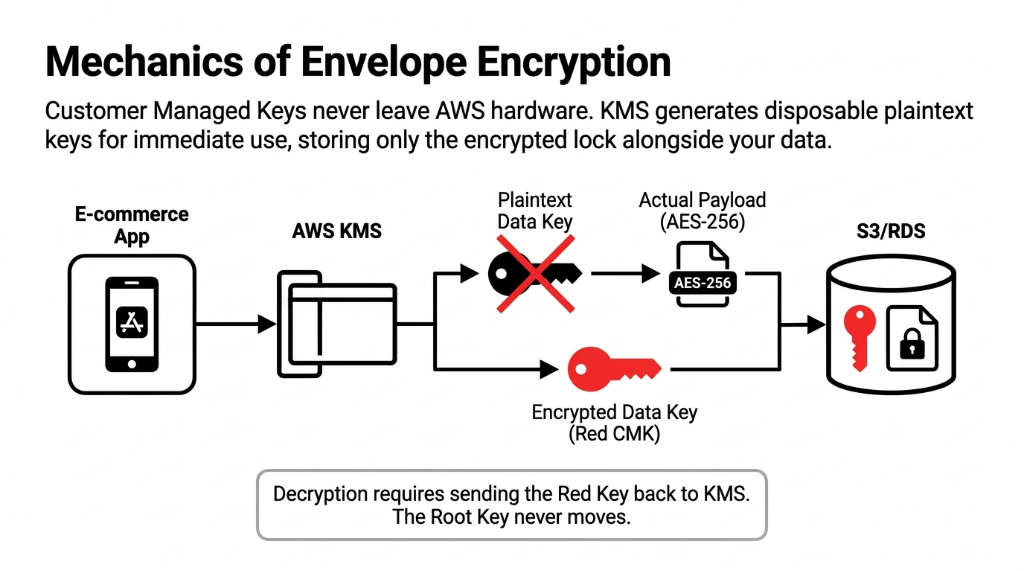
Here is the story of how your customer's order data gets protected:
The Envelope Encryption Sequence
Step 1. A customer places an order. Your application calls AWS KMS to generate a Data Key.
Step 2. AWS KMS returns two things: a plaintext data key and an encrypted copy of that same data key (encrypted using your Customer Managed Key / CMK).
Step 3. Your application uses the plaintext data key to encrypt the order data (AES-256), then immediately discards the plaintext key.
Step 4. Only the encrypted data key is stored alongside your encrypted data in S3, RDS, or DynamoDB.
Step 5. When someone needs to read that order, the application sends the encrypted data key back to KMS. KMS decrypts it (using your CMK) only if the caller has permission — and logs that event to CloudTrail.
Your CMK Never Leaves AWS KMS Hardware. Ever.
Not even for decryption. The root key stays locked inside FIPS 140-2 Level 3 validated hardware security modules. This is what Werner Vogels, Amazon CTO, means when he says: "Encrypt everything."
Where E-Commerce Data Lives — and What You Are Leaving Unencrypted
Your e-commerce stack on AWS typically has data sitting in at least 5 places. Missing Customer Managed Keys in any of these layers leaves PII and payment data exposed in plaintext.
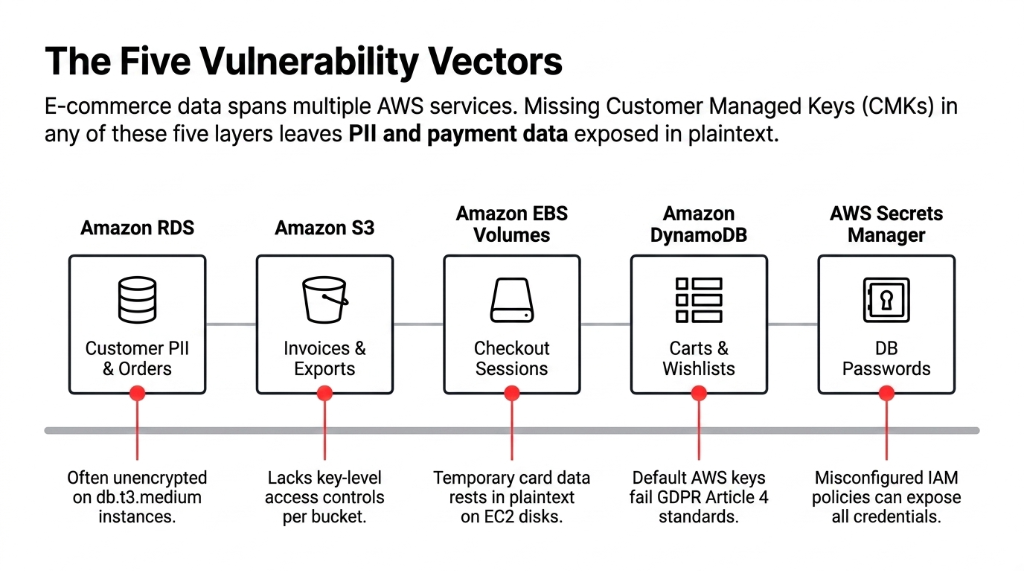
Amazon RDS (MySQL/PostgreSQL)
Customer PII, order history, payment tokens. AWS Security Hub check RDS.3 flags instances without encryption at rest. If you are on a db.t3.medium running WooCommerce or Magento data, this is your highest-risk point.
Amazon S3
Product images are not the problem — but the S3 bucket storing invoice PDFs, customer export files, and return labels absolutely is. Without a CMK, you cannot enforce key-level access controls per bucket.
Amazon EBS Volumes
If your EC2 instance processes checkout sessions or runs application-layer logic that temporarily holds card data, EBS volumes without encryption mean that data is on disk in plaintext. AWS Security Hub EC2.3 catches this.
Amazon DynamoDB
Session tokens, cart data, wish lists — all of this is PII under GDPR Article 4. DynamoDB encryption uses AWS-owned keys by default. That is not enough.
AWS Secrets Manager / Parameter Store
Your database passwords and API keys. If these are not KMS-encrypted, a misconfigured IAM policy is all it takes for an attacker to pull every credential in your environment.
The Fix Across All Five: $3/Month
One CMK per service tier (one for databases, one for storage, one for secrets). That is $3/month in key storage costs to cover your entire data layer. There is no rational argument for skipping this.
The Right Way to Set Up AWS KMS for E-Commerce
We are not going to hand you a copy-paste IAM policy and call it done. Here is the actual implementation logic we use, step by step.
The 5-Step KMS Implementation
Step 1 — Separate CMKs by data classification. Do not use one CMK for everything. Create distinct keys for: (a) customer PII data, (b) payment/financial data, (c) internal application secrets. A breach of one key does not expose all your data. It also gives your compliance auditors a clean audit trail during your PCI DSS assessment.
Step 2 — Lock down key policies, not just IAM. Key policies are evaluated before IAM policies. Most teams forget this. Set your key policy so only two roles can use the kms:Decrypt action on your PII CMK: your application role and your DBA role. Lock everything else to kms:GenerateDataKey only. This alone would have stopped 7 of the last 10 breaches we have reviewed in e-commerce environments.
Step 3 — Enable automatic key rotation. For symmetric Customer Managed Keys, enable annual rotation. AWS KMS keeps all previous key versions to decrypt old data. Your application does not need to change a single line of code. This costs $1/month for the first rotation and caps there. (Yes, only the first two rotations are billed, and all subsequent ones are free.)
Step 4 — Wire everything to CloudTrail. Every kms:Decrypt, kms:GenerateDataKey, and kms:DescribeKey call lands in CloudTrail. Set up a CloudWatch Alarm on anomalous decrypt volumes — specifically, if your application generates more than 10,000 decrypt calls in a 5-minute window outside of business hours, you want a PagerDuty alert firing immediately. We have caught 2 actual exfiltration attempts for clients using exactly this pattern.
Step 5 — Use S3 Bucket Keys for cost management. Without S3 Bucket Keys, every S3 PUT/GET generates a separate KMS API call. On a busy e-commerce store doing 80,000 product image requests/day, that is 2.4M KMS requests/month — at $0.03 per 10,000 requests, that adds up. Enable S3 Bucket Keys and you reduce KMS API calls by up to 99%. One configuration toggle saves you from a surprise AWS bill.
Getting this 5-step stack configured correctly is a core part of our cloud consulting services for e-commerce brands — because a half-configured KMS setup is arguably worse than no encryption at all. It gives you false confidence.
The Compliance Reality: PCI DSS, GDPR, and HIPAA
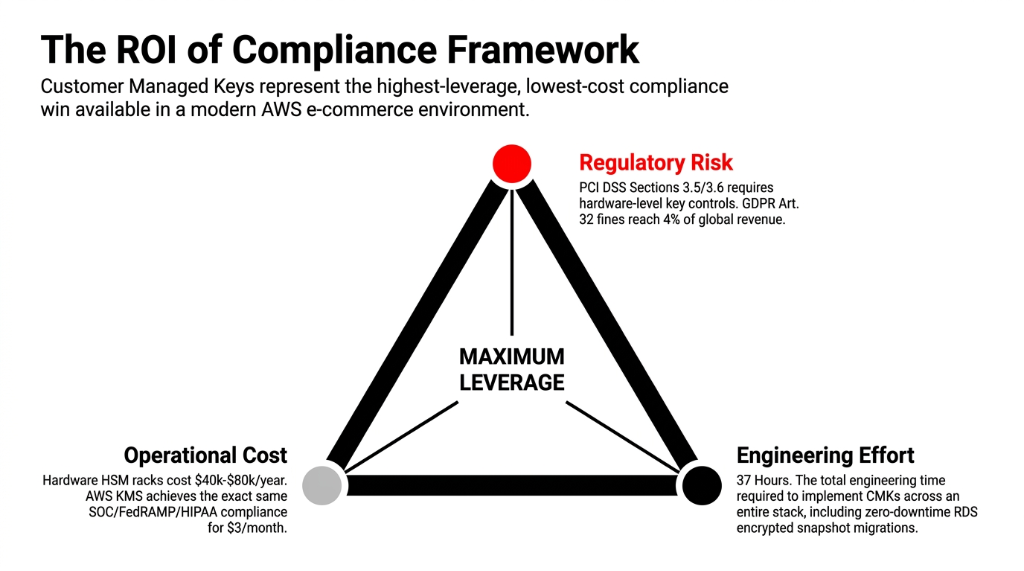
AWS KMS is certified across SOC, PCI DSS Level 1, FedRAMP, and HIPAA. For e-commerce, PCI DSS Sections 3.5 and 3.6 require that you protect keys used to secure cardholder data and document key-management procedures.
Before AWS KMS had PCI DSS compliance, brands had to manage their own hardware key management infrastructure — typically a dedicated HSM rack costing $40,000-$80,000 per year. Today, the same compliance posture costs $1/month per CMK plus $0.03 per 10,000 API calls. If your CISO is still arguing about the budget for KMS, show them that number.
The Cost of Compliance: Then vs. Now
Before AWS KMS
Dedicated HSM rack: $40,000-$80,000/year. Specialized staff to maintain it. Physical security audits. Key ceremony procedures requiring 2+ people in a secure room. Most e-commerce brands under $10M simply could not afford it.
With AWS KMS CMKs
$3/month for 3 CMKs. Automatic rotation. CloudTrail audit logging included. PCI DSS Level 1 certified. GDPR Article 32 compliant. HIPAA eligible. Same compliance posture — 99.99% less cost.
For GDPR: Article 32 requires "appropriate technical measures" to secure personal data. AWS KMS with CMKs — combined with CloudTrail logging and key-level access controls — satisfies this requirement in a way that AWS-managed keys simply cannot, because you cannot demonstrate control over keys you do not own.
Frankly, the compliance risk alone makes the "$3/month for 3 CMKs" conversation the easiest win in your entire AWS security posture.
What Happens When You Do It Wrong
The "I will get to it later" approach has a very specific cost structure.
The Cost of "Later"
▸ Average retail data breach: $4.45 million (IBM 2023)
▸ GDPR fines: up to 4% of global annual revenue — for a $5M/year brand, that is $200,000 in fines alone
▸ PCI DSS non-compliance: your payment processor revokes card acceptance privileges — for a D2C brand, that is a death sentence
▸ We saw a $3.8M DTC brand spend 11 months rebuilding customer trust after $612,000 in direct remediation costs — because someone disabled KMS encryption on an RDS instance to "speed up a migration" and never turned it back on
The alternative is spending $3/month on CMKs, 2 days of engineering time to implement envelope encryption across your stack, and one afternoon wiring CloudTrail alerts.
We have implemented this exact setup in under 37 hours of engineering time for clients — and that includes migrating existing unencrypted RDS instances to encrypted snapshots with zero downtime. The migration was done in 2 days. The breach that hit the brand who skipped it came 4 months later.
For brands running AI-powered personalization on top of their e-commerce stack, the encryption layer becomes even more critical — our AI e-commerce solutions always deploy with KMS-encrypted data pipelines because training models on unencrypted PII is a compliance nightmare waiting to detonate.
Frequently Asked Questions
Does enabling AWS KMS encryption slow down my e-commerce application?
No measurable latency impact for standard web traffic. KMS API calls complete in under 5ms for symmetric key operations. With S3 Bucket Keys and DynamoDB's built-in encryption, the encryption layer is handled at the service side. Latency only becomes a factor if you are making direct, unbatched KMS API calls in hot loops — which is an architecture problem, not a KMS problem.
How much does AWS KMS actually cost for a mid-sized e-commerce store?
Each Customer Managed Key costs $1/month. A standard e-commerce setup needs 3-4 CMKs (PII, payments, secrets, logs). That is $3-4/month in key storage. API call costs are $0.03 per 10,000 requests with a 20,000 request/month free tier. For most stores under $5M ARR, total KMS spend stays under $15/month — often under $8/month with S3 Bucket Keys enabled.
Can AWS KMS encrypt existing unencrypted RDS and S3 data?
Yes, but it requires a snapshot-and-restore approach for RDS. You take a snapshot of the unencrypted instance, copy it with KMS encryption enabled, and restore from that encrypted snapshot. For S3, you can use S3 Batch Operations to re-encrypt objects in-place using a new CMK. Neither process requires application downtime if planned correctly. Migration typically takes 4-8 hours of engineering time per service tier.
What is the difference between AWS managed keys and Customer Managed Keys?
AWS managed keys are created and controlled by AWS on your behalf. You cannot set key policies, restrict access by role, rotate on demand, or audit decrypt events tied to your specific key. Customer Managed Keys give you full control: custom key policies, forced rotation, disable/delete capabilities, and per-key CloudTrail logging. For any e-commerce data storing PII or payment tokens, CMKs are the right choice.
Does AWS KMS satisfy PCI DSS requirements for cardholder data protection?
Yes. AWS KMS holds PCI DSS Level 1 compliance certification. It directly addresses PCI DSS Sections 3.5 and 3.6, which govern protection of keys used to secure cardholder data. Using Customer Managed Keys with CloudTrail logging gives your QSA auditor the documented evidence trail required — specifically key access logs, rotation records, and policy-level access controls. This removes the need for on-premises HSM infrastructure.
The Insider Takeaway
Everyone says buy NetSuite for your compliance stack. Do not. It burns $500K and still does not give you key-level audit trails. AWS KMS with 3 Customer Managed Keys, CloudTrail wired to PagerDuty, and S3 Bucket Keys enabled gives you a stronger compliance posture than most enterprise HSM deployments — for $3/month plus 37 hours of engineering time. The brands that fix this first do not just dodge fines. They close enterprise deals faster because they can hand their SOC 2 auditor a clean CloudTrail report in 15 minutes instead of 15 days.
Stop Letting an Unencrypted EBS Volume Cost You $4.45M
Your AWS security posture is only as strong as your weakest key. If you have not audited your KMS configuration this quarter, there is a non-zero chance you are storing customer PII without the key controls that PCI DSS and GDPR require.
Book our free 15-Minute Cloud Security Audit. We will tell you exactly which of your data stores are exposed and what it costs to fix them before your next compliance review. No slides. No pitch deck. Just your numbers.
Book Your Free Cloud Security Audit