
The Vulnerability Gap No One Talks About
Here is what an e-commerce AWS stack typically looks like: EC2 instances running your storefront or middleware, Lambda functions handling order processing and payment webhooks, and ECR container images for microservices managing inventory, shipping, and customer data.
Every single one of those three layers is a potential entry point. And they accumulate vulnerabilities at a rate most teams do not track.
The Lambda Blind Spot: $9M ARR Client, 14 Unscanned Functions
Lambda functions that process payment confirmations from Stripe or Razorpay are often running Python 3.8 runtimes with dependency packages that have not been assessed in 90+ days. A single vulnerable cryptography library version — anything below 41.0.6 — exposes your function to known injection flaws. We pulled this finding from a $9M ARR e-commerce client. They had 14 Lambda functions that had not been scanned once since deployment.
The container side is worse. Teams push Docker images to ECR for every sprint. Each image carries OS-level packages — OpenSSL, libssl, zlib — that age out of security support. Without Enhanced Scanning enabled on ECR, you are flying blind. Inspector's ECR integration detects OS-level vulnerabilities AND programming language package vulnerabilities across C#, Go, Java, JavaScript, PHP, Python, Ruby, and Rust.
This is the kind of hidden exposure we uncover during our AWS consulting services engagements — because most teams assume "deployed" means "secure."
Why "We Run Pen Tests" Is Not Enough
We hear this constantly from CTOs and DevOps leads: "We do quarterly penetration testing, so we are covered."
No. You are not.
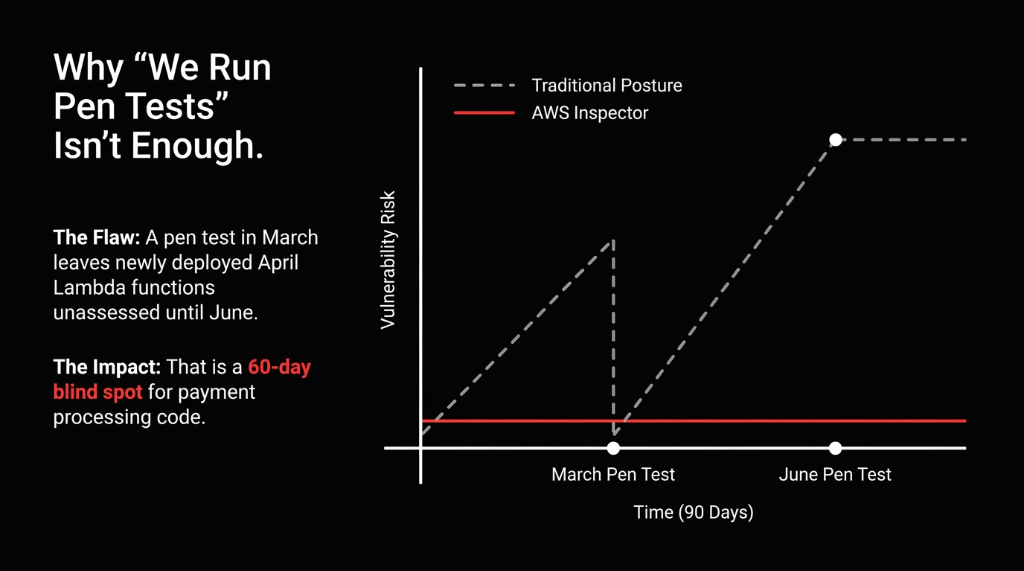
Penetration tests are point-in-time snapshots. You do one in March, patch what they find, and deploy 6 new Lambda functions by April. Those new functions are now unassessed until your next pen test in June. That is a 60-day window where your payment processing code is running with unreviewed dependencies.
AWS Inspector runs continuously. Every time you push a new container image, it scans. Every time you deploy an updated Lambda function, it scans. Every time Amazon adds a new CVE to its database, it re-evaluates your entire environment — automatically, without a ticket, without a sprint item, and without a $15,000 pen testing invoice.
Smarter Than Raw CVSS Numbers
Inspector's risk scoring correlates CVE severity with your actual network exposure. A critical CVE on an internet-facing EC2 instance with ports 443 and 22 open scores dramatically higher than the same CVE on an isolated internal service. Your team cannot patch 847 things at once. They can patch the 11 things that are actively exploitable from the internet this week.
How We Deploy Inspector for E-Commerce Workloads
When Braincuber sets up AWS Inspector for an e-commerce client, we do not just click "Enable" and walk away. Here is the exact deployment logic we follow:
The 5-Step Inspector Deployment
Step 1 — Multi-Account Activation via AWS Organizations. If you are running separate AWS accounts for staging, production, and data warehousing (you should be), Inspector needs to be enabled at the Organizations level with a delegated administrator account. Single pane of glass for findings across every account. Clients who skip this step end up with blind spots in staging — which is exactly where attackers probe first.
Step 2 — EC2 Scanning via SSM Agent. Inspector uses the AWS Systems Manager (SSM) agent on your EC2 instances. If your instances do not have SSM installed (and about 31% of instances in accounts we inherit do not), Inspector simply will not scan them. We audit SSM coverage on day one. This is the most common reason clients think Inspector is running fine but have 0 EC2 findings.
Step 3 — ECR Enhanced Scanning, Set to Continuous. We flip ECR repositories from Basic to Enhanced scanning and set to "Continuous Scan" — not "Scan on Push" only. A vulnerability can be disclosed after you pushed an image. If you only scan on push, a container deployed 30 days ago could be sitting with a critical CVE discovered last week.
Step 4 — Lambda Code Scanning Enabled. Standard Lambda scanning catches dependency vulnerabilities. But Lambda Code Scanning — which uses automated reasoning and ML — catches missing encryption, injection flaws, and data leaks in your actual function code. We have seen it flag hardcoded API credentials in a payment webhook function. That function had been live for 11 months.
Step 5 — EventBridge Routing to Security Hub and Slack. Raw Inspector findings in the console are useless if nobody watches the console. We configure EventBridge rules to push Critical and High findings to Security Hub for centralized tracking, and to a dedicated #aws-security-alerts Slack channel. Response time on critical findings drops from "whenever someone logs in" to under 14 minutes.
The EventBridge-to-Slack alerting pipeline is part of the broader security operations architecture we build during our cloud consulting services engagements — because a finding nobody sees is a finding nobody fixes.
What Inspector Will Find in Your E-Commerce Stack (Be Prepared)
When we enable Inspector on a typical e-commerce AWS environment that has been running without it, here is what the first 72 hours look like:
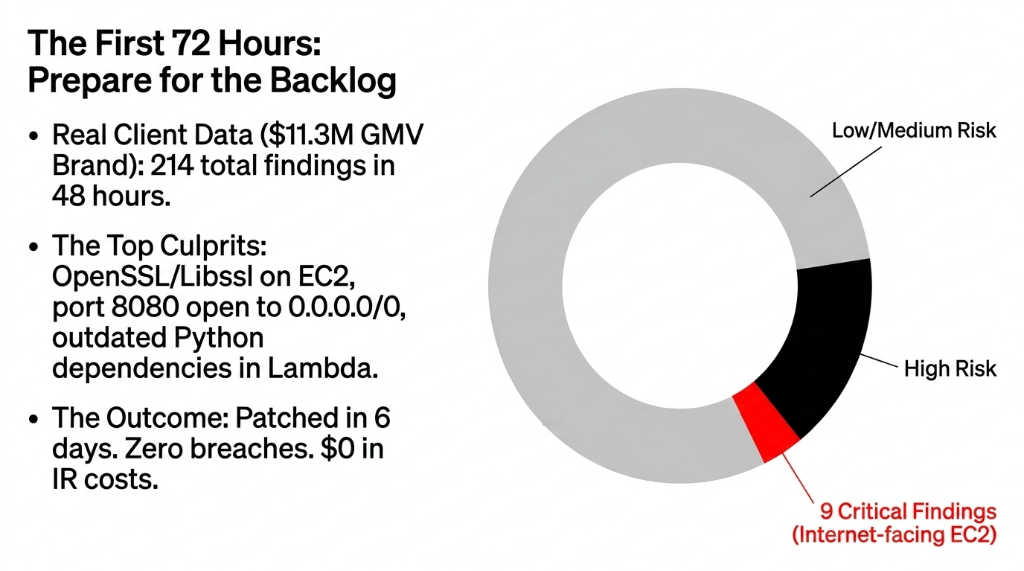
The Typical Findings Backlog
▸ EC2 package vulnerabilities — almost always OpenSSL, kernel packages, and libssl versions. Amazon Linux 2 AMIs from 2022 produce 40-70 findings per instance.
▸ Network reachability alerts — EC2 instances with security groups allowing unrestricted inbound access. Admin panels on port 8080 open to 0.0.0.0/0 are the single most common finding.
▸ Lambda dependency vulnerabilities — outdated boto3, requests, cryptography, and Pillow packages are the top four in Python-based e-commerce Lambdas.
▸ Container image OS CVEs — base images like python:3.9-slim or node:18 without regular rebuilds accumulate 15-30 CVEs within 6 months.
$11.3M Fashion Brand: 214 Findings, 9 Critical, Patched in 6 Days
On a recent deployment for a mid-market fashion e-commerce brand (annual GMV: $11.3M), Inspector surfaced 214 findings in the first 48 hours. Of those, 9 were Critical severity — all on internet-facing EC2 instances. We patched all 9 within 6 days using Inspector's built-in remediation guidance. Zero breach. $0 in incident response costs.
The SBOM Angle: Compliance Is Becoming Mandatory
If you sell to customers in the EU or US enterprise segment, Software Bill of Materials (SBOM) requirements are no longer optional advice. The US Executive Order on Improving the Nation's Cybersecurity explicitly references SBOM as a baseline expectation, and EU NIS2 directives push similar requirements for critical digital infrastructure.
Amazon Inspector generates SBOMs for your scanned workloads automatically. For an e-commerce brand processing payment card data under PCI-DSS, the ability to produce a machine-readable SBOM for every container image in ECR is the difference between passing your QSA audit and spending $40,000 on remediation consulting. We have watched this play out with two clients in the past 8 months.
What This Costs (And What It Saves)
The Math Is Not Complicated
$7.60/Month
Total Inspector cost for a typical e-commerce stack: 12 EC2 instances ($0.11 each), 30 Lambda functions ($0.09 each), 50 container images ($0.09 initial + $0.01/mo continuous)
$38,000 Average
Cost of identifying and remediating a vulnerability after it has been exploited — including incident response, forensics, regulatory notification, and customer remediation (Ponemon Institute)
$4.45 Million
Average total cost of a retail data breach (IBM 2023). For a $5M-$15M ARR e-commerce brand, that is not a fine — that is company-ending money.
The AWS Security Stack We Actually Build
We do not deploy Inspector in isolation. It is one layer in a defense-in-depth architecture we build for e-commerce clients:
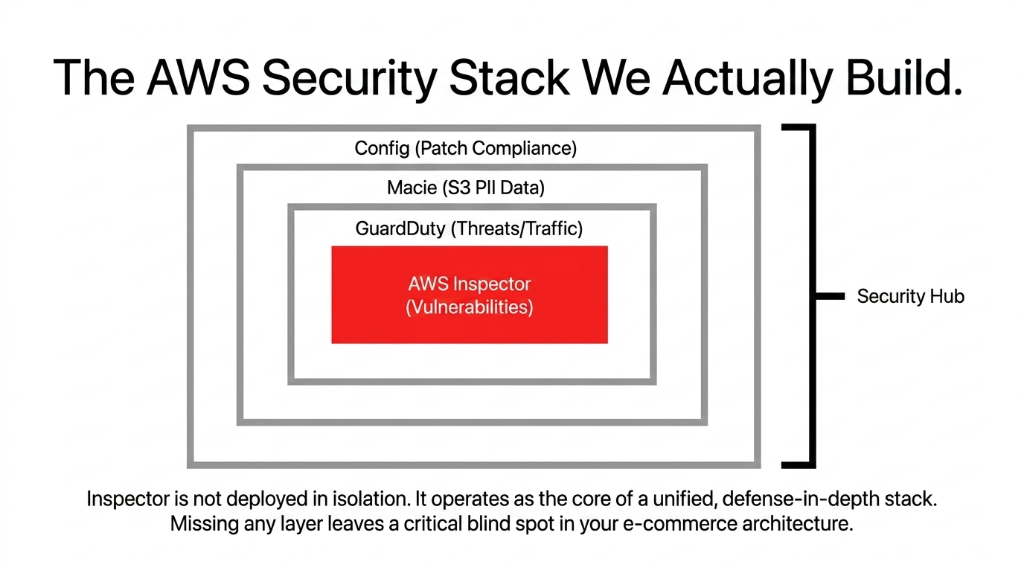
| Layer | Tool | What It Catches |
|---|---|---|
| Vulnerability scanning | AWS Inspector | EC2/Lambda/ECR CVEs, network reachability |
| Threat detection | AWS GuardDuty | Active attacks, API abuse, DNS anomalies |
| PII discovery | Amazon Macie | Customer data in S3 buckets |
| Compliance drift | AWS Config + SSM Patch Manager | Misconfigurations, patching enforcement |
| Centralized findings | AWS Security Hub | Cross-service aggregated compliance view |
This is not a product upsell. This is the minimum viable security posture for any e-commerce brand storing payment data or customer PII on AWS. If you are running only one of these, your security posture has gaps you cannot see.
For brands layering AI-driven personalization or recommendation engines on their AWS stack, the vulnerability scanning layer becomes even more critical — our AI e-commerce solutions always deploy with Inspector-scanned container images because a compromised ML inference endpoint is a direct path to customer data exfiltration.
Frequently Asked Questions
Does AWS Inspector slow down my EC2 instances or Lambda functions?
No. Inspector uses the SSM agent for EC2 scanning and performs out-of-band analysis — it does not inject traffic into your application path. Lambda scanning happens asynchronously and has zero impact on function execution time or cold start latency. Your checkout flow will not notice it running.
How quickly does Inspector detect a newly disclosed CVE?
When Amazon adds a new CVE to its vulnerability database, Inspector re-evaluates all relevant workloads automatically — typically within hours of the CVE being published. You do not need to trigger a new scan. This is what makes it fundamentally different from scheduled pen tests or monthly vulnerability scans.
Can AWS Inspector scan workloads across multiple AWS accounts?
Yes. Using AWS Organizations with a delegated administrator account, Inspector covers all member accounts from a single console. For e-commerce brands with separate production, staging, and data warehouse accounts, this is the recommended deployment model — it eliminates blind spots that single-account setups miss entirely.
What is the difference between Inspector Classic and the current AWS Inspector?
Inspector Classic (v1) required manual target configuration and agent installation. The current Amazon Inspector (v2) is fully automated — it discovers and scans resources without manual configuration. For any new deployment, use v2. Classic is deprecated and should not be used for new e-commerce security programs.
Does AWS Inspector help with PCI-DSS compliance?
Directly, yes. PCI-DSS Requirement 6.3.3 mandates that all system components are protected from known vulnerabilities by installing applicable security patches. Inspector's continuous CVE scanning and remediation guidance creates an auditable, documented record of vulnerability identification and remediation — exactly what your QSA auditor will ask for during a PCI assessment.
The Insider Takeaway
Everyone says "we do quarterly pen tests." Stop saying that to your auditor like it is a badge of honor. A $15,000 pen test in March does not protect the 6 Lambda functions you deployed in April. AWS Inspector scans continuously for $7.60/month — every new deployment, every new CVE, every container rebuild. The brands that deploy Inspector alongside GuardDuty, Macie, and Config do not just pass PCI audits faster. They stop having 2 AM security incidents entirely.
Your AWS Stack Is Being Probed Right Now
Shodan and Censys index AWS IP ranges 24/7. Attackers do not wait for your next quarterly pen test. That unpatched Lambda function processing $50,000/day in orders is your most expensive DevOps oversight.
Book our free 15-Minute AWS Security Audit. We will pull your Inspector findings gap, identify your highest-risk workload, and give you a remediation priority list on the first call. No fluff. No sales deck.
Book Your Free Vulnerability Audit