
Your AWS bill went up again last month. You did not ship a single new feature.
That is not a scaling problem. That is a waste problem — and we have seen it cost US e-commerce brands an average of $14,300/month in completely preventable cloud spend.
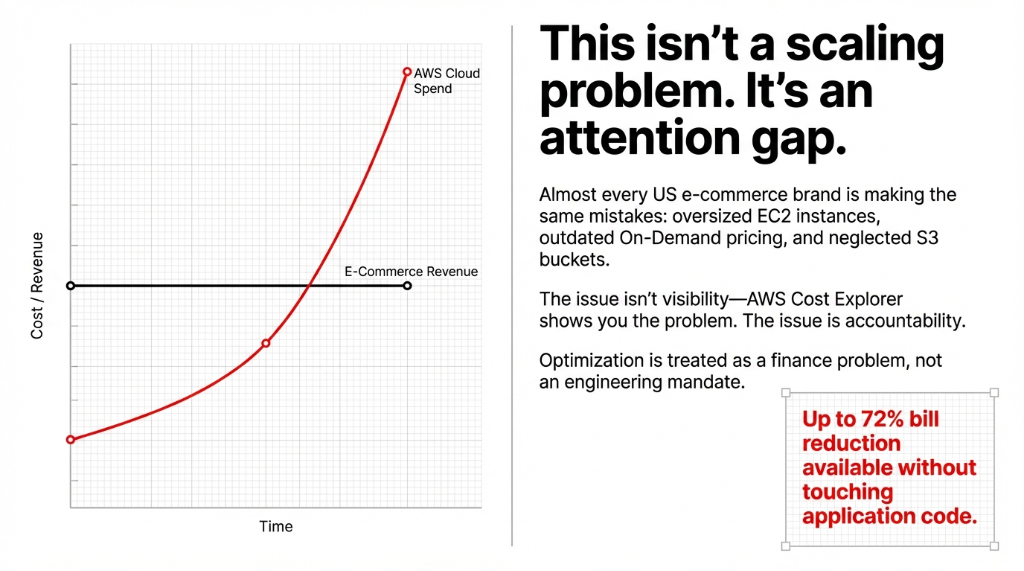
We have audited cloud infrastructure for over 60 e-commerce brands across the US, and almost every single one of them is running the same mistakes: oversized EC2 instances, On-Demand pricing on workloads that have not changed in 14 months, and S3 buckets bleeding money on data nobody has accessed since Q3 2023.
This is not a technology gap. It is an attention gap. Here are 15 things you can do right now — this week — to cut your AWS bill without touching a line of application code.
Vector 1: Put Out the Compute Fire
1. Switch On-Demand EC2 to Reserved Instances
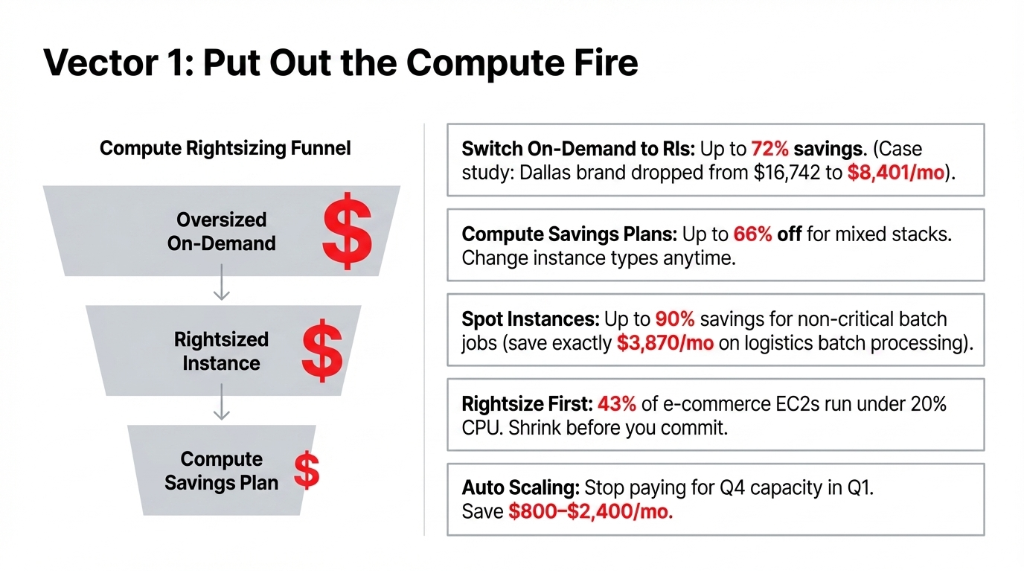
If you have been running the same EC2 instance type for more than 90 days, you are paying the most expensive rate possible. Reserved Instances for a 1-year term cut your hourly rate by up to 72% compared to On-Demand.
Case Study: Dallas E-Commerce Brand
100x m5.xlarge On-Demand at $0.192/hour = $16,742/month
1-year Partial Upfront RIs at $0.0966/hour = $8,401/month
$99,492 saved in year one. Zero resource changes.
2. Buy Compute Savings Plans for Mixed Stacks
Here is what most AWS cost articles won't tell you: if your team switches instance families, regions, or operating systems regularly, a Standard RI becomes dead weight. Compute Savings Plans give you up to 66% off On-Demand with freedom to change instance types, sizes, and regions any time. We always recommend Savings Plans first for any team running more than three different EC2 instance families.
3. Use Spot Instances for Background Jobs
Your order confirmation email queue, image resizing pipeline, inventory sync jobs, and nightly reporting do not need On-Demand capacity. Spot Instances offer up to 90% savings.
One logistics brand saves exactly $3,870/month running all non-critical batch processing on Spot with ASG fallback to On-Demand. Works without a single failure in 11 months.
4. Rightsize Before You Buy Commitments
Do not buy an RI on an oversized instance — that is locking in the waste. Use AWS Compute Optimizer or Trusted Advisor first. We consistently find that 43% of EC2 instances in e-commerce environments run at under 20% CPU utilization. You are paying for m5.2xlarge performance and getting t3.small usage. Drop to the right size first, then commit.
5. Auto Scaling Groups — Stop Paying for Black Friday in February
Every e-commerce brand scales up for Q4. Almost none of them scale back down in Q1. If your minimum instance count is still set to 8 and it is April, you are paying for 8 servers processing zero traffic at 2 AM on a Tuesday. Configure proper scale-in policies and save $800-$2,400/month.
Vector 2: Kill the Dev Environment Costing $1,200/Month While You Sleep
6. Schedule Non-Production Shutdowns
The single fastest win available. Your dev and staging environments do not need to run Saturday nights and Sundays. They do not need to run after 7 PM on weekdays either. Use AWS Instance Scheduler to automate shutdowns.
Most teams recover $1,100-$2,800/month from this one change. Takes about 3 hours to implement. No architecture changes required.
7. Delete Idle Snapshots, Unattached EBS Volumes, and Ghost Load Balancers
AWS Trusted Advisor will flag these for free. We have walked into environments where clients were paying $437/month for EBS snapshots tied to EC2 instances terminated in 2022 and an Application Load Balancer pointing to a target group with zero healthy targets.
Pure waste. Run Trusted Advisor today. Delete what it flags.
Vector 3: Storage Costs — The Slow Leak Nobody Patches
8. Enable S3 Intelligent-Tiering on Every Product Asset Bucket
Your product images and static assets get viewed constantly when first uploaded. Six months later, 70% are accessed less than once a week. S3 Intelligent-Tiering automatically moves objects to cheaper tiers — saving up to 40% after 30 days and 68% after 90 days — with zero retrieval fees and no performance impact. AWS customers have saved over $6 billion using this feature since 2018. There is no reason your S3 buckets are not using it right now.
9. Lifecycle Policies on Order Logs and Transaction Records
Your order history from 2021 does not need to live in S3 Standard. Set a lifecycle policy: objects older than 90 days to S3 Glacier Instant Retrieval, older than 365 days to Glacier Deep Archive. Deep Archive costs $0.00099/GB/month — that is 95% cheaper than Standard. For a $20M/year GMV brand with 3 years of history, this trims $380-$760/month.
10. Stop Storing Duplicate Product Image Variants in S3
We see this constantly: a Shopify store uploading the original image and five resized variants to S3, all in Standard class. Use CloudFront's image optimization or Lambda@Edge to resize on-the-fly and serve at the edge. Eliminate 4 out of 5 storage objects per product. Cut image-related S3 costs by 60-78%.
Vector 4: Your Network Bill Is Silently Eating Your Margins
11. Put CloudFront In Front of Everything
Data transfer from EC2, RDS, or ALB to the internet is expensive. Data transfer from AWS origins to CloudFront edge locations is free. CloudFront then serves traffic at a cheaper per-GB rate than raw EC2 egress.
For a store serving 10 TB/month, this saves $770-$850/month in data transfer fees and reduces origin server load by up to 70%.
12. ElastiCache: Stop Paying RDS to Answer the Same Questions 10,000 Times
Your product catalog queries — top sellers, category pages, featured items — are being re-executed against RDS on every single page load. ElastiCache Redis caches these responses in milliseconds.
One US home goods brand reduced their RDS class from db.r5.2xlarge ($0.48/hr) to db.r5.large ($0.12/hr) after deploying ElastiCache — saving $2,628/month — because database CPU dropped from 78% to under 19%.
Vector 5: Architecture Decisions That Pay Off in 30 Days
13. Migrate Event-Driven Workloads to Lambda
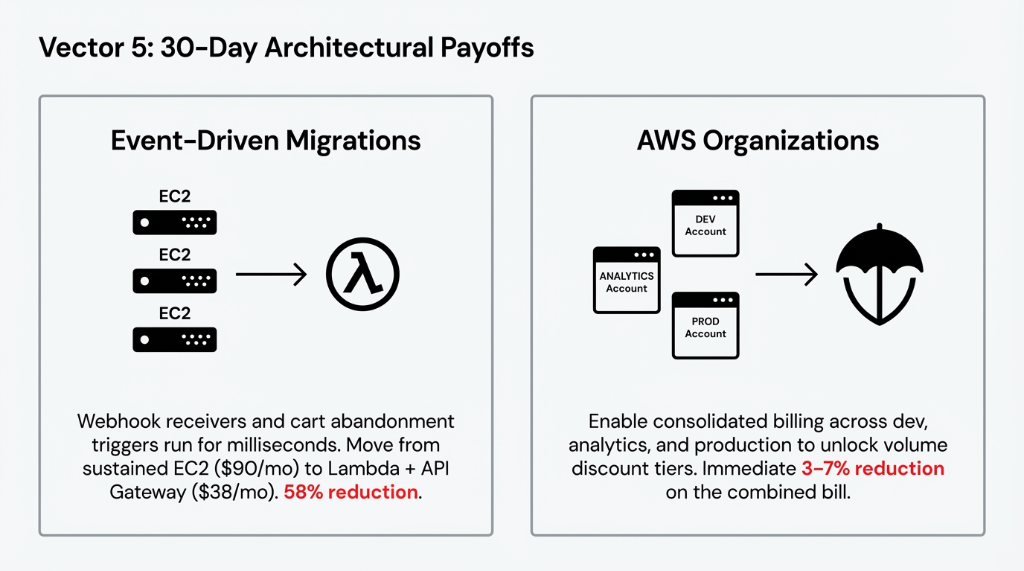
Your webhook receivers, payment confirmation handlers, inventory update triggers, and cart abandonment processors do not need always-on EC2. They run for milliseconds in response to events.
3x t3.medium EC2 ($90/month) to Lambda + API Gateway = $38/month — a 58% reduction with zero operational overhead.
(Yes, Lambda can cost more than EC2 for sustained high-traffic APIs. Do not move your storefront there. Move your event handlers.)
14. Run Multi-AZ RDS Only in Production
Multi-AZ RDS doubles your database cost — you are paying for a hot standby replica processing zero traffic. Right call for production. Not the right call for staging, QA, or your dev sandbox. Switch non-production to Single-AZ. Save $180-$960/month per environment.
15. Enable Consolidated Billing via AWS Organizations
If your operation runs multiple AWS accounts — production, dev, analytics — and you are not using AWS Organizations with consolidated billing, you are leaving volume discount tiers on the table. Most teams see an immediate 3-7% reduction in their combined bill. Takes 20 minutes to set up.
What These 15 Changes Add Up To
| Savings Area | Monthly Recovery |
|---|---|
| Reserved Instances / Savings Plans | $4,200-$8,100 |
| Non-production shutdowns | $1,100-$2,800 |
| S3 Intelligent-Tiering + Lifecycle Policies | $380-$900 |
| CloudFront + ElastiCache | $1,400-$3,500 |
| Rightsizing + Spot Instances | $900-$2,400 |
| Lambda migrations + Multi-AZ cleanup | $500-$1,400 |
| Total Monthly Savings | $8,480-$19,100 |
We have seen brands cut their AWS bills from $23,000/month to $13,700/month in 47 days using exactly these steps. None of these require re-architecting your application. None require a 3-month migration project. They require discipline and 2-3 weeks of focused engineering time.
The Uncomfortable Truth About AWS Cost Tools
AWS Cost Explorer will show you the problem. It will not fix it. Trusted Advisor will flag idle resources. Your dev team will ignore the alert emails. The issue is not visibility — it is accountability. Most e-commerce engineering teams treat AWS cost optimization as a finance problem, not an engineering problem. That is why the bill keeps climbing.
Assign one person who owns the bill. Give them permission to shut things down. The savings follow.
At Braincuber Technologies, we have run cloud infrastructure audits for e-commerce brands running on AWS across the US, UK, and UAE. In our last 23 audits, the average discovered waste was $11,730/month — money sitting in idle EBS volumes, oversized RDS instances, and On-Demand EC2 that had not been touched in months.
Frequently Asked Questions
How quickly can I see savings after implementing these strategies?
Shutting down non-production environments and enabling S3 Intelligent-Tiering show up on your next AWS bill within 30 days. Reserved Instances apply the moment you purchase them. Most brands see measurable reductions in 2-4 weeks. Full impact of all 15 changes typically shows after 60 days.
Is it safe to use Spot Instances for e-commerce workloads?
Never use Spot for your live storefront, checkout, or payment API. Use them exclusively for background, batch, or event-driven jobs — inventory sync, image processing, reporting — where a 2-minute interruption causes a minor retry, not a lost order. Pair with an ASG fallback to On-Demand for safety.
How much engineering time does this actually take?
The 15 strategies require roughly 40-80 hours of focused engineering work for a standard e-commerce AWS environment. Non-production scheduling and S3 Intelligent-Tiering take under 4 hours combined. RI purchases take 30 minutes once you have analyzed usage in Cost Explorer. Rightsizing and Lambda migrations take the longest.
Will rightsizing EC2 instances affect site performance?
Only if you rightsize without data. Use CloudWatch metrics and Compute Optimizer recommendations based on actual CPU, memory, and network utilization over the past 14 days. If your m5.2xlarge is running at 12% CPU, dropping to m5.large will not degrade performance. Rightsizing based on actual metrics is safe.
Do these strategies apply if we run Shopify with AWS back-end services?
Yes. Most Shopify Plus brands use AWS for data warehouse (Redshift), order processing microservices (Lambda/EC2), product data storage (S3), and analytics pipelines (EMR). All 15 strategies apply directly to those workloads. Your Shopify storefront runs on Shopify's infrastructure — but everything in your AWS account is fair game.
Stop Funding Amazon's Next Data Center With Your AWS Bill
Your $14,000/month AWS bill is preventable. We will identify your single biggest cost leak in the first call and tell you exactly what to cut. No fluff. No sales pitch. Just a bill that is lower next month.
Free audit • Biggest leak identified • Revenue recovery estimate on the first call