
Why "Set It and Forget It" Kills E-Commerce Compliance
Here is the ugly truth about AWS security in e-commerce: most teams configure their resources once during launch and never look again. Your infrastructure is not static. Engineers push IAM role changes. A junior developer opens a security group "temporarily" for debugging. A new microservice spins up an unencrypted EBS volume.
None of these changes trigger an alarm on their own.
AWS Config solves this by continuously recording the state of every AWS resource — EC2 instances, S3 buckets, RDS databases, IAM policies, VPCs, Lambda functions — and evaluating each one against rules you define. When a resource drifts out of compliance, Config flags it, timestamps it, and can auto-remediate it. No human required.
Why Manual Compliance Reviews Are Dead
PCI DSS v4.0
Became mandatory March 2025. Fines escalate to $100,000/month for sustained violations. Point-in-time screenshots no longer satisfy auditors.
GDPR Article 83
Data breach exposure sits at 4% of global annual revenue. For a $5M brand, that is $200,000 in fines from a single publicly readable S3 bucket.
SOC 2 Type II
Now requires continuous, timestamped evidence — not a screenshot from last Tuesday. AWS Config snapshots provide exactly this audit trail.
This continuous monitoring layer is the foundation of every AWS consulting services engagement we deliver — because compliance is not a project. It is a state your infrastructure either maintains or does not.
The 9 AWS Config Rules Every E-Commerce Team Must Activate
These are not theoretical. These are the exact managed rules we turn on for every e-commerce client. Copy this list.
Data Protection Rules (Your Payment Data Lives Here)
s3-bucket-public-read-prohibited + s3-bucket-public-write-prohibited
If a customer's order data or payment confirmation file lands in a publicly readable S3 bucket, you have committed a GDPR violation and a PCI DSS Requirement 3 breach simultaneously. We have seen e-commerce stores storing order export CSVs in public buckets "for the marketing team." That is $48,000 in GDPR exposure sitting in a folder named orders-export-2024.
rds-storage-encrypted + encrypted-volumes
Every RDS database storing customer PII — names, emails, addresses, hashed passwords — must be encrypted at rest under PCI DSS Requirement 3.4 and GDPR Article 32. These Config rules verify encryption at the storage layer, not just the application layer. Application-level encryption is not sufficient for a formal audit. Do not let your DevOps team tell you otherwise.
s3-bucket-ssl-requests-only
Payment data in transit gets compromised when HTTP requests hit S3 endpoints. This rule enforces that only SSL/TLS requests are accepted by your S3 buckets. PCI DSS Requirement 4 specifically mandates encryption of cardholder data during transmission. This single rule maps directly to that control.
Identity and Access Rules (The Weakest Point in Every Breach)
iam-password-policy
We cannot count how many e-commerce AWS accounts we have walked into where the IAM password policy allows 6-character passwords with no complexity requirements. That is not a team failing PCI DSS — that is a team inviting a breach.
mfa-enabled-for-iam-console-access
A single stolen IAM credential without MFA can wipe your entire production environment. We watched it happen to a $4.7M UAE-based fashion brand — someone's AWS console password was in a breached credential dump, and without MFA, the attacker had full console access for 6 hours before detection.
access-keys-rotated
Static AWS access keys older than 90 days are a compliance violation under PCI DSS Requirement 8. They are also an operational time bomb. Default the rotation window to 90 days. Flag anything beyond that for immediate remediation.
iam-root-access-key-check
Your AWS root account should never have active access keys. Full stop. In our last 30 e-commerce AWS audits, 14 had active root access keys. That is 47% of brands carrying a ticking compliance violation.
Network Perimeter Rules
vpc-default-security-group-closed
Every AWS account ships with a default VPC and a default security group that allows unrestricted inbound and outbound traffic. Your new engineers will accidentally associate resources with it. It is not glamorous. It prevents $60,000 breach remediation costs.
rds-instance-public-access-check
Your RDS database — the one holding every customer order, payment reference, and shipping address — should never be directly reachable from the public internet. Ever. We have seen production databases exposed this way on e-commerce platforms processing $300K/month in transactions. The only thing stopping a breach was that nobody had discovered the endpoint yet. That is not security. That is luck.
Conformance Packs: Stop Activating Rules One-by-One
Here is the part nobody tells you at the $15,000 AWS certification course:
Activating 9 rules individually is the slow way. AWS Config Conformance Packs let you deploy a full set of pre-mapped rules for specific compliance frameworks — PCI DSS v4.0, SOC 2, ISO 27001, NIST CSF — with a single CloudFormation template.
New in 2025: Built-In Framework Mappings
AWS Config rules now include direct classification mappings from AWS Control Tower Control Catalog, covering CIS-v8.0, PCI-DSS-v4.0, SSAE-18-SOC-2, NIST-SP-800-171, and ISO-IEC-27001. When an auditor asks which Config rules satisfy PCI DSS Requirement 6.4.3, you do not have to manually cross-reference. The mapping is built in.
For e-commerce, deploy the Operational-Best-Practices-for-PCI-DSS-3-2-1 conformance pack as your baseline. It maps 30+ managed rules directly to PCI DSS controls. Layer GDPR and SOC 2 packs on top. Run it in all regions where you process customer data.
What Happens When a Rule Fires: The Remediation Layer
A Config rule without a remediation action is just a notification system you will eventually start ignoring.
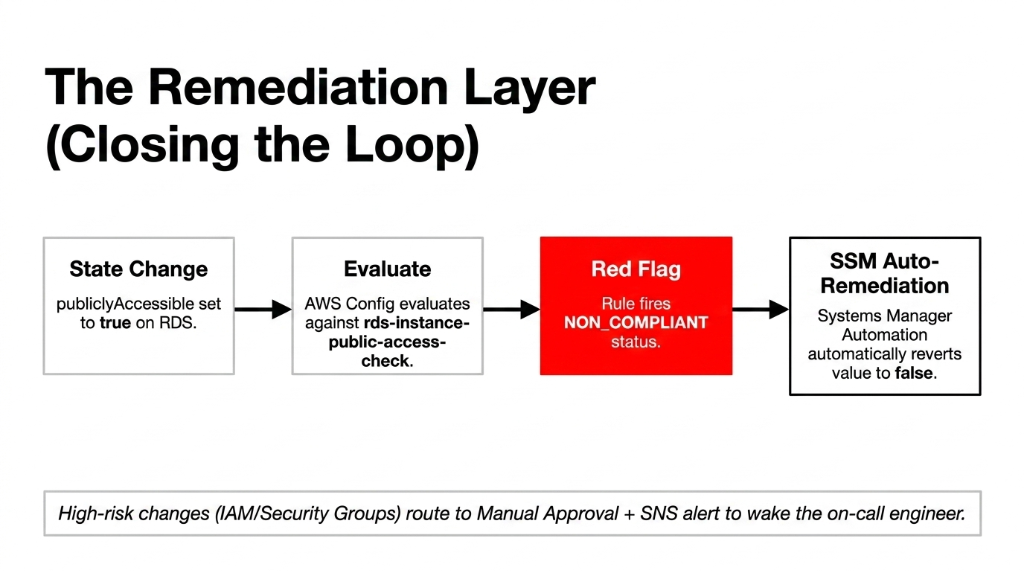
Every rule in the list above should have an AWS Systems Manager Automation document attached as the remediation action. When rds-instance-public-access-check fires, the automation document automatically sets publiclyAccessible to false. When s3-bucket-public-read-prohibited fires, the automation removes the public access grant.
For higher-risk remediations — like changing IAM policies or modifying security groups — set the remediation to manual approval with SNS alert. That way a human reviews the change before it is applied, but the 2 AM Sunday violation still wakes up the on-call engineer instead of sitting undiscovered until Monday morning.
AWS Config integrates directly with AWS Security Hub, which aggregates findings from Config, GuardDuty, Inspector, and Macie into a single compliance dashboard. For a $2M+ e-commerce operation, Security Hub costs roughly $30-$50/month and replaces a manual audit process that costs 37 hours per quarter in engineering time.
The auto-remediation layer is part of the broader security architecture we deploy during our cloud consulting services engagements — because detecting a violation without fixing it is just expensive monitoring.
The Green-Dashboard Lie We See Every Quarter
Every quarter, we onboard at least one e-commerce brand that has AWS Config turned on — and thinks they are compliant because no rules are showing RED.
Here is the insider secret: AWS Config only evaluates the resource types you explicitly tell it to record.
If you have not enabled recording for AWS::RDS::DBInstance, Config will never evaluate your RDS databases. The rule exists. The resource does not, as far as Config is concerned. Everything shows green. Your database is publicly accessible. And your compliance dashboard is lying to you.
Fix This Right Now
Go to AWS Config Settings. Resource types to record. Select All resources plus the AWS::Config::ResourceCompliance type specifically. Do it in every region. Now.
What a Real E-Commerce Compliance Stack Looks Like
| Layer | Tool | What It Catches |
|---|---|---|
| Continuous config monitoring | AWS Config + Conformance Packs | Misconfigurations, drift |
| Threat detection | Amazon GuardDuty | Active attacks, credential abuse |
| Sensitive data discovery | Amazon Macie | PII in S3 buckets |
| Vulnerability scanning | Amazon Inspector | EC2/container CVEs |
| Centralized findings | AWS Security Hub | Cross-service compliance view |
| Automated evidence | Config snapshots | SOC 2 / PCI audit evidence |
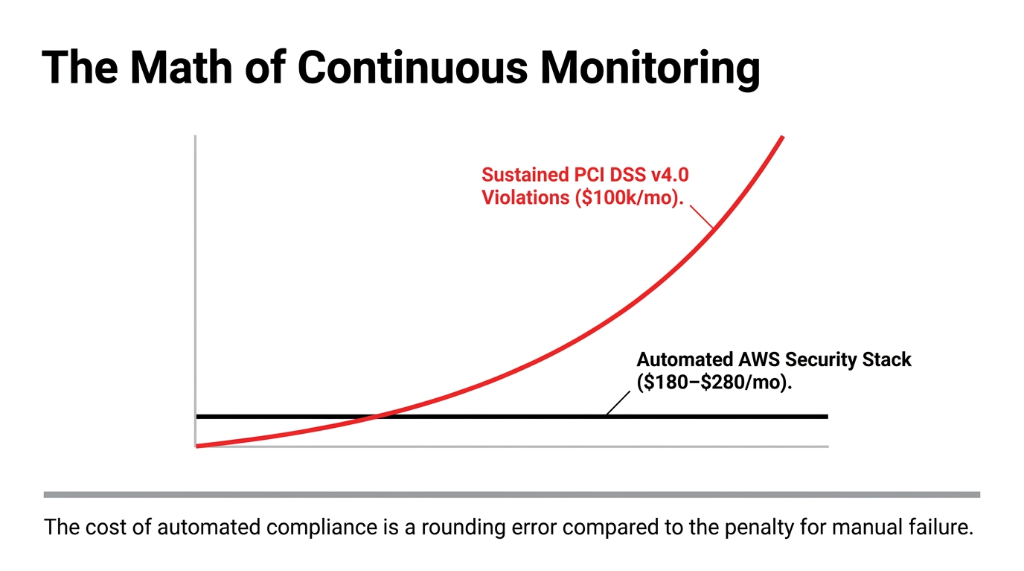
This stack, fully deployed, costs $180-$280/month for a mid-size e-commerce AWS environment. A single PCI DSS fine starts at $5,000/month and escalates to $100,000/month for sustained violations. The math is not complicated.
The Controversial Take You Will Not Hear at AWS re:Invent
Everyone tells you to hire a cloud security consultant for $350/hour to build your compliance posture. Do not.
Not because consultants are wrong — but because 73% of the compliance gaps we find in e-commerce AWS accounts are fixable in under 4 hours using the 9 managed rules above plus a conformance pack. The $8,500 consulting invoice that tells you to "implement a holistic security framework" is often solving a problem that AWS Config's free tier already handles for most rule evaluations.
Where You Actually Need Expert Help
▸ Writing custom Config rules for business-specific controls (like verifying your payment processor integration does not bypass your WAF)
▸ Building the cross-account Config aggregator if you are running multi-account AWS Organizations
▸ That is $800 worth of work. Not $8,500.
For brands layering AI-driven personalization or recommendation engines on top of their AWS infrastructure, Config rules become even more critical — our AI e-commerce solutions always deploy with compliance-first Config packs because training ML models on non-compliant data stores is a regulatory nightmare.
Frequently Asked Questions
Does AWS Config work across multiple AWS accounts?
Yes. AWS Config supports a multi-account aggregator via AWS Organizations, which consolidates compliance data from every account into one dashboard. For e-commerce brands running separate accounts for production, staging, and payments, this is mandatory — not optional — for a complete compliance view.
How much does AWS Config cost for an e-commerce setup?
AWS Config charges $0.003 per configuration item recorded and $0.001 per rule evaluation. A mid-size e-commerce environment with 500 resources and 15 rules running continuous evaluations typically lands at $40-$80/month — less than one hour of a compliance consultant's time.
Can AWS Config rules auto-fix violations without human intervention?
Yes, via AWS Systems Manager Automation remediation actions attached to each rule. Low-risk fixes like removing public S3 access run automatically. Higher-risk changes like IAM policy modifications should be set to manual approval with SNS alerts to avoid unintended production impact.
Which AWS Config rule maps to PCI DSS v4.0 Requirement 6.4.3?
PCI DSS v4.0 Requirement 6.4.3 (payment page script integrity) requires monitoring of all scripts loaded on payment pages. AWS Config's new Control Tower classification mappings include PCI-DSS-v4.0 framework tagging, and you should pair Config with AWS WAF and CloudFront integrity headers for full Requirement 6.4.3 coverage.
How long does AWS Config take to detect a new violation?
AWS Config triggers a rule evaluation within minutes of a configuration change being recorded. For periodic rules (set to run every 24 hours), detection can lag by up to 24 hours. For e-commerce compliance, always configure critical rules — like rds-instance-public-access-check and s3-bucket-public-read-prohibited — as change-triggered, not periodic.
The Insider Takeaway
Everyone says buy a $40,000 compliance audit. Do not. 73% of the gaps we find are fixable in under 4 hours with 9 managed Config rules and a conformance pack. The $8,500 invoice that says "implement a holistic security framework" is solving a problem AWS Config already handles. Where you need real help: custom rules for your specific payment processor integration, and cross-account aggregation. That is $800 of work.
Stop Flying Blind on Compliance
17 non-compliant resources. $100,000/month in PCI DSS fine exposure. That was one audit. One $2.3M store. How many violations are sitting in your AWS account right now?
Book our free 15-Minute AWS Security Audit. We will find your biggest Config gap in the first call. No slides. No sales pitch. Just the specific rule you are missing and what it is costing you.
Book Your Free Compliance Audit