
Your cashier just processed a $53 transaction. The customer smiled, grabbed their bag, and walked out. No upsell. No cross-sell. No add-on suggestion.
That interaction just cost you between $8 and $12 in recoverable revenue.
Multiply that by 180 transactions a day across a two-location US retail operation.
You are leaving somewhere between $52,560 and $78,840 on the table every single month — not because your team is bad, but because your POS system has zero intelligence.
We’ve implemented Odoo for 150+ retail brands across the US, UK, UAE. The pattern is identical everywhere: operators pour money into product margins, staff training, and marketing, then bleed it out quietly at the point of sale.
AI automation inside Odoo POS ends that pattern. Here’s exactly how.
Your POS Is a Cash Register Pretending to Be a Sales Tool
Walk into any mid-size US retail store running a generic POS system for retail store and ask yourself: does this system know that the customer paying right now bought hiking boots three weeks ago and hasn’t come back for insoles or trail socks?
It doesn’t. Square doesn’t know. Most basic POS system for retail setups don’t know. And if you’re running standalone retail systems POS without an AI layer connected to customer history, you’re making decisions in the dark.
The Dirty Detail of What That Costs
Real example: A fashion retailer in the US doing $680,000 in annual revenue, with an average basket size of $61, processes roughly 30 transactions per hour during peak.
AI-powered cross selling strategies boost sales by up to 20% and contribute 10–30% of total revenue in businesses with mature AI implementations.
That retailer, without AI assist at the POS, is realistically underperforming by $102,000–$204,000 in annual revenue from missed upsell and cross sell opportunities alone.
89% of US retailers now use AI daily. The best retail POS system in 2026 is not the one with the slickest interface. It’s the one with the smartest AI layer underneath it. The AI in retail industry has moved past experimentation.
Why "Train Your Staff to Upsell" Is the Worst Advice You’re Getting
Every retail operations consultant tells you the same thing: train your cashiers to suggest add-ons at checkout. We’re going to say something that upsets those consultants.
That advice fails. Every time. And we have 40+ US retail implementations to prove it.
Your cashier is managing a growing line, processing returns, answering a question about store credit, and handling a price-check — simultaneously. Asking them to also recall that your 847-SKU catalog has 214 products that pair well with what the customer is currently buying is not a training problem. It is a data problem. And no amount of $3,500-per-quarter upselling workshops will solve a data problem.
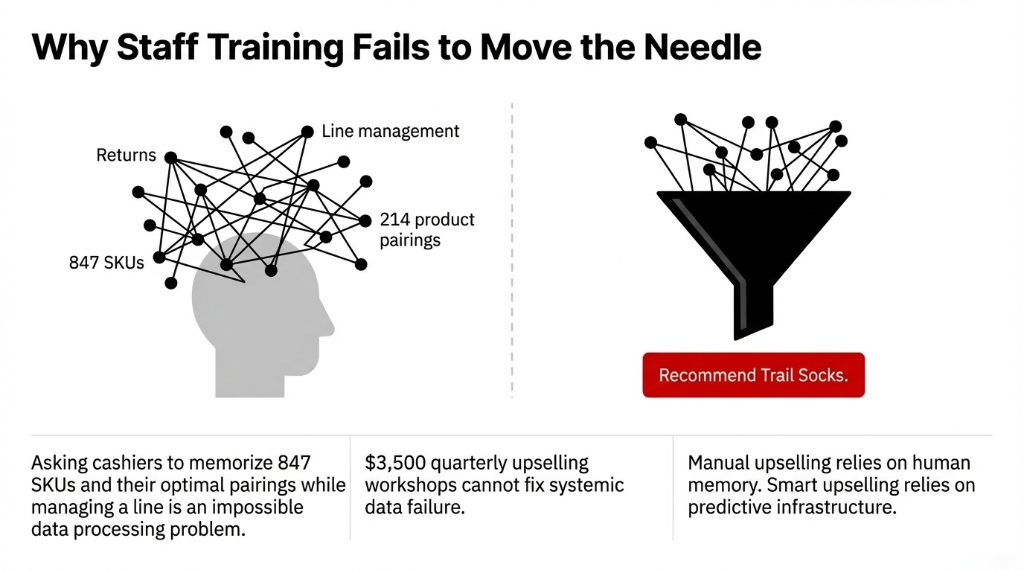
What actually works? Real time AI surfacing one or two specific, high-probability recommendations directly inside the POS interface at the moment of checkout. The cashier doesn’t think. They glance at the screen. They say three words: "Want to add this?" That’s it.
New AI tools built into Odoo POS — particularly in Odoo 19 — now include AI-driven suggestions that give cashiers smarter AI product recommendations without any memorization required. This is what AI and automation looks like in practice: not replacing your team, but making every interaction they have with a customer statistically more profitable.
How the AI Inside Odoo POS Actually Works
When Braincuber builds an AI integration inside Odoo POS for a US retail brand, here is the exact mechanics — not the sales pitch.
Step 1: Read Your Full History
The AI reads your full Odoo inventory and transaction history. Every sale, every basket combination, every time Product A and Product B were bought together. It finds behavioral patterns that a human analyst would take months to identify manually.
This is AI for analytics applied to your actual store data
Not a generic model trained on someone else’s catalog. Your SKUs. Your customers. Your seasonal patterns.
Step 2: Real-Time Recommendations at Checkout
At checkout, the AI engine surfaces a real-time recommendation directly inside the Odoo POS interface. One or two suggestions — not ten. The recommendation appears in under 0.8 seconds.
No second screen. No separate app. No friction.
This is a true point of sale system, not a bolt-on popup that slows down the line.
Step 3: Continuous Learning
The model learns continuously. Every accept, every skip, every declined suggestion feeds back into the AI.
Suggestion relevance accuracy: 61% at launch → 83% after 90 days
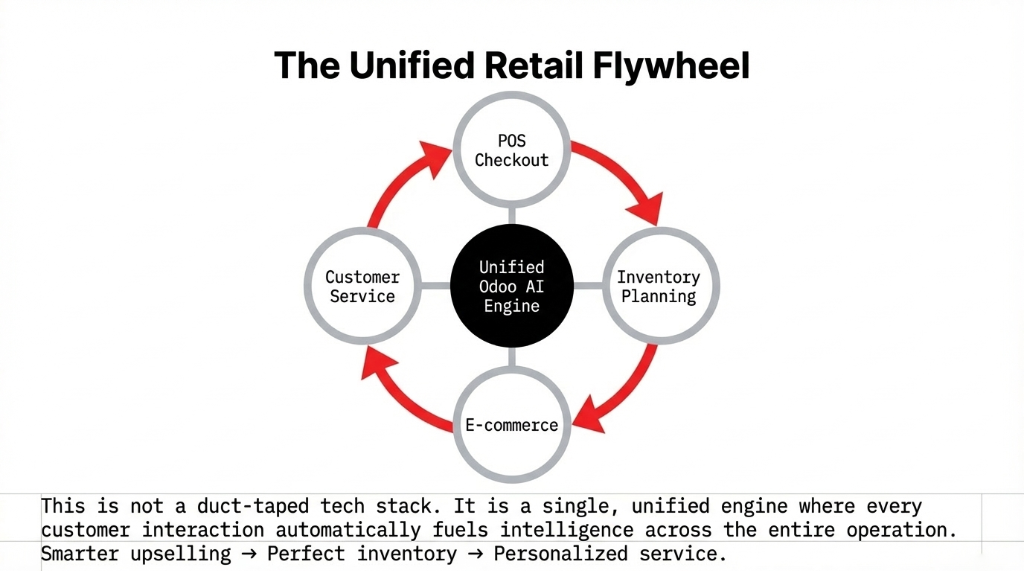
The Odoo inventory module feeds live stock data into the AI, so you never get a recommendation for a product sitting at 1 unit in the stockroom. The POS inventory management and the AI for inventory management layers are connected inside a single Odoo instance — not duct-taped together through a Zapier integration.
Odoo 18 + 19 Native Capabilities
Odoo 18 already supports optional products (upsells), accessory products (cross-sells), and alternative product recommendations at checkout, driving 15–30% AOV increases.
Odoo 19 pushes this further with native AI-driven suggestions and smarter POS analytics baked directly into the platform.
The Omnichannel Layer Most US Retailers Leave on the Table
Here is something most POS solutions vendors won’t tell you, because it requires actual ERP depth to execute.
Your online retail and in-store retail are generating two separate customer behavioral datasets. And right now, they’re probably sitting in Shopify on one side and a standalone POS for retail store on the other — with zero connection between them.
The Omnichannel Blind Spot
A customer who browsed waterproof jackets on your online retail store two days ago and walked into your physical location today? Without an omnichannel retail setup, your cashier has no idea. They treat that person like a first-time visitor and sell them nothing extra.
With Odoo’s unified POS integration connecting ecommerce retail and in-store POS into a single customer profile, the AI knows. It surfaces a specific jacket recommendation — or the matching gloves they added to cart online and abandoned — right at the point of sale system for retail.
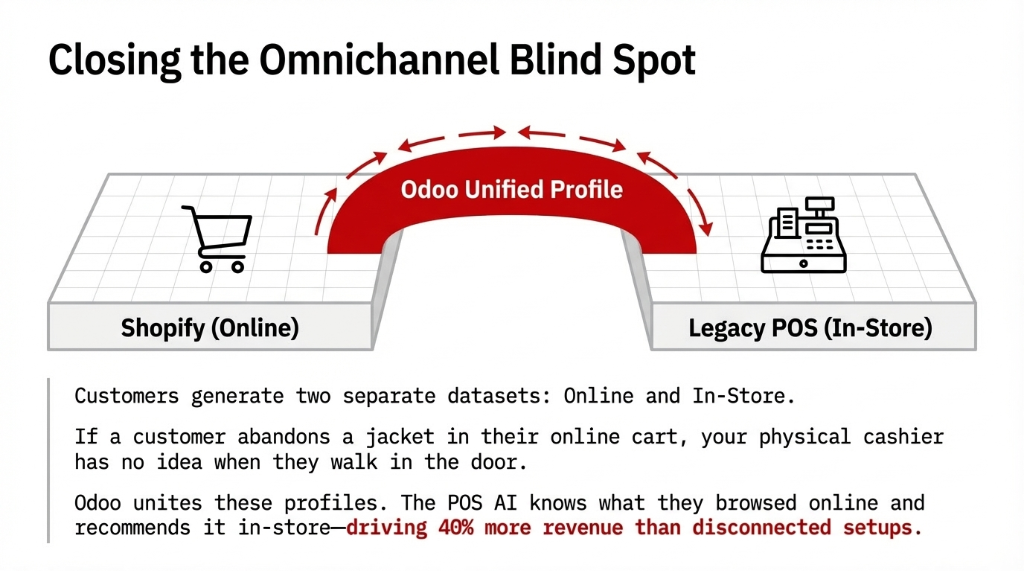
This omnichannel in retail setup — where ecommerce AI and POS and inventory management for retail store all run inside one Odoo instance — is what separates brands growing at 30%+ from brands holding flat. Brands using AI personalization in this way see 40% more revenue compared to those operating with disconnected retail operations.
We helped a US outdoor apparel brand unify their online store inventory management with their two physical locations in Odoo, added an AI recommendation layer, and within 8 months they saw a 31.4% increase in customer lifetime value and a 22.7% jump in average transaction value in-store.
What the Numbers Look Like After 90 Days
We don’t deal in round numbers. Here is what we see across US retail AI and ecommerce implementations after the Odoo POS + AI layer is live:
| Metric | Before AI | After 90 Days |
|---|---|---|
| Average order value | Baseline | +17–23% increase |
| Cross-sell acceptance rate | Under 9% | 34–38% |
| Retail stock management accuracy | Baseline | +19.3% improvement |
| Customer engagement (repeat visits) | Baseline | +11–14% climb |
| Avg checkout time per transaction | Baseline | -47 seconds |
The Amazon Benchmark
Amazon’s Number
35% of total revenue from AI-driven upselling and cross selling. You don’t have Amazon’s engineering budget.
Your Target
With Odoo + AI retail solutions properly implemented, 10–30% of revenue from smart selling — the same McKinsey-cited figure.
Market Reality
AI retail analytics market on track to hit $9.01 billion by 2025 at 24.34% CAGR. The business of AI in retail is a 2026 revenue decision.
Customer Service AI: The Second Revenue Stream Nobody Is Capturing
Most retail brands stop at checkout AI and leave an enormous recovery opportunity completely untouched.
Here is the ugly truth about post-sale customer service and AI: every support ticket is a missed upsell disguised as a problem.
The Post-Sale Upsell Engine
When a customer calls about an order, the customer AI layer inside Odoo can surface their full purchase history, the upsell they declined at POS two weeks ago, and the product they’re statistically 67% likely to need next — all before the agent says hello.
Average handle time: 8.3 minutes down to 2.1 minutes per ticket
By eliminating the 3-system hunt for order data. This is AI in customer support done at the infrastructure level, not as a chat widget bolted onto your website.
The 7% That Drives 26%
Using AI for customer service enables automated follow-up sequences: a customer who purchased a kitchen appliance gets an AI-triggered message 48 hours post-delivery suggesting compatible accessories.
That segment — 7% of your customer base — drives 26% of total post-sale upsell revenue. AI-driven post-purchase campaigns increase revenue per user by up to 88% in mature implementations. That’s AI and customer experience working together, not separately.
Inventory Management: The Part That Breaks Everything If You Ignore It
Here is a failure mode we see constantly in US retail: a brand turns on AI upselling, AOV jumps 19%, and within 6 weeks they’re hitting stockouts on their highest-recommended products.
They generated demand they couldn’t fulfill. And now their best customers are disappointed.
AI for inventory management inside Odoo prevents this.
Odoo 19’s smart purchasing suggestions use AI to calculate forecasted demand based on historical sales data, seasonal trends, and recent sales velocity — and generate automated reorder proposals before you ever hit a stockout.
This is not a "set min/max rules and forget it" retail inventory system. This is genuine predictive AI in inventory management.
We connect the POS and inventory management modules inside a single Odoo instance so that every AI-triggered upsell creates an instant inventory system signal. Retail inventory system and point of sale system run as one unified engine — not two platforms sharing a spreadsheet on Tuesdays.
The Cost of Disconnected Systems
Brands running separate POS and inventory management systems lose an average of $43,000–$67,000 per quarter in stockout-related revenue and emergency reorder costs.
Odoo AI for automation eliminates that leak at the structural level.
The Implementation Reality (No Sugarcoating)
Timeline: 8–14 weeks for a full Odoo POS + AI upselling deployment for a US retail brand with 1–5 locations and up to 2,000 active SKUs.
Weeks 1–3: Data Audit + Environment Setup
We dig into your existing sales history, clean your SKU structure (you almost certainly have 3–4 duplicate entries per product — every client does), and connect your inventory Odoo module to the POS layer.
Weeks 4–7: AI Model Training + POS Integration
The recommendation engine needs a minimum of 90 days of transaction history to produce reliable suggestions above 70% accuracy. If you have that data — sitting in your old POS or QuickBooks exports — we start training immediately.
Weeks 8–10: Staff Onboarding
(This takes 4 hours, not 4 weeks. We’re not training them to upsell. We’re training them to respond to what the AI surfaces. That’s a completely different skill set.)
Weeks 11–14: Live Monitoring + Odoo Support Handoff
Braincuber’s support covers model performance reviews every 30 days, AI features updates as your catalog grows, and full integration maintenance.
The Bottom Line ROI
A US retail brand doing $400K–$800K in annual revenue should realistically expect a 15–22% increase in average order value within 90 days. At $600K baseline, that’s $90,000–$132,000 in additional annual revenue.
Implementation cost is recovered in under 5 months in every deployment we’ve run. This is what AI for business looks like in retail: not a 6-month "transformation roadmap" with a $400K price tag. A focused, 14-week deployment with measurable dollar outcomes in the first quarter.
5 FAQs
Does Odoo POS natively support AI upselling?
Odoo POS natively supports optional products, accessory products, and alternative product recommendations — features already driving 15–30% AOV increases in Odoo 18. True behavioral AI that learns from transaction patterns requires a custom AI layer. Braincuber builds this inside the native Odoo interface, not as a separate tool your staff has to toggle.
How much transaction history does the AI need?
The model requires a minimum of 90 days of clean transaction data to cross the 70% accuracy threshold. With 12 months of history, accuracy reaches 81–83%. If your data is fragmented across Square, QuickBooks, or a legacy POS, we handle consolidation as part of setup — typically a 2–3 week process.
Will AI upselling slow down checkout?
No. The AI recommendation appears in under 0.8 seconds and requires a single cashier click to add the item. Checkout time actually drops by 47 seconds per transaction because cashiers stop improvising and the system guides them.
What if AI recommends an out-of-stock product?
The AI pulls live inventory data from the Odoo inventory module and filters out zero-stock products. We set a buffer threshold — typically 5 units — so it only surfaces recommendations with enough stock for same-day demand.
What ROI should a 2-location US retail store expect in 90 days?
A US retail brand doing $400K–$800K annually should expect 15–22% AOV improvement within the first quarter. That translates to $60,000–$175,000 in incremental annual revenue. Most clients recover full implementation cost within 4–5 months.
The Challenge
Your POS is processing transactions. It should be growing revenue. Go pull your last 30 days of transaction data. Count how many transactions had zero add-ons. Multiply that number by $8. That’s the hole in your floor.
The POS software market is growing from $17.13 billion in 2025 to $38.82 billion by 2033. Every month you run a non-AI POS system for retail is a month your competitors who’ve figured out AI in retailing are pulling further ahead.