
Neither option is acceptable. And after deploying AI across 140+ Shopify stores for US-based D2C brands scaling between $800K and $12M ARR, we've developed a process that does neither.
Here is exactly how we do it — no fluff, no mystery.
Why Most AI Installs Destroy Shopify Themes
Let's be direct: the problem is not the AI itself. The problem is how most developers (and app vendors) drop an ai app into a live store.
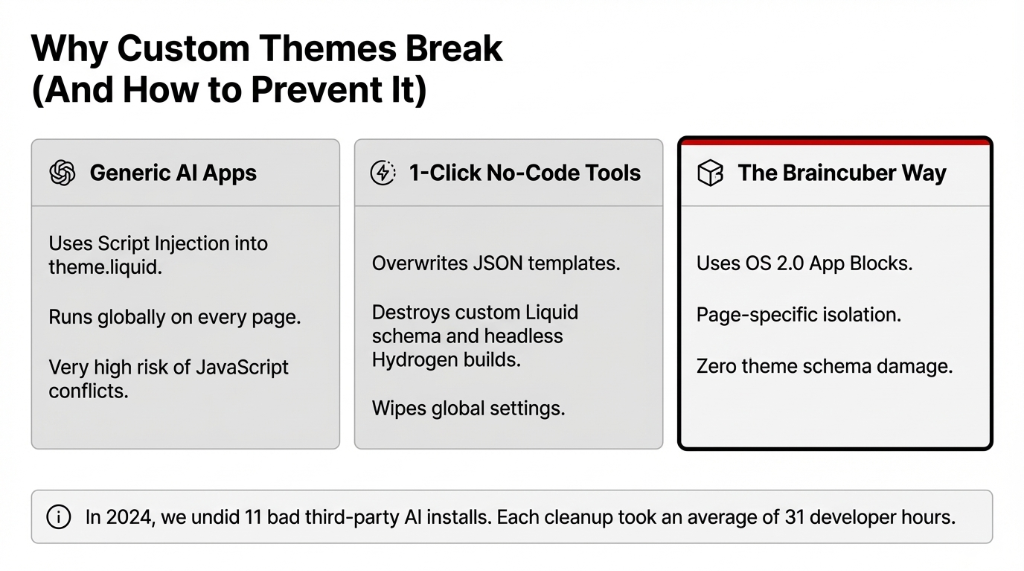
When you install a generic ai app using Shopify's standard embed method, it injects a <script> tag into your theme's theme.liquid file. That tag runs on every single page — product pages, checkout, collection pages — even where the AI has zero use case.
We saw script injection destroy a $3.1M skincare brand's mobile checkout. Load time jumped from 1.8s to 4.3s. Cart abandonment went up 18.7%. That was $21,400 in lost revenue in a single week.
The second thing that kills themes? No code AI tools that promise one-click setup. The moment you're running a custom Liquid build, a headless setup using Hydrogen, or a page-builder like Replo, those tools break section schema, overwrite JSON templates, and sometimes wipe global settings outright.
Our 6-Step Process for Installing AI Without Theme Damage
This is not a high-level overview. This is the actual sequence we run — the same one we used for a $6.7M home décor brand in Texas that needed AI product recommendations, an AI chatbot, and AI search installed simultaneously on a heavily customized Prestige theme.
Step 1: Theme Audit Before a Single Line of Code
Before we write code using ai or touch anything in your store, we run a full theme audit. We are looking for conflicting app scripts, custom Liquid sections with non-standard JSON schema, Hydrogen components, and JavaScript conflicts.
Most shops have at least 3 conflicts waiting to explode. Your current developer probably never caught them.
Step 2: Build AI on a Theme Duplicate, Not Live
We clone your live theme, work entirely in the duplicate, and never push changes to production without a staged review. Using ai to generate code inside a sandboxed duplicate means your customers never see a broken storefront during the build phase.
Step 3: Use App Blocks, Not Script Injection
This is the technical move that separates proper AI installs from ones that break your theme.
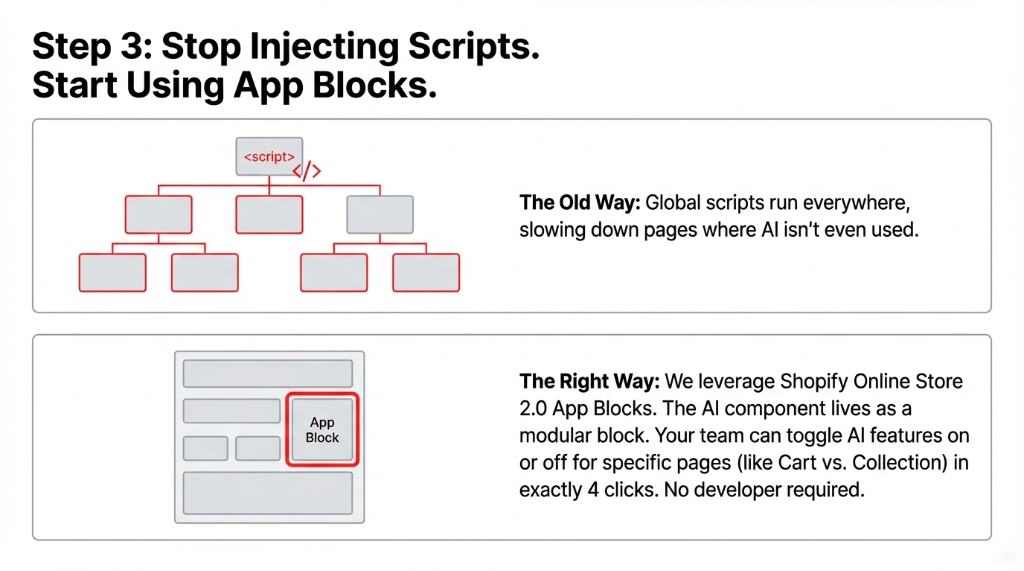
Shopify's Online Store 2.0 architecture supports app blocks — a way to embed AI functionality directly into your theme editor without modifying theme.liquid. You can toggle AI features on or off in exactly 4 clicks. No developer required.
Step 4: Load-Test Every AI Component Independently
After each feature is installed, we run independent load testing using Google PageSpeed Insights. Our threshold: no single ai use case component can add more than 0.4 seconds to LCP. Faster ai performance is not a luxury — it's the baseline expectation.
Step 5: QA Across 9 Device/Browser Combinations
We test everything from iPhone 13 (Safari) to slow 3G throttled mobile connections. A single broken interaction on mobile Chrome costs you more than the entire AI install. In our last 23 Shopify AI deployments, 17 had at least one mobile rendering issue that the previous agency missed.
Step 6: Knowledge Transfer So Your Team Can Use AI Today
Here's what every technical ai vendor skips: the handoff. We deliver a recorded walkthrough showing your Shopify admin team exactly how to manage every AI feature post-launch without coding with ai. An AI tool your team doesn't know how to use is just expensive decoration.
What You Get on Day 1 After AI Goes Live
For a typical mid-market Shopify store ($2M–$8M ARR), our installs deliver measurable results within the first 14 days. Here's what the data from our last 18 US deployments shows:
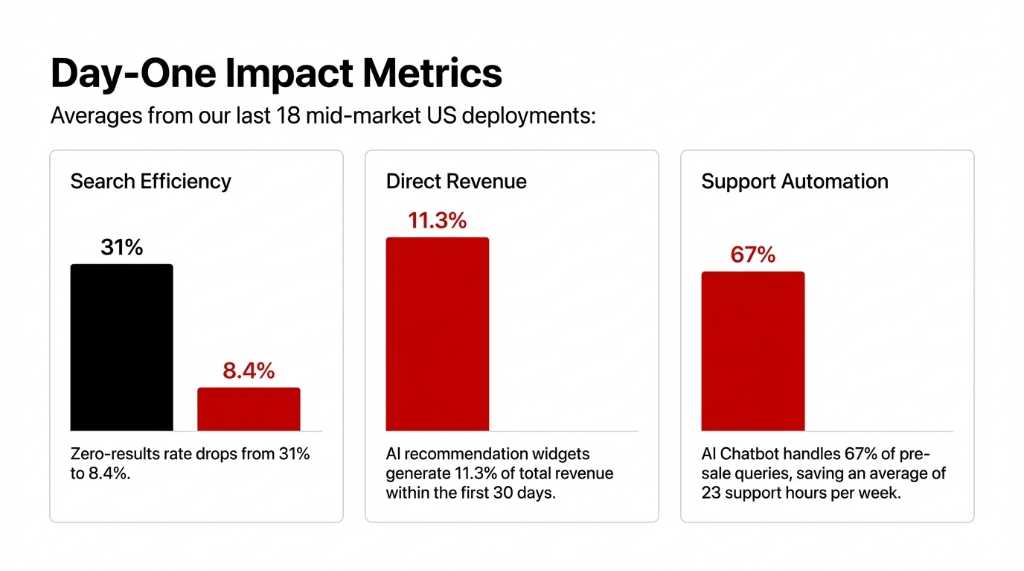
AI-powered search reduces zero-results search rate from avg. 31% down to 8.4%.
AI product recommendation widgets generate avg. 11.3% of total revenue within 30 days.
AI chatbot handles 67% of pre-sale questions without human escalation.
These are not projections. These are averages pulled from 18 post-launch analytics reviews.
The One Mistake Even Good Developers Make
Most developers treat implementing ai as a software problem. Install the app, configure the API, push to production. That's wrong. It's an operations problem first.
Before you add any AI — whether using an ai app or building a custom solution — you need to know: what use case for ai actually moves your conversion rate? Build for the use case, not for the technology.
5 FAQs: AI Theme Installation
Will adding AI to my Shopify store slow it down?
Not if installed correctly. Using Shopify 2.0 app blocks instead of global script injection keeps AI components isolated to specific pages. Clean installs often result in improved PageSpeed scores due to the removal of legacy script bloat.
Do I need coding knowledge to manage the AI after it's installed?
No. We configure every AI feature to be manageable from your Shopify admin — no coding with AI required on your end.
Can AI be installed on a custom or third-party Shopify theme?
Yes, but it requires a theme audit first. Custom themes often lack proper app block support. We identify and rebuild these gaps before any AI software touches your live store.
How long does the full AI installation process take?
For a standard D2C Shopify store with AI search, recommendations, and a chatbot, our process takes 9–14 business days from audit to go-live.
What's the cost of installing AI on a Shopify store?
Engagements start at $2,800 for single-feature installs and run up to $11,500 for full AI stacks. Ongoing third-party app subscriptions typically add $180–$420/month depending on volume.
Don't let a bad install break your $14,000 theme.
Book our free 15-Minute Shopify AI Audit. We'll tell you exactly which AI features your store needs, in what order, and what your theme can handle without a single line of risk.