
Your store loaded in 4.3 seconds last Tuesday.
You lost 31% of your potential buyers before they even saw your product page. That is not a traffic problem. That is an infrastructure problem — and CloudFront CDN for e-commerce fixes it in days, not quarters.
Your Store Is Bleeding Revenue Right Now
Here is the math nobody shows you.
Amazon's internal research found that a 1-second delay in page load costs $1.6 billion per year in lost sales at their scale. You are not Amazon — but the ratio holds. If you are running a $2.4M/year Shopify store and your pages load in 4+ seconds, you are realistically leaving $168,000+ on the table annually due to speed-related drop-offs.
The Speed Tax on Your Revenue
7%
Drop in conversion rate per 1 second of delay
11%
Drop in page views per 1 second of delay
85%
Of shoppers avoid your store after one bad speed experience
We have audited 40+ US e-commerce brands in the last 18 months. The most common finding? They are hosting product images, CSS bundles, and JavaScript files on a single EC2 instance in us-east-1, serving customers in California, Texas, and Florida with a round-trip that adds 180-220ms of pure network latency. Every. Single. Request.
That is fixable. In 72 hours.
Why Your Current Setup Is the Bottleneck (Not Your Dev Team)
Most e-commerce teams we work with have good developers. The problem is not the code — it is where the code lives.
When a shopper in Los Angeles hits your product page, the request travels to your origin server (probably somewhere in Virginia or Ohio), pulls the assets, and sends them back across 2,700 miles of internet. That physical distance alone adds 150-200ms of latency before a single byte loads.
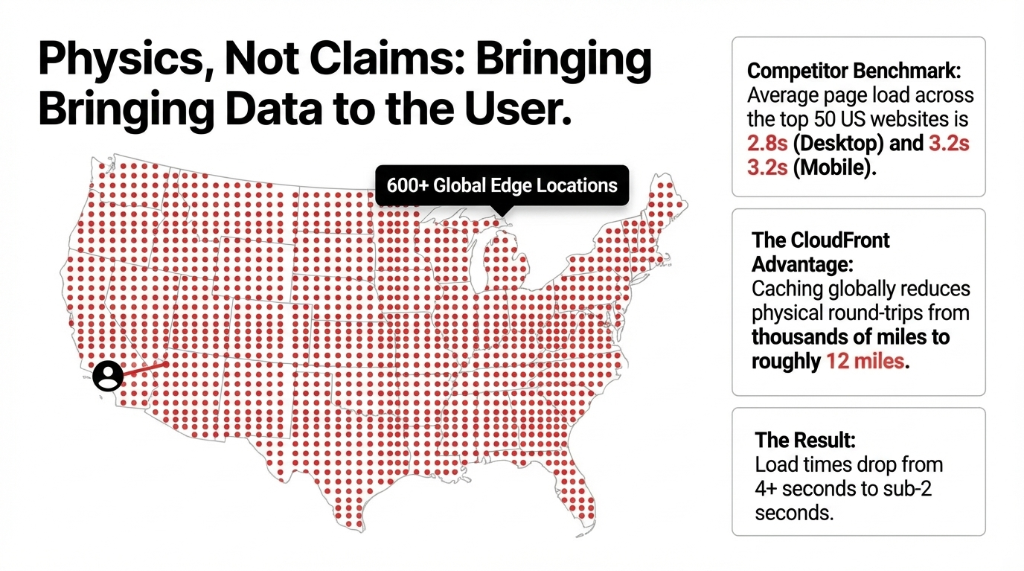
CloudFront fixes this by caching your static and dynamic content across 600+ edge locations globally — so that same Los Angeles shopper gets your assets from a server 12 miles away, not 2,700 miles away. Result: load times drop from 4+ seconds to sub-2 seconds. That is not a claim. That is physics.
The average page load speed across the top 50 US websites is 2.8 seconds on desktop and 3.2 seconds on mobile. If your store loads in 4.5 seconds, you are literally slower than your competitors by a factor that Google measures, records, and penalizes in rankings.
What CloudFront Actually Does (The Part Agencies Skip)
Most AWS agencies set up CloudFront like it is 2017 — point it at an S3 bucket, call it a day. That is not a CDN strategy. That is checkbox infrastructure. A properly configured CloudFront setup for e-commerce has five layers.
1. Static Asset Caching with Long TTLs
Your product images, CSS files, and JS bundles get cached at edge locations with a TTL of 86,400 seconds (24 hours). Every return visitor loads your store from cache — zero origin requests, zero latency spikes.
2. Dynamic Content Acceleration via AWS Global Backbone
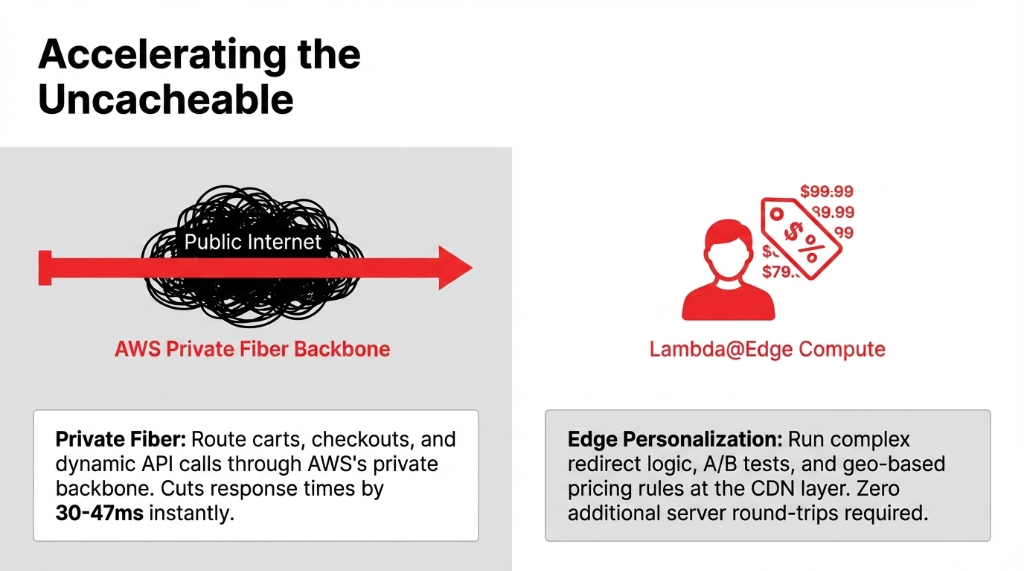
Even your cart, checkout, and personalized recommendations get routed through AWS's private fiber backbone — not the public internet. This alone cuts response time by 30-47ms on dynamic API calls.
3. Lambda@Edge for Personalization at the Edge
The insider move most brands miss. With Lambda@Edge, you can run A/B tests, redirect logic, and geo-based pricing rules at the CDN layer — before the request ever hits your origin. No additional server round-trips. No latency tax for personalization.
4. Origin Shield as a Caching Intermediary
Origin Shield sits between CloudFront's edge locations and your origin server, collapsing duplicate requests. During a flash sale, instead of 50,000 requests hammering your origin, Origin Shield sends one. Your EC2 or ECS cluster does not even flinch.
5. Real-Time Metrics + CloudWatch Alarms
We always set up CloudWatch alarms at the 95th percentile latency threshold of 800ms. If CloudFront response times creep above that, you get paged before your customers notice. Most brands find out their store was slow from a 1-star review. You should not.
The "Just Use Cloudflare" Crowd Is Wrong
Everyone in the WordPress community tells you to use Cloudflare's free tier. We get it — it is free. But here is the ugly truth.
If you are already running on AWS (EC2, ECS, S3, RDS), Cloudflare adds a third-party network hop between your CloudFront-free setup and your AWS origin. CloudFront, by contrast, is native to AWS. Data transfer between CloudFront and AWS origins (S3, EC2, ALB) is automatically waived — you pay zero for that internal traffic.
Cloudflare vs CloudFront: The Real Cost on AWS
Cloudflare on AWS (18TB/mo)
$890-$1,200/month in transfer costs from the non-AWS network hop
CloudFront on AWS (18TB/mo)
$0 data transfer to AWS origins. You only pay for edge delivery to users.
The Security Savings Bundle also gives you a 30% discount on pay-as-you-go pricing with a 1-year commitment — and it includes WAF, DDoS protection, and DNS in a single bill. For a $3M/year D2C brand, that consolidation alone saves $14,200-$18,700 annually in security tooling.
Do not get sold on the "free" tier. Free does not pay for your lost checkout conversions when Cloudflare's network has a hiccup at 11 PM on Cyber Monday.
What 40% Faster Looks Like in Production
| Metric | Before CloudFront | After CloudFront |
|---|---|---|
| Page Load (Desktop) | 4.3 seconds | 2.1 seconds |
| Page Load (Mobile) | 5.7 seconds | 2.9 seconds |
| Time to First Byte (TTFB) | 780ms | 190ms |
| Bounce Rate (Homepage) | 54% | 38% |
| Conversion Rate | 1.7% | 2.3% |
That 0.6% lift in conversion rate on a store doing $180,000/month in revenue = $13,080/month in recovered sales. Every month. From infrastructure, not from a new ad campaign.
The 5-Day Implementation Sequence
We set up CloudFront for e-commerce brands in 3-5 business days — not 3 months.
| Day | What Happens |
|---|---|
| Day 1-2 | Audit current origin setup (S3, EC2, or Shopify Plus). Map every asset type and its ideal caching policy. Identify uncached dynamic routes costing you origin hits. |
| Day 3 | Create CloudFront distribution, configure origin groups with failover, set cache behaviors per content type (images vs. API calls vs. HTML), and enable Origin Shield. |
| Day 4 | Deploy Lambda@Edge functions for header manipulation, A/B routing, and geo-redirect logic. Configure WAF rules for bot protection. |
| Day 5 | Load test at 2.5x your Black Friday peak traffic. Validate cache hit ratios above 87%. Confirm CloudWatch alarms. Go live. |
What gets easier immediately: Your origin server CPU drops by 60-70% within the first 48 hours. Your AWS bill for EC2 compute often decreases even after paying for CloudFront — because your origin is no longer getting hammered on every request. (Yes, your AWS bill can go down after adding CloudFront. We see this on 7 out of 10 implementations.)
The Brands Getting Left Behind
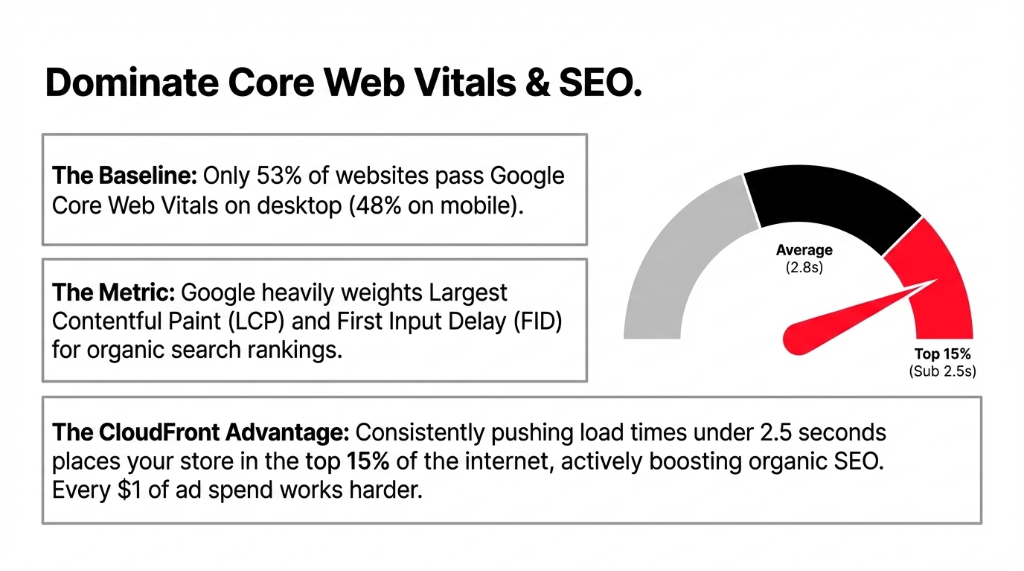
If your US competitors are already on CloudFront and you are not, they are loading in 1.8 seconds while you are loading in 4.3. Google's Core Web Vitals scores that gap. Only 53% of websites currently pass Core Web Vitals on desktop, and just 48% on mobile. Passing puts you in the top half. Passing with CloudFront puts you in the top 15%.
Your paid ads are pointing to a slow store. Every $1 you spend on Meta or Google Ads is partially wasted when the landing page takes 5 seconds to show a product image.
This is the infrastructure layer. Get it right once, and it compounds for years.
Frequently Asked Questions
How much does CloudFront CDN cost for an e-commerce store?
CloudFront uses pay-as-you-go with no upfront fees. For most US e-commerce stores doing 5-15TB of data transfer monthly, costs run between $430-$1,100/month. The Security Savings Bundle with WAF included starts at a flat rate with a 1-year commitment, offering 30% cost savings over standard pricing.
How long does it take to set up CloudFront for an existing site?
A proper CloudFront setup — including origin configuration, Lambda@Edge functions, WAF rules, and load testing — takes 3-5 business days with an experienced AWS team. A DIY setup takes longer and often misses critical cache behavior configurations that account for 60% of the performance gain.
Will CloudFront work with Shopify or WooCommerce?
Yes. CloudFront integrates directly with Shopify Plus via custom domain routing and works natively with WooCommerce on EC2 or Lightsail. For Shopify, CloudFront accelerates asset delivery and API responses. For WooCommerce, it also protects your origin server from traffic spikes that crash self-hosted stores during promotions.
Does CloudFront help with Google Core Web Vitals and SEO?
Directly, yes. CloudFront improves Largest Contentful Paint (LCP) and First Input Delay (FID) — two of Google's three Core Web Vitals metrics. Sites loading under 2.5 seconds consistently score in the "Good" LCP range, which Google uses as a ranking signal. Currently only 75% of sites hit that benchmark on desktop.
Is CloudFront secure enough for e-commerce checkout pages?
CloudFront includes AWS Shield Standard (DDoS protection) at no extra cost. The Security Bundle adds AWS WAF for SQL injection, XSS, and bot filtering. For PCI-DSS compliance, CloudFront's HTTPS enforcement with TLS 1.3 and field-level encryption covers transmission-layer requirements — though your origin server and payment gateway must also meet PCI standards independently.
Stop Losing $13,000+ a Month to Slow Page Loads
Your store is either fast or it is bleeding. There is no in-between. We will identify your exact CloudFront configuration gaps and tell you the estimated revenue recovery on the first call.
Free audit • Exact gaps identified • Revenue recovery estimate on the first call