
Your Shopify store is leaking sales right now — and your product photos are the hole.
We worked with a US-based D2C accessories brand running 300 SKUs. They were spending $127 per product shot, plus hidden logistics and revision costs, putting their true cost per image at $412. That is $123,600 a year on photography alone — and their mobile conversion rate was still sitting at 1.8%.
After switching to an AI photography workflow, their per-image cost dropped to $11, their load times went from 3.4 seconds to 0.9 seconds, and mobile conversions climbed to 2.6%. That is 44% more revenue from the same traffic.
This is the complete guide to making that same shift — covering every tool, every file format, every image size, and every trick we use to make Shopify product photos work harder.
Your Photography Budget Is a Lie
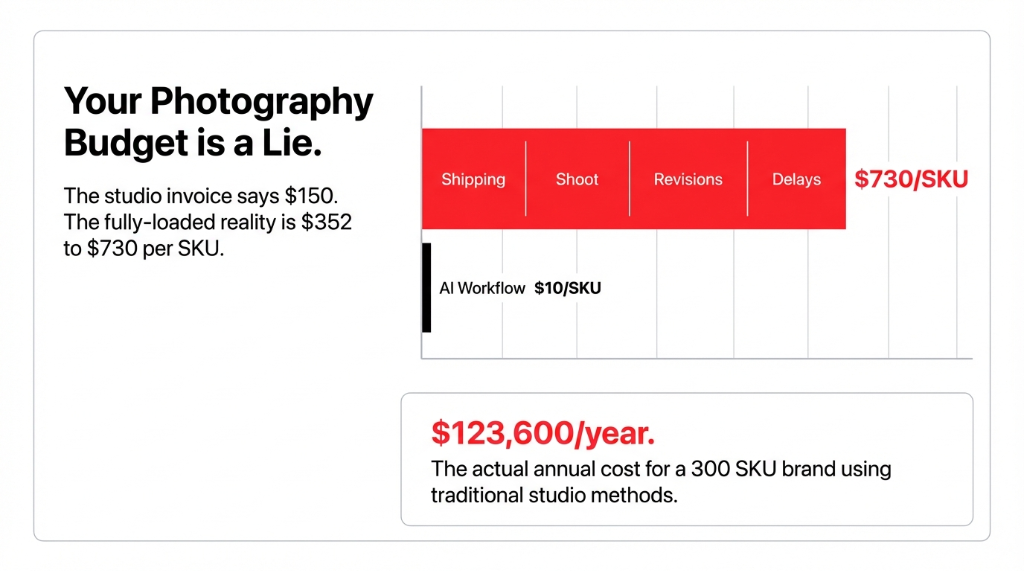
The invoice says $150 per shot. Your CFO approved it. But that number is fantasy.
The actual, fully-loaded cost of traditional product photography — when you add sample shipping, internal coordination, revision fees, color correction, format conversion, and delay costs — runs $352 to $730 per product. For a store with 500 SKUs, that is a real-world spend of up to $487,500 a year just to keep your catalog photographed.
And here is what makes it worse: a high quality photo from a traditional shoot is still a static asset. It does not adapt to seasons. It does not swap backgrounds for holiday campaigns. It does not let you test a white background photo against a lifestyle background picture in 10 minutes. You pay $300-$500 per lifestyle shot, wait three weeks, and then your competitor runs a flash sale with fresh creative.
That is not a photography problem. That is a broken workflow.
Why "Hire a Better Photographer" Is the Wrong Answer
Everyone in your network will tell you to find a better photographer. Don't.
The bottleneck is not talent — it is time and volume. AI photography solves the volume problem in a way no human photographer ever can. A single AI image generator like Photoroom or Flair.ai can produce 47 product photos with white background in the time it takes a traditional studio to finish setup. We have seen brands using ai generate image tools cut their image production timeline from 3 weeks to 4 hours. That is not an exaggeration.
Insider Secret
The controversial truth: if you are spending more than $25 per product image in 2026, you are overpaying. Full stop.
New Reality
AI tools deliver photo high resolution output at 2,048 × 2,048 pixels — Shopify's exact recommended size — at a fraction of the cost.
How AI Creates Product Photos — The Actual Process
Here is exactly what happens when you use ai to create images for your Shopify catalog, step by step.
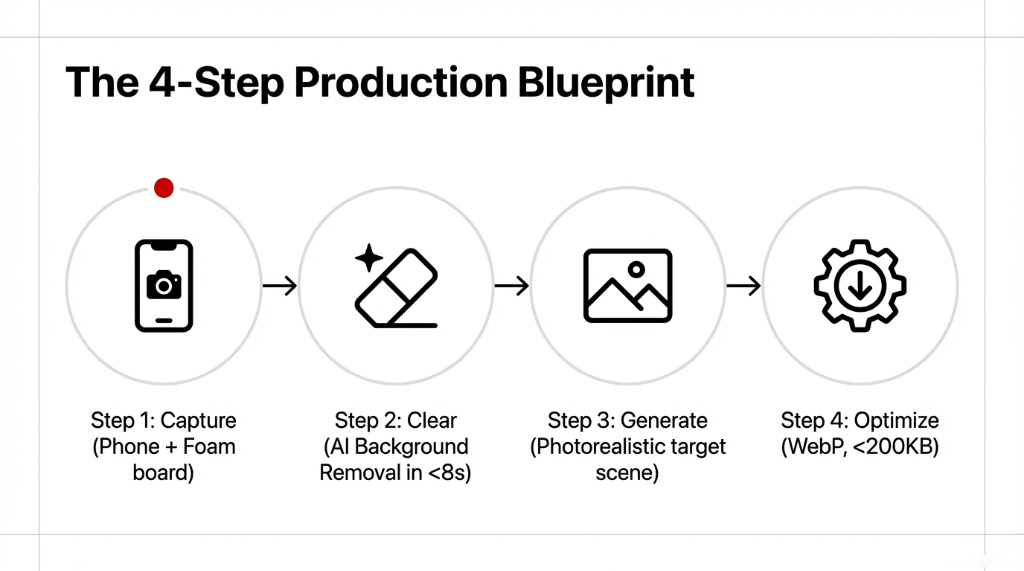
Step 1: Capture a clean source photo. Take your product photo against any plain surface with decent natural light. You do not need a studio. Your phone camera on a white foam board works. This is your photo image input.
Step 2: Use an AI tool to remove the background.
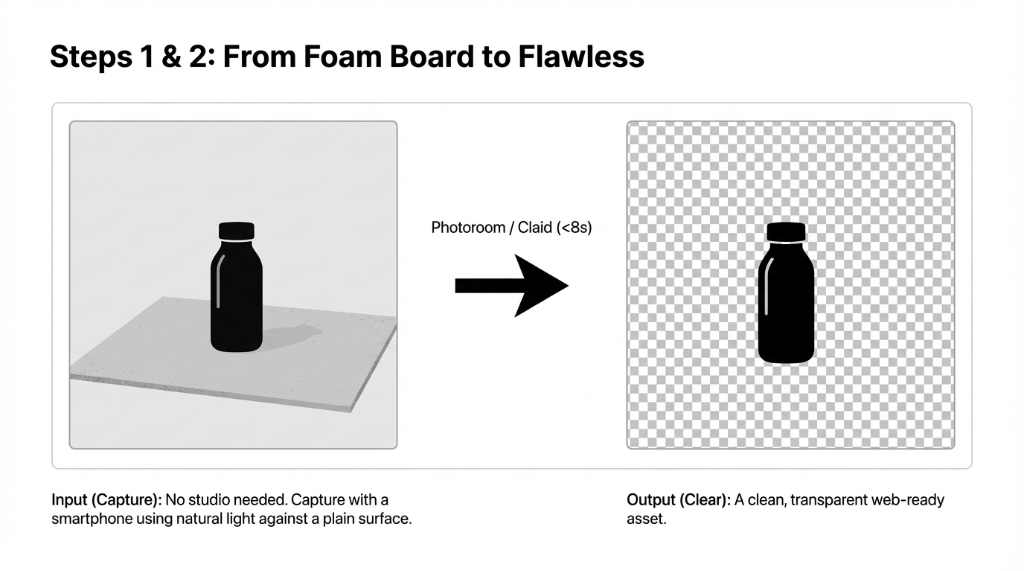
Tools like Photoroom or Claid perform background removal image processing in under 8 seconds. What used to take a retoucher 15 minutes per image — including transparent background photo cutouts for no background images — now takes less than a click. The result is a clean transparent background image you can drop onto any surface.
Step 3: Generate your target scene. This is where ai generate capabilities change everything. You describe the scene — "marble counter, morning light, coffee shop" — and the tool places your product into a photorealistic setting. Flair.ai uses drag-and-drop presets, Lightbox works right inside Shopify.
Step 4: Convert and optimize. This is where 78% of Shopify merchants lose the gains they just made. They create ai images that are technically beautiful but 4MB per file. That kills your page speed, which kills your Google ranking, which kills your traffic. Every extra second of load time costs 7% in conversions.
Here is the image convert workflow that fixes this:
- Image size target: 2,048 × 2,048 pixels for main product images; minimum 800 × 800 pixels.
- Photo dimensions for background images: 1,920 × 1,080 pixels at 16:9 ratio.
- File format: WebP beats JPEG by 25-34% in file size at the same visual quality.
- Reduce file size target: 100–200 KB per product image.
- Image reduce size tools: Claid's compression API or Shopify's built-in optimizer compress images without quality loss.
To make image smaller file size without the blurry artifact problem, always start from the highest resolution possible before compression. Starting small and using AI upscalers to convert a photo to high resolution almost always leaves a detectable softness.
The Image Dimensions That Actually Matter on Shopify
Stop guessing on photo sizes. Here is the definitive breakdown:
| Image Type | Recommended Size | Aspect Ratio | File Size Target |
|---|---|---|---|
| Main product image | 2,048 × 2,048 px | 1:1 | 100–200 KB |
| Collection page image | 1,024 × 1,024 px | 1:1 | 70–100 KB |
| Hero / banner image | 1,920 × 1,080 px | 16:9 | 300–500 KB |
| Blog thumbnail | 1,200 × 628 px | 1.91:1 | Under 150 KB |
Inconsistent picture sizes across your product grid are a silent conversion killer. Use a photo resizer to batch-standardize image dimensions before upload. If you need help building out custom templates for these dimensions, our Shopify development services team can set them up in less than 48 hours. Image reduce file size operations should always come last in the workflow, after you have locked in picture convert dimensions.
The AI Tools That Do the Heavy Lifting
We are not recommending everything here — just what we have seen work across US Shopify stores. Selecting the right AI solutions can mean the difference between a broken tech stack and a fully automated product catalog.
Photoroom — Best overall for ai professional photo output with Shopify-native integration. Handles remove background photo and scene generation. Photo ai free tier available for testing.
Flair.ai — Best for lifestyle ai photography where you need drag-and-drop control over props and environments. Creates ai generate photos with studio-quality lighting physics.
Claid — Best for batch processing. If you need to optimize images across 500+ SKUs, Claid's API handles photo reduce file size, background replacement, and resolution standardization.
Lightbox — Best for merchants who want ai create photo capabilities without leaving the Shopify admin. Generates product shots that are immediately conversion-ready.
What 80% of Shopify Merchants Miss About AI Images
Here is the number that should stop you cold: 80% of consumers are more likely to buy when a product is shown in a real-life setting.
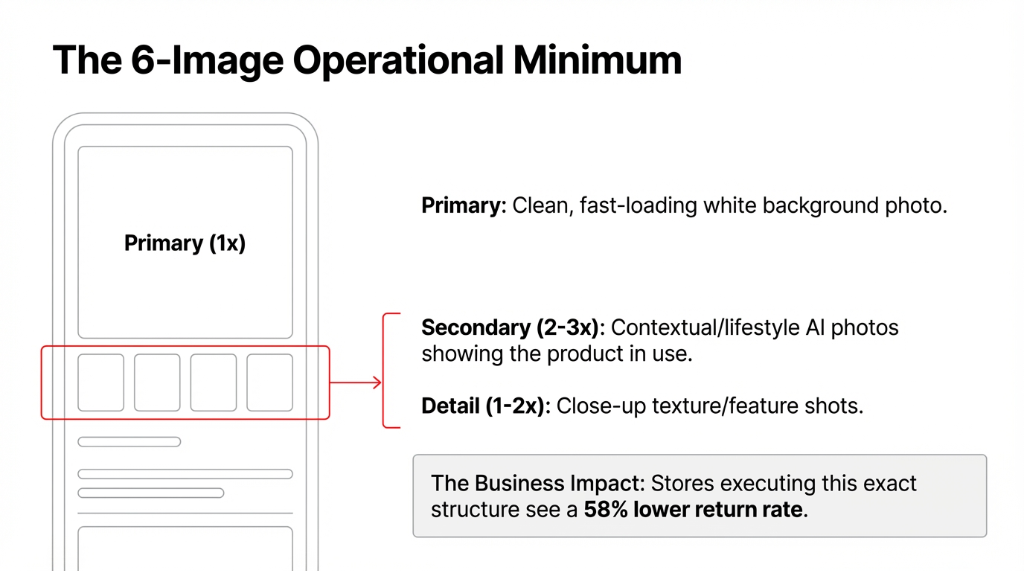
That means your flat white background to photo image — while technically correct for main product listings — is not enough on its own. The brands winning on Shopify in 2026 are running both: a clean white background photo as the primary image, and AI-generated lifestyle ai photos as secondary images to trigger the emotional "I want that" response.
A/B testing by Scalio found that personalized, contextual ai images drove a 3.2% conversion rate versus 2.1% for generic product photos — a 52% lift. On a $500,000/month Shopify store, that difference is $260,000 in additional monthly revenue.
Using ai to create images for secondary lifestyle shots costs under $15 per product. Getting a photographer to create the same scene costs $300–$500. The math writes itself for your AI e-commerce strategy.
The Return Problem
Stores executing this exact 6-image structure see a 58% lower return rate. Skimping on images literally costs you revenue after the sale.
Stop Paying $412 Per Image.
The US brands we work with at Braincuber Technologies that made the switch average $11.40 per image, down from $412. Book a free 15-Minute Shopify Store Audit with Braincuber we will review your current image workflow and identify your exact speed and conversion gaps.
Book Your Free AuditFrequently Asked Questions
Do AI-generated product images actually rank on Google Images?
Yes. Google ranks images based on context and relevance, not origin. An ai image with a descriptive filename like 'blue-ceramic-mug-white-background.webp' and proper alt text will index and rank the same as a traditionally photographed photo image.
What is the best way to reduce file size without losing quality on Shopify?
Export your output as WebP at 80% quality, targeting 100–200 KB per product image. Use tools like Claid or TinyPNG to optimize images in bulk. WebP handles both transparency and compression without the quality artifacts of JPEG.
Can I use AI tools to make my existing product photos high resolution?
Yes. Tools like Topaz Gigapixel AI can upscale existing product photos, effectively converting a 1,000-pixel image to 2,048 pixels. However, starting with a new photo high resolution capture and using AI directly produces better results than trying to convert photo high resolution after the fact.
How many images should each Shopify product have?
Four to six is the operational minimum: one clean white background photo as the main listing image, two to three lifestyle or contextual ai photos, and one detail shot. Stores with six or more product shots see an average 58% lower return rate.
Which Shopify-native AI tool is best for removing image backgrounds?
Photoroom has native Shopify integration and is the most widely used. Lightbox is the top-rated App Store option for merchants who want to create ai images without leaving the dashboard. Both handle no background images and transparent background images automatically.