
The Real Cost of Running Flipkart Manually
Here is what “manual operations” actually looks like at scale.
Your ops team downloads the Flipkart settlement report every 14 days. Someone — probably an underpaid executive — opens it in Excel, tries to VLOOKUP it against your order data, mismatches 11–19% of entries, and by the time you have caught the error, the dispute window has already closed.
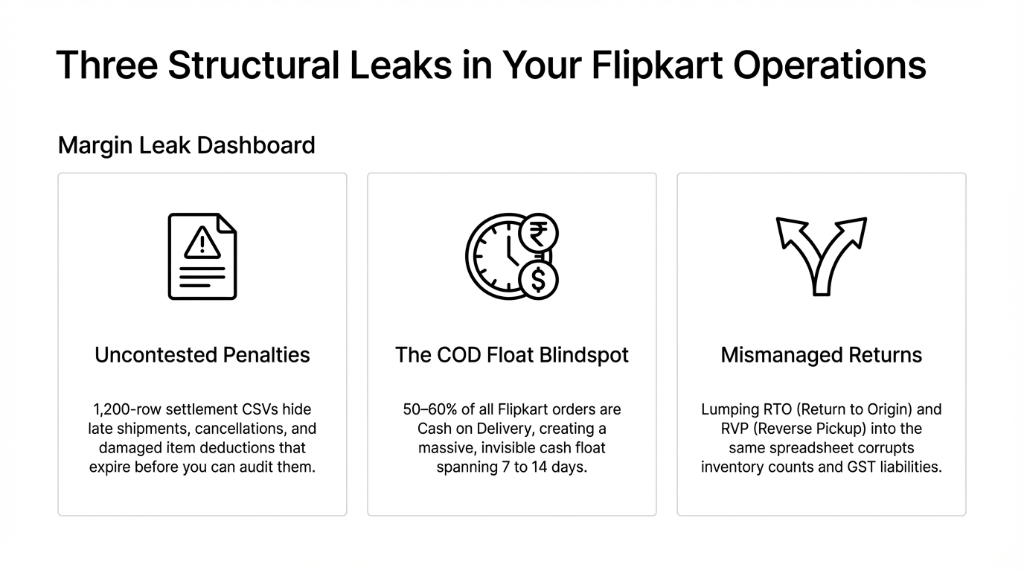
The Hidden Cost of “Fine” Operations
COD Float Trapped
₹2.38 lakh sitting in perpetual float at 400 COD orders/week with ₹850 AOV — zero live visibility in your ledger
VLOOKUP Error Rate
11–19% mismatch rate when your team manually reconciles settlement reports against order data in Excel
Penalty Deductions
Late shipments, incorrect listings, cancellations, damaged items — deducted silently from your settlement. No email. No notification. Just a line item in a 1,200-row CSV.
⚠ Real incident: A fashion accessories seller in Surat doing ₹62 lakh/month had ₹3.7 lakh in uncontested Flipkart penalty deductions sitting quietly in their settlements over 3 months. They had not disputed a single one. Not because they did not want to — because they had no system to catch it.
Why Every “Expert” Gets Flipkart Returns Wrong
The standard advice is: “Set up a returns policy and track it in a spreadsheet.” That advice will cost you money. Here is why.
Flipkart has two separate return flows — RTO (Return to Origin, when the courier cannot deliver) and RVP (Reverse Pickup, when the customer initiates a return). Most sellers treat both the same. They are not the same.
RTO vs. RVP: The ₹4.2 Lakh Difference
RTO means you got your product back, your inventory should increase, and no refund is owed. RVP means the customer returns an item they received, a refund is triggered, and your GST liability on that transaction has to be reversed.
Mix Them Up and You Get
Inventory counts that lie to you, GST liabilities that are overstated or understated, and settlement discrepancies you will never trace back to source.
Flipkart’s return window varies by category: 3 days for accessories and lifestyle items, up to 10 days for electronics. That means your return reconciliation is not a one-time monthly task. It is a rolling, daily obligation.
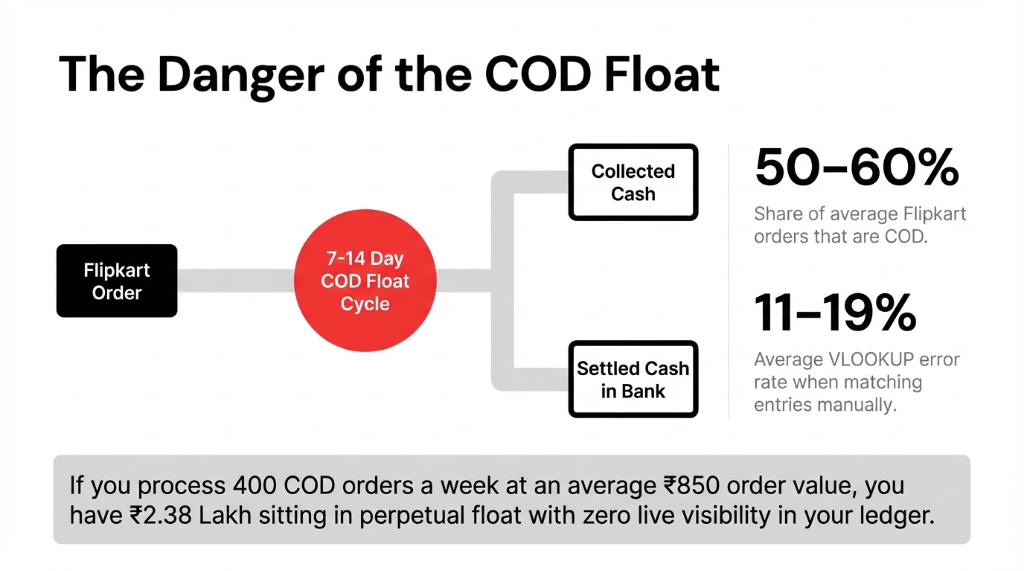
50 to 60% of all Flipkart orders are Cash on Delivery. COD returns are processed differently from prepaid returns — refunds go back to the customer via a different channel, and the seller’s payout netting works on a separate line in the settlement report. If your Odoo is not configured to flag COD orders separately from the moment they are imported, you will always be reconciling blind.
What a Proper Odoo Flipkart Integration Actually Does
Let us be specific, because the word “integration” gets thrown around like it means something. A real Odoo Flipkart integration — the kind we build at Braincuber — does the following, with zero manual intervention:
The 5 Modules That Make It Work
1. Order Import with Payment Mode Flag
Every Flipkart order lands in Odoo’s Sales module tagged as either COD or prepaid — instantly. The COD flag triggers a separate payment journal workflow so your accounts team never confuses collected-cash with settled-cash.
2. Inventory Sync — Both Directions, Per Warehouse
Flipkart inventory updates push from Odoo to Flipkart per fulfilment centre, not just a single aggregate number. This matters when stock is split between your own warehouse and Flipkart’s FBF nodes. Overselling triggers a penalty. This prevents it.
3. Returns Auto-Reconciliation
When an RTO or RVP hits Flipkart’s system, it syncs back to Odoo as a reverse transfer. Inventory adjusts. The original sales order is credited. The GST reversal is posted automatically. You are GSTR-1 ready without touching a thing.
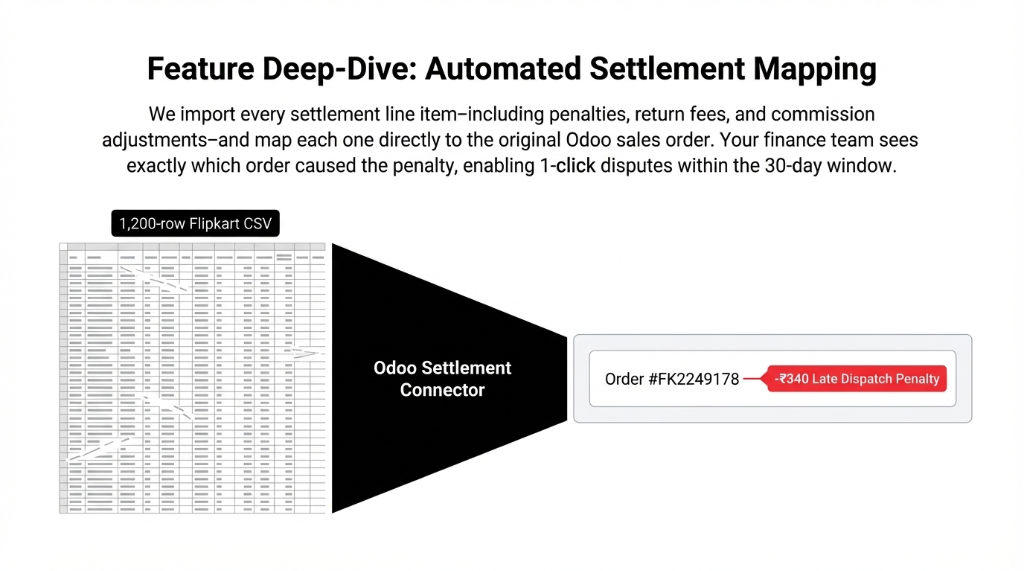
4. Penalty Tracking via Settlement Sync
Our connector imports every settlement line item — including deductions for penalties, return fees, and commission adjustments — and maps each one to the original Odoo sale order. If Flipkart deducts ₹340 as a “late dispatch penalty” on Order #FK2249178, your finance team sees exactly which order caused it.
5. COD Payout Reconciliation — Automated
COD settlements remit collected cash minus Flipkart’s fees on a 7–14 day rolling cycle. Odoo’s accounting module auto-matches incoming bank transfers against open COD receivables. Reconciliation that used to take your accountant 3 hours now takes 7 minutes.
The Numbers You Should Actually See After Go-Live
We are not going to tell you vague things like “save time and improve efficiency.” Here is what our clients actually see after a properly built Odoo Flipkart integration:
| Metric | Before Odoo | After Integration (90 Days) |
|---|---|---|
| Settlement disputes recovered | Uncontested — invisible | ₹2.1 lakh – ₹5.4 lakh recovered |
| COD reconciliation time | 3–4 hours/week | Under 30 minutes/week |
| Inventory accuracy (Flipkart) | 73–78% fill rate | 96–98% within 45 days |
| GSTR-1 prep time (returns) | 2-day CA exercise | Same-day Odoo report export |
| Auto-match rate (COD entries) | Manual — 81–89% | 91–94% automated |
The Pune Recovery Story
One of our clients — an electronics accessories brand in Pune doing ₹1.1 crore/month on Flipkart — was hemorrhaging ₹4.2 lakh per quarter in a combination of uncontested penalties, COD payout gaps, and inventory adjustment errors. Within 11 weeks of going live on our Odoo Flipkart connector, that number dropped to ₹38,000. That is not a marketing claim. That is a reconciliation report.
What the Implementation Actually Looks Like
We are not going to tell you this is a “plug and play” affair. It is not, and anyone selling you that story is either lying or building something that will break in 60 days.
A proper Odoo Flipkart integration for a seller doing above ₹25 lakh/month needs:
The 17–23 Day Implementation Sequence
Days 1–2
Flipkart API Credentials — Seller Hub access with API enabled. Takes 24–48 hours on Flipkart’s end if you have never done it.
Days 2–3
Odoo Multi-Channel Module — Configure Flipkart as a channel in Odoo’s sales system.
Days 3–8
Product Mapping — Your Odoo internal SKUs matched to Flipkart FSN (Flipkart Serial Numbers), one by one. For sellers with 300+ SKUs, this alone takes 3–5 days.
Days 8–12
Tax Configuration — HSN codes mapped, CGST/SGST vs. IGST logic configured by ship-from/ship-to state.
Days 12–17
COD Journal + Return Workflow — COD pending/settled separation in Chart of Accounts. RTO and RVP flows mapped to separate stock moves and account moves.
Days 17–23
Testing + Go-Live — Validation, edge-case testing, team training, and live launch.
⚠ The “2-week” promise: (Yes, we know you have been quoted “2 weeks” by someone else. Ask them what their RTO reconciliation workflow looks like. Watch the silence.) Anyone promising “immediate” go-live is skipping the tax configuration and the return workflow — which is exactly where your money leaks.
Stop Letting Flipkart’s Fee Structure Eat Your Margins
Flipkart revised its fee structure in November 2025 — updating fixed fees, commission fees, and shipping fees based on your seller tier (FBF vs. NFBF), product category, and shipping zone. If your Odoo integration does not account for this revision in its commission-tracking logic, your margin reporting has been wrong since Q4 2025.
The ₹96,000/Month You Do Not See
For a seller doing ₹80 lakh/month with an average commission of 11.3%, being off by even 1.2% in your margin model means you are making decisions based on ₹96,000/month in phantom profit.
That is not a minor issue. That is the difference between a business that scales and a business that runs out of working capital wondering what went wrong.
Your Flipkart Margins Are Leaking Right Now
Every week you operate without a live Odoo Flipkart integration, you are running a Flipkart business with a 90-day-old view of your real numbers. Penalties go uncontested. COD floats go untracked. Returns create ghost inventory. And your accountant spends 11 hours a month on reconciliation work that should take 40 minutes.
Pull your last settlement report. Count the penalty deductions. If you cannot tell us which orders caused them, you have a problem.
FAQ
Does Odoo Flipkart integration handle COD orders differently from prepaid?
Yes — and it must. COD orders import into Odoo with a separate payment status (“COD Pending”) and trigger a distinct journal workflow. Cash is only recognized as received when Flipkart confirms delivery and remits the settlement, typically 7–14 days after order placement. This prevents revenue overstatement in your P&L.
Can Odoo automatically dispute Flipkart penalties on my behalf?
Odoo itself does not auto-file disputes on Flipkart’s Seller Hub, but a well-configured integration flags every penalty deduction against the originating sale order and generates an exception report. Your team then disputes within the window with full documentary evidence — order ID, shipment date, AWB number — ready to paste. Most sellers recover 60–75% of disputed amounts when they dispute with this level of documentation.
How does Odoo handle Flipkart’s RTO vs. RVP return flows?
RTO (Return to Origin — failed delivery) and RVP (Reverse Pickup — customer-initiated return) are mapped as separate stock move types in Odoo. RTO triggers inventory receipt without a customer credit note. RVP triggers a reverse transfer plus a credit note and GST liability reversal. Treating them the same is one of the top three inventory errors we see in Flipkart seller accounts.
Will the integration break if Flipkart changes its API or fee structure?
A custom-built or well-maintained connector will require updates when Flipkart revises its API or fee logic — as it did in November 2025. Off-the-shelf marketplace apps on Odoo Apps Store may lag 30–90 days behind such changes. This is why choosing an implementation partner who actively maintains the connector matters more than buying the cheapest module on the market.
How long does it take to see ROI on an Odoo Flipkart integration?
For a seller doing above ₹30 lakh/month on Flipkart, the integration typically pays for itself within 60 to 75 days — through recovered penalty disputes, reduced finance team hours, and eliminated inventory errors that were causing over-purchasing. The exact figure depends on your current error rate, which we identify in the first 15 minutes of an audit call.
Stop Bleeding Cash on Flipkart. Pull the Data.
Book a free 15-Minute Operations Audit with Braincuber. We will pull your settlement data, show you exactly what you are losing, and tell you whether integration is the right fix or whether something else is broken first. No sales pitch. Just numbers.