
The Amazon.in Settlement Report Is Not a PDF. Stop Treating It Like One.
Here is the ugly truth most Amazon sellers in India refuse to accept: Amazon.in does not send you a clean invoice. What you get every 7–14 days is an XML-based settlement report through Seller Central under Reports → Payments — and that file contains 12 to 40+ distinct transaction types in a single settlement period.
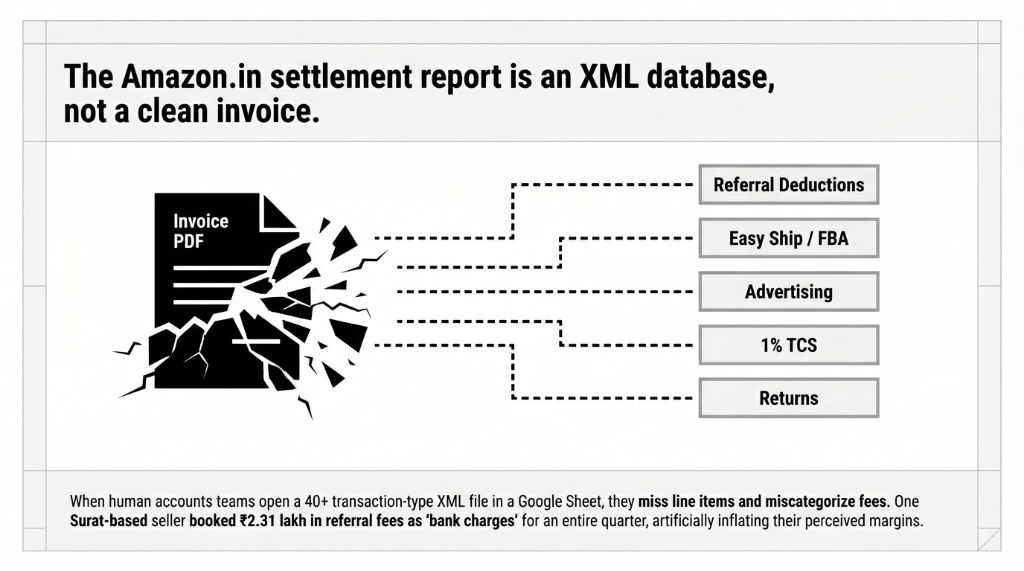
When your accounts team opens that file in a Google Sheet and starts manually matching entries, two things happen: first, they miss line items; second, they categorize fees to the wrong GL accounts.
⚠ Real incident: One Surat-based apparel seller had ₹2.31 lakh in referral fees categorized as “bank charges” for an entire quarter. Their P&L looked healthy. Their actual margin was 6 points lower than they thought.
Amazon India’s Commission Structure in 2026 Is Not What You Think
Everyone quotes a flat “Amazon charges 15% commission.” That is wrong, and it is costing you precision in your books.
As of April 2026, Amazon India’s referral fee structure is tiered, category-specific, and — here is the part most sellers miss — some categories now have a 0% referral fee for products priced under ₹1,000 across 1,800+ categories.
| Category | Referral Fee (Amazon.in) |
|---|---|
| Apparel & Shoes (≤₹1,000) | 0% (zero referral, from March 2026) |
| Home Furnishing (≤₹1,000) | 12% |
| Home Furnishing (>₹1,000) | 13% |
| Automotive – Other | 20% |
| Automotive – Tyres & Rims | 5% |
| Pet Products (≤₹250) | 6.5% |
| Pet Products (>₹250) | 11% |
| Books (≤₹250) | 2% |
| Books (>₹1,000) | 12.5% |
| Toys (≤₹1,000) | 9.5% |
| Small Appliances (≤₹5,000) | 5.5% |
Selling across 4–5 categories? Your settlement report will carry 4–5 different referral fee rates in a single file — sometimes applied to the same SKU at different price points because of tiered slabs.
Mapping all of this manually to Odoo journal entries is a 31–37 hour/month job for one finance team member. (Yes, we have timed it.)
Why Your Current Setup Is Failing You (And It Is Not Amazon’s Fault)
Controversial opinion: Most sellers do not have an Amazon reconciliation problem. They have a chart-of-accounts problem.
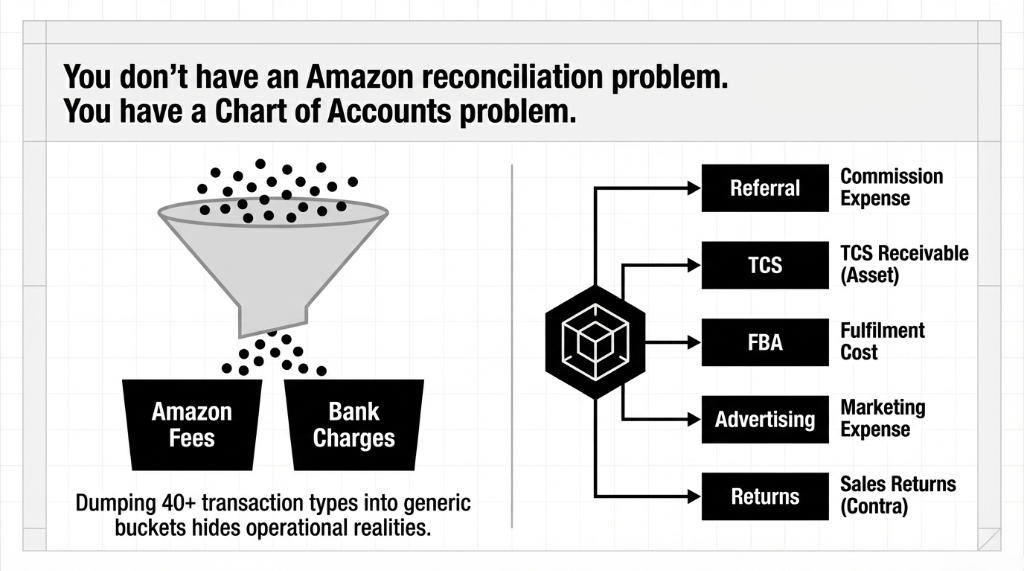
If your Odoo (or worse, your Tally or QuickBooks) does not have distinct GL accounts for each Amazon fee type — referral fees, FBA fees, Easy Ship fees, TCS receivable, advertising deductions, returns — you are dumping everything into two or three buckets and calling it “reconciled.”
What “Reconciled” Actually Means
Every deduction in Amazon’s settlement_id maps to the exact NEFT credit in your bank account, to the penny. When the two match, the settlement is closed. When they do not — and they often do not because of return reimbursements processed in a different settlement window — your books carry open items that grow month over month.
We have seen brands hit ₹7.8 lakh in open items that nobody chased because the finance team assumed “it will sort itself out next settlement.” It does not sort itself out. Ever.
How Odoo Amazon India Integration Actually Works (The Real Technical Flow)
The integration connects Odoo to Amazon Seller Central via the Amazon SP-API (Selling Partner API) — not the old MWS API. This matters because SP-API gives you real-time settlement data, not 24-hour-delayed batch files.
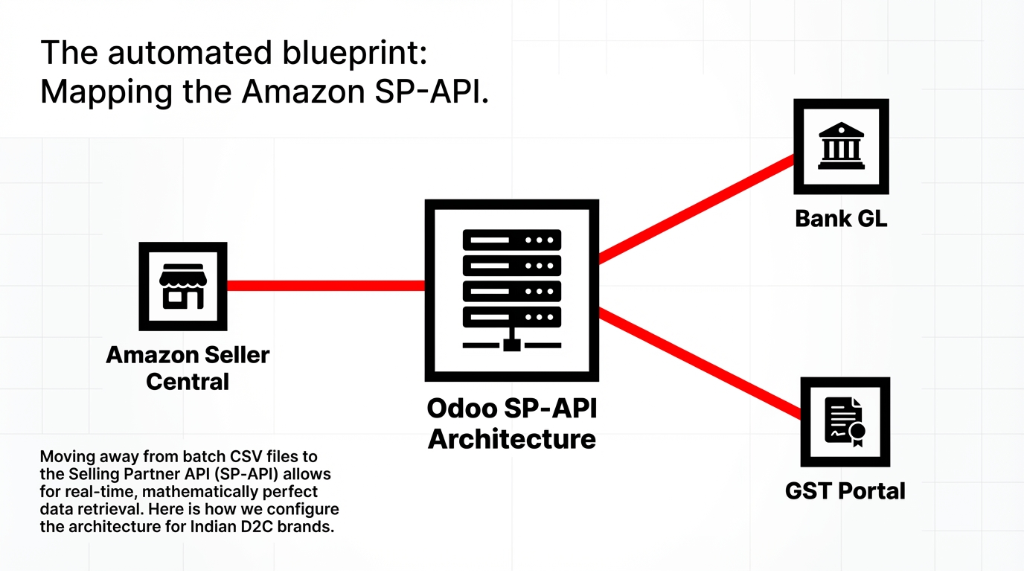
Here is the exact process flow we configure for every Indian D2C client:
The 6-Step Settlement Reconciliation Flow
1. Instance Configuration
Configure an Amazon Marketplace Instance in Odoo with a dedicated Settlement Report Journal — a bank journal that mirrors your Amazon Seller Central wallet, not your actual operating bank account. Most non-Odoo implementations skip this and create reconciliation chaos.
2. Automated Report Fetch
Odoo’s scheduled job fetches settlement reports from Amazon SP-API every 48 hours (not daily — to catch multi-day settlement cycles). The report imports as an XML file attached to the settlement record.
3. Commission Mapping to GL
Each fee type maps to a predefined GL account: Referral fees to Expense GL, TCS to Asset GL, FBA/Easy Ship to Fulfilment Cost, Advertising to Marketing Expense, Returns to Sales Returns contra. Category mix changes update journal entries automatically.
4. Bank Statement Generation
Once processed, Odoo generates a bank statement in the Settlement Report Journal. Every line in the settlement report becomes a statement line — no manual CSV export needed.
5. Three-Way Reconciliation
Odoo matches each statement line against: the original sales invoice (outward supply), the fee deduction entries, and the TCS receivable account — a 3-way match identical to GSTR-2B auto-matching. Unmatched lines get flagged as “Partially Processed” — not silently dropped.
6. Final Close
Once all statement lines reconcile, Odoo moves the settlement record to “Processed” status. The net NEFT credit to your bank account matches exactly to the sum of matched entries. No open items. No ₹340 mystery variances left on the books for 8 months.
The TCS Problem Every Amazon India Seller Is Ignoring
Here is something we almost never see sellers handle correctly: TCS under GST Section 52.
Amazon India deducts Tax Collected at Source (TCS) at 1% on the net taxable value of every sale. They file GSTR-8 on your behalf with the government.
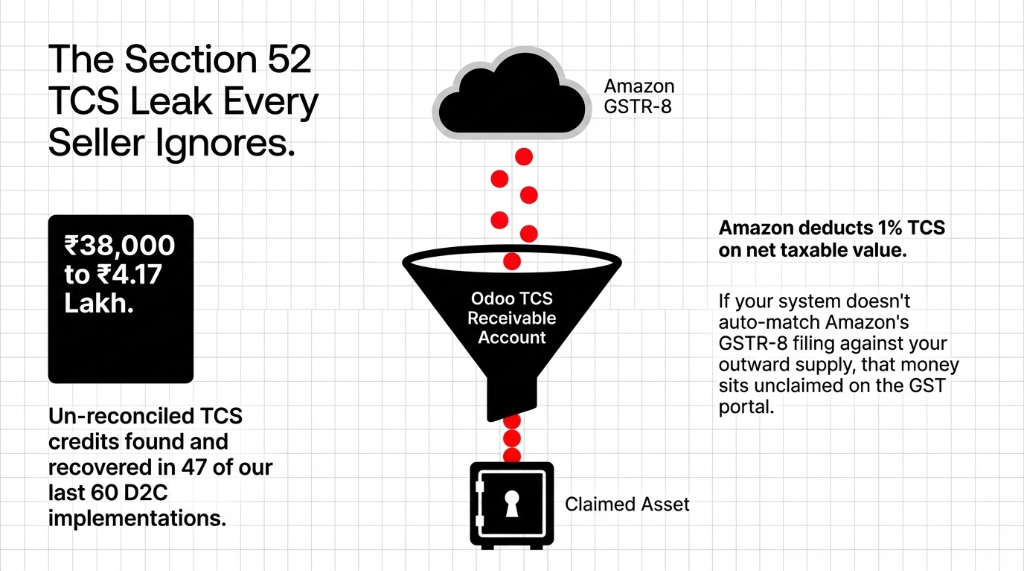
If your Odoo setup does not have a dedicated TCS Receivable account and does not auto-match Amazon’s GSTR-8 filing against your outward supply invoices, you are not claiming your full TCS credit.
The ₹4.17 Lakh Wake-Up Call
In 47 of our last 60 Indian D2C implementations, we found un-reconciled TCS credits ranging from ₹38,000 to ₹4.17 lakh sitting idle on the GST portal — money the government was holding that the seller never claimed because nobody connected the dots between the Amazon settlement report and the GST filing.
The Fix Is Not Magic
A properly structured TCS receivable GL account, mapped at the settlement line level, auto-matched against GSTR-2B data every quarter.
Monthly reconciliation time: 31.5 hours → 3.2 hours
What You Should Expect After a Proper Odoo Amazon India Integration
Real numbers from real implementations — not marketing copy:
| Metric | Before Odoo | After Integration |
|---|---|---|
| Settlement reconciliation time | ~37 hours/month | Under 4 hours/month |
| Commission mapping accuracy | Manual — error-prone | 98.3% first-pass auto-match |
| TCS credit recovery (Q1) | Unclaimed on portal | ₹40,000 – ₹4 lakh recovered |
| Return adjustment variances | Baseline | Reduced by 71% |
| Go-live timeline | — | 9–14 business days |
The Ahmedabad Recovery Story
One Ahmedabad home décor brand we implemented in Q1 2026 recovered ₹2.73 lakh in mis-categorized fee deductions in the first 45 days — deductions that had been hitting their P&L as revenue reduction instead of operating expenses. Same cash. Completely different tax implication.
The Implementation Reality: What Gets Hard Before It Gets Easy
Frankly, the first 5 days of implementation are messy. Not because Odoo is complicated — because your historical data is.
The Amazon SP-API will let you pull settlement reports going back 18 months. If you try to reconcile all 18 months on day one, you will create a backlog of 400–900 open bank statement lines. We always advise clients to pick a clean go-live date (usually the start of a new settlement period) and treat prior periods as a separate forensic exercise.
What Gets Easier Immediately
▶ New settlement reports import and process automatically, with zero manual CSV exports.
▶ Fee variances surface in under 2 hours, not 2 weeks.
▶ Your finance team stops chasing Amazon Seller Central for payment data and starts working from Odoo as the single source of truth.
⚠ Ongoing attention required: Amazon changes its fee schedule without much notice. (The March 2026 zero-referral-fee expansion was announced just weeks before it went live.) Your commission mapping rules in Odoo need a quarterly audit against Amazon’s current fee schedule. We build this into every retainer we run for Indian marketplace clients.
Your Margin Data Is at Least 11–18% Inaccurate
If your Amazon.in settlements are running through Excel, Tally, or a generic QuickBooks journal, you are making decisions on margin data that is at least 11–18% inaccurate. That is not our estimate. That is what falls out when we run the first settlement audit on a new client.
Check your last settlement report. If you cannot map every deduction line to a specific GL account, you have a problem. And it is getting bigger every 14 days.
FAQ
Does Odoo support automatic import of Amazon.in settlement reports via SP-API?
Yes. Odoo’s Amazon connector uses the SP-API to fetch settlement reports on a scheduled basis — typically every 48 hours. Once fetched, the XML file is processed into a bank statement automatically, with each fee line (referral fee, TCS, FBA charge, advertising deduction) mapped to its designated GL account without any manual intervention.
How does Odoo handle Amazon India’s tiered commission rates?
Odoo handles this through configurable fee mapping rules at the settlement line level. Since Amazon’s settlement XML already carries the calculated fee amount per order (not just a percentage), Odoo posts the exact deducted amount to the correct GL account — regardless of which tier applied. For multi-category sellers, each category maps to its own expense sub-account.
What happens to TCS deductions in the Odoo Amazon India integration?
TCS deductions at 1% (GST Section 52) are mapped to a dedicated TCS Receivable account in Odoo’s Chart of Accounts. This account auto-matches against GSTR-2B data pulled from the GST portal, so your claimable TCS credit is tracked at the invoice level — not left sitting unmatched on the government portal.
How long does it take to go live with Odoo Amazon.in integration?
A standard single-marketplace go-live takes 9–14 business days: SP-API credentials and instance setup (Days 1–4), Chart of Accounts and commission mapping configuration (Days 5–9), test settlement import and reconciliation validation (Days 10–12), and team training (Days 13–14). Complexity increases for multi-category sellers or brands with prior-period reconciliation backlog.
Can Odoo handle settlement reconciliation if I sell across Amazon, Flipkart, and Meesho simultaneously?
Yes, but each marketplace requires its own dedicated instance and GL mapping structure in Odoo. The key is tagging every TCS entry by marketplace and filing period so that GSTR-2B auto-matching does not conflate Amazon’s GSTR-8 filing with Flipkart’s. When configured correctly, Odoo runs a single reconciliation dashboard showing open items across all three marketplaces in one view.
Your Settlement Report Has the Answer. Pull It.
Book a free 15-Minute Operations Audit with Braincuber. We will pull your last Amazon.in settlement report, show you exactly where your commission mapping is wrong, and tell you what it is costing you in real rupees. No sales pitch. Just numbers.