
Your document team isn’t slow. Your process is broken. When we audited a mid-size US logistics firm last year, their 7-person operations team was spending 40.3 hours every single week just extracting data from invoices, purchase orders, BOLs, and supplier contracts — manually, in Excel, with a side of copy-paste prayers. That’s one full-time employee doing nothing but re-typing data that already existed somewhere else.
At $28/hour average fully-loaded labor cost, that’s $58,656 a year in pure waste.
Not counting the errors. Not counting the downstream firefighting when a PO number gets fat-fingered and an order vanishes into the ERP void.
We fixed it in 11 weeks. Here’s exactly what we did — and why their previous attempt with a generic OCR tool failed miserably.
The Problem Wasn’t Volume. It Was Variety.
Most people think document processing is a volume problem. “We just have too many documents.” That’s wrong.
The real killer is variety. This client was receiving invoices from 214 suppliers — each with a different format, field position, font, and language quirk. Their previous OCR tool (a legacy system bolted onto their ERP) hit 67% extraction accuracy. Meaning 1 in 3 documents needed manual correction anyway.
The Operational Breakdown
1,800 Invoices/Month
From 214 vendors, processed in 14-minute average cycles. Every vendor a different format. Every format a manual template.
900 BOLs/Month
Manually cross-referenced against POs in a separate spreadsheet tab. Not a database. A spreadsheet tab.
214 Supplier Contracts
Reviewed line-by-line for pricing changes — by a $65,000/year ops manager who had an MBA and was essentially doing data entry.
The spreadsheet they used had 47 tabs. Yes, we counted. Yes, we screenshotted it for posterity.
Their ops director called it “organized chaos.” We called it $94,000/year of avoidable cost.
Why Their First Attempt at Document Automation Failed
Before we got involved, they tried a point-and-click OCR tool — a popular one, the kind with a nice dashboard and a $299/month price tag.
It failed because of one thing their vendor never told them: standard OCR tools read documents. AI document processing understands them.
OCR vs. Intelligent Document Processing — The Hard Difference
What OCR does: Scans pixels and converts them to text. Doesn’t know that “Inv. No.” and “Invoice #” and “Doc. Reference” on three different supplier templates all mean the same field.
They built 31 templates in 6 months
Quit in frustration after template #31 still broke on page 2. Every time a new supplier sent a document in a slightly different layout, someone had to manually build a new template.
Buying an OCR tool and calling it AI is the #1 mistake we see US mid-market companies make with document automation. It isn’t.
Intelligent document processing (IDP) uses a combination of computer vision, NLP, and machine learning to identify document intent and context — not just text coordinates. That’s the difference between a tool that breaks when the margin shifts by 3mm and one that extracts correctly from a handwritten sticky note attached to a fax. (Yes, one of their suppliers still faxed. In 2024.)
What We Actually Built — Step by Step
We deployed Braincuber’s AI document processing solution integrated directly into their existing ERP workflow. No rip-and-replace. No 18-month IT project.
Week 1–2: Document Discovery and Baseline
Scope: Audited 3 months of inbound documents — 8,700 files total. Categorized them into 9 document types. Mapped the 23 data fields that actually mattered for downstream ERP entry.
Baseline established
14.2 minutes average manual processing time per document. 4.3% error rate. These are the numbers we measured everything against.
Week 3–5: Pilot on Invoices Only
Why invoices first: Highest volume, most standardized document type. We never start with everything.
94.7% accuracy on unseen invoice formats
Deployed in human-in-the-loop mode — the system auto-extracted and a human reviewed only flagged exceptions. No new template configuration needed. In 3 weeks, the model hit 94.7% accuracy on formats it had never seen before.
Week 6–8: BOL and PO Integration
Built: Automated cross-reference check — the system now matches BOL line items against open POs in the ERP in real time.
▸ Discrepancies over $150: Trigger an alert for human review
▸ Under $150: Auto-reconciled. That threshold came from the client’s own data — discrepancies under $150 were always supplier rounding errors, never fraud.
Week 9–11: Contract Clause Monitoring
This is where the ops manager got his time back. We deployed an AI document review layer that monitors supplier contracts for pricing escalation clauses, renewal dates, and liability caps.
From 214 contracts line by line to a 1-page exception report every Monday morning
The system flags any clause that deviates from the standard template by more than 12% semantic similarity. Instead of reading contracts, he now reviews exceptions.
The Numbers After 90 Days
We don’t do fluffy before/after stories. Here are the actual metrics from the 90-day post-deployment audit:
| Metric | Before | After | Change |
|---|---|---|---|
| Avg. processing time per doc | 14.2 min | 1.8 min | -87.3% |
| Manual hours/week on docs | 40.3 hrs | 4.1 hrs | -89.8% |
| Extraction error rate | 4.3% | 0.4% | -90.7% |
| Invoice approval cycle time | 17.4 days | 2.9 days | -83.3% |
| Annual labor cost (doc processing) | $58,656 | $6,011 | $52,645 saved |
First-Year ROI: 217%
Implementation cost was $24,300. Total savings in year one: $52,645 in direct labor alone — before counting the $8,200 in recovered vendor overcharges the contract monitoring caught in month 2.
The IDP market is projected to grow from $14.66 billion in 2025 to $27.62 billion by 2030 — precisely because the ROI is this undeniable.
The Thing No One Tells You About AI Document Extraction
Here’s the insider detail your software vendor will never put in a slide deck: the first 30 days of data are worth more than the software itself.
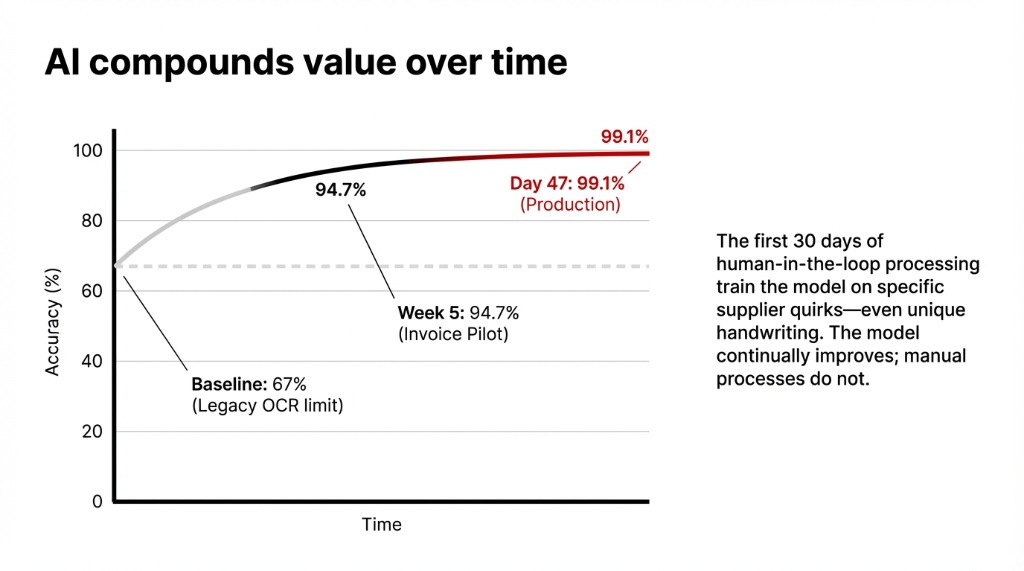
Every document the AI processes in production — including the ones humans correct — trains the model on your specific document ecosystem. By day 47 of this deployment, accuracy on the client’s top 50 suppliers hit 99.1%. The model learned their quirks. Their suppliers’ idiosyncratic formatting. The handwriting of one warehouse manager in Memphis who signs every BOL with a signature that looks like a seismic reading.
The Compounding Advantage Your Competitors Can’t Close
Companies that deployed AI document management systems in 2023 are now operating with a structural cost advantage their competitors cannot close without making the same investment.
The model keeps improving. Manual processes don’t.
What the Ops Team Does Now
The 7-person team didn’t shrink. That would miss the point entirely.
Same Headcount. Different Work.
3 People: Data Entry → Vendor Relationships
Previously doing copy-paste. Now managing vendor relationships and exception handling — work that requires judgment, not keystrokes.
1 Person: 47-Tab Spreadsheet → Process Improvement
The spreadsheet warrior now owns process improvement and dashboard reporting. The 47-tab spreadsheet has been retired.
Ops Manager: Reading Contracts → Negotiating Them
Caught a pricing escalation clause in month 3 that saved $18,700 on a renewal. That’s what happens when you free up an MBA from data entry.
Hiring more staff to process documents isn’t scaling. It’s bloating. The client had been interviewing for a document processing coordinator role at $44,000/year when we started the engagement. They cancelled the hire. That $44,000 isn’t a cost avoided — it’s a decision that compounded. Because next year, that role would have needed a backfill, then a manager, then a process.
What It Takes to Replicate This
You don’t need a 200-person IT team. You need three things:
The Three Requirements
▸ 500 historical documents across your top document types — so the model has something to learn from before going live
▸ One internal champion at VP level or above who owns the success metrics. Not IT. Operations or Finance.
▸ A 30-day human-in-the-loop phase where auto-extracted data gets spot-reviewed before ERP entry. This isn’t a crutch — it’s how the model learns your edge cases at production speed.
The companies that rush to full automation on day one consistently underperform versus those that run human-in-the-loop validation for the first 90 days. We’ve seen this across implementations in the US, UK, and UAE.
If you’re processing more than 500 documents a month and still routing them through a shared inbox and a spreadsheet, you are leaving measurable, calculable money on the table every week. Check your cloud infrastructure while you’re at it — the data pipeline starts there.
The Challenge
Pull up your document processing workflow right now. Count how many minutes your team spends per document, end to end. Multiply by volume. Multiply by your fully-loaded labor rate.
That number is what you’re paying to re-type data that already exists. If it’s over $3,000/month, you have a problem with a proven solution.
Frequently Asked Questions
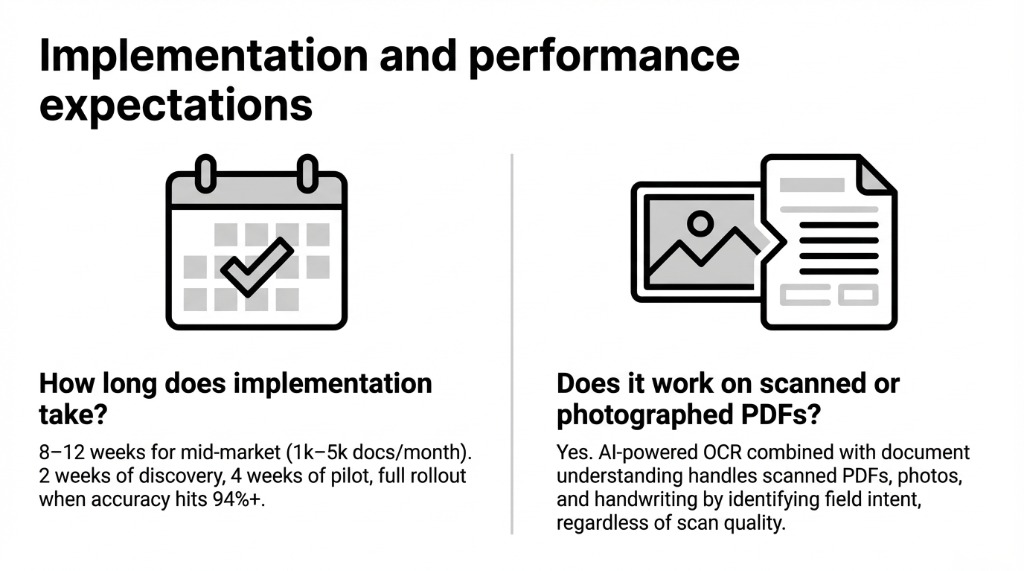
How long does AI document processing implementation take?
For a mid-market company processing 1,000–5,000 documents monthly, expect 8–12 weeks. The first 2 weeks are discovery and data mapping. Weeks 3–6 are pilot on your highest-volume document type. Full rollout follows after pilot accuracy hits 94%+.
What ROI can we expect in the first 90 days?
Most mid-market US companies see 20–40% processing time reduction within the pilot phase. Full first-year ROI ranges from 30% for conservative deployments to 217% for high-volume implementations. Payback typically occurs within 3–6 months.
Does it work on scanned or photographed PDFs?
Yes. AI-powered OCR combined with document understanding models handles scanned PDFs, photographed documents, and handwritten forms. The model identifies field intent, not just character sequences, so scan quality variations don’t break extraction.
Will this replace our document staff?
In every Braincuber implementation, headcount stays flat but job content changes. Staff previously doing data entry shift to exception handling, vendor management, and process oversight. The value compounds when skilled people are redirected toward judgment work.
What document types can AI processing handle?
Invoices, purchase orders, bills of lading, contracts, tax forms, loan applications, compliance documents, medical records, and legal agreements. Any document with repeating structured or semi-structured data is a candidate, including multi-language and mixed-format batches.